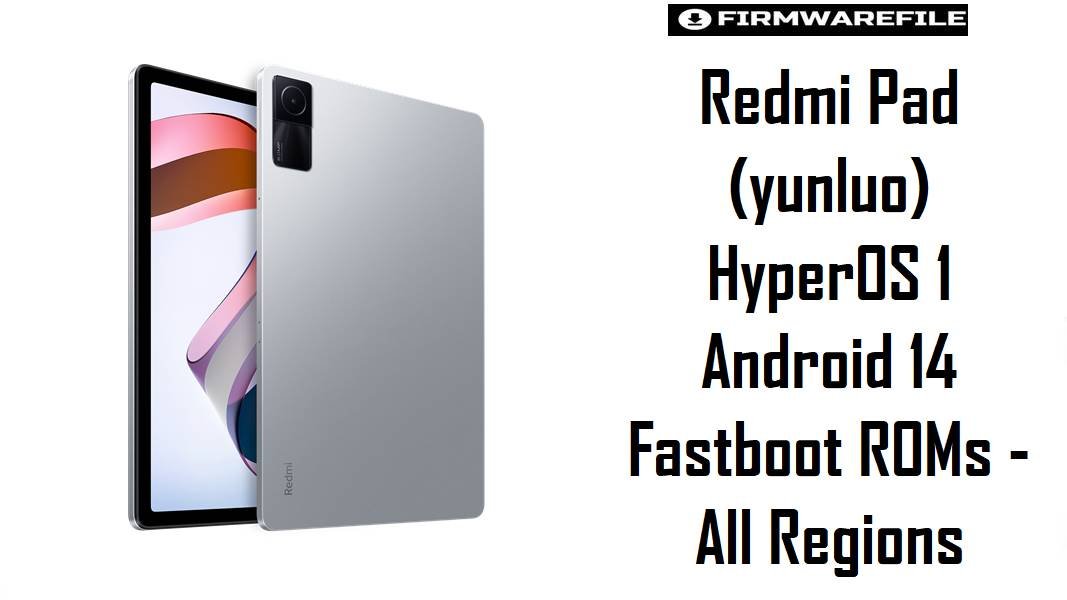
Redmi Pad (yunluo) HyperOS 1 Android 14 Fastboot ROMs – All Regions
Redmi Pad (codename yunluo) is a 10.6‑inch Helio G99 tablet that offers strong battery life and a 90 Hz display, but many HyperOS users complain about random lag, UI pauses, and battery drain when updates stack poorly on budget hardware. These HyperOS 1 Android 14 fastboot ROMs let Redmi Pad owners perform a clean, region‑matched reinstall that often restores smooth scrolling, fixes update‑induced glitches, and stabilizes endurance for the 8000 mAh battery.
Download Firmware for Redmi Pad (yunluo)
These packages are official HyperOS 1.0 Android 14 fastboot ROMs for Redmi Pad with codename yunluo, sorted by region. Global ULYMIXM is the main export variant, while China ULYCNXM and regional ULY**XM builds target specific markets. For typical users, the best choice is the newest HyperOS 1 fastboot ROM that matches the tablet’s original region (CNXM/MIXM/INXM/EUXM/RUXM/TWXM/TRXM/IDXM).
| Filename | Region / Variant | Build Number | Build Date | Android Version | Flashing Method | Notes | File Size | Download |
|---|---|---|---|---|---|---|---|---|
| yunluo_images_OS1.0.8.0.ULYCNXM_20241028.0000.00_14.0_cn_2bf951f965.tgz | China (CNXM) | OS1.0.8.0.ULYCNXM | 2024-10-28 | Android 14 / HyperOS 1.0 | Xiaomi Flash Tool (Fastboot) | China HyperOS 1 fastboot ROM for Redmi Pad, listed as OS1.0.8.0.ULYCNXM on HyperOS trackers with Android 14 and a stable branch for Chinese units. Recommended only for China‑region tablets. | 4.78 GB | Download From Xiaomi (CN) |
| yunluo_global_images_OS1.0.9.0.ULYMIXM_20250416.0000.00_14.0_global_f8dbb84a10.tgz | Global (MIXM) | OS1.0.9.0.ULYMIXM | 2025-04-16 | Android 14 / HyperOS 1.0 | Xiaomi Flash Tool (Fastboot) | Global HyperOS 1 fastboot ROM for Redmi Pad, OS1.0.9.0.ULYMIXM stable with Android 14 and updated security patches, referenced on global firmware collections. Best choice for most international Wi‑Fi units (22081283G) sold as global. | 4.45 GB | Download From Xiaomi (Global) |
| yunluo_in_global_images_OS1.0.10.0.ULYINXM_20250730.0000.00_14.0_in_804aa80bc7.tgz | India (INXM) | OS1.0.10.0.ULYINXM | 2025-07-30 | Android 14 / HyperOS 1.0 | Xiaomi Flash Tool (Fastboot) | Indian‑region HyperOS 1 ROM, OS1.0.10.0.ULYINXM, marked as stable for Redmi Pad India with local market tuning. Only for tablets originally sold with INXM firmware. | 4.23 GB | Download From Xiaomi (IN) |
| yunluo_eea_global_images_OS1.0.11.0.ULYEUXM_20250416.0000.00_14.0_eea_a3a567835a.tgz | EEA Europe (EUXM) | OS1.0.11.0.ULYEUXM | 2025-04-16 | Android 14 / HyperOS 1.0 | Xiaomi Flash Tool (Fastboot) | Latest EEA HyperOS 1 fastboot ROM for Redmi Pad, with OS1.0.11.0.ULYEUXM cited as current stable on EEA firmware lists and changelog pages. Recommended for EU‑sold units for full EEA compliance. | 4.41 GB | Download From Xiaomi (EEA) |
| yunluo_ru_global_images_OS1.0.7.0.ULYRUXM_20250416.0000.00_14.0_ru_96947a01ee.tgz | Russia (RUXM) | OS1.0.7.0.ULYRUXM | 2025-04-16 | Android 14 / HyperOS 1.0 | Xiaomi Flash Tool (Fastboot) | Russian HyperOS 1 ROM, OS1.0.7.0.ULYRUXM, stable branch for Redmi Pad Russia with region‑specific services. Use only on RUXM tablets. | 4.56 GB | Download From Xiaomi (RU) |
| yunluo_tw_global_images_OS1.0.10.0.ULYTWXM_20250730.0000.00_14.0_tw_fb8fc8a5a5.tgz | Taiwan (TWXM) | OS1.0.10.0.ULYTWXM | 2025-07-30 | Android 14 / HyperOS 1.0 | Xiaomi Flash Tool (Fastboot) | Taiwan‑region HyperOS 1 ROM, OS1.0.10.0.ULYTWXM stable with localized carrier support. For TW‑sold Redmi Pad units only. | 4.30 GB | Download From Xiaomi (TW) |
| yunluo_tr_global_images_OS1.0.8.0.ULYTRXM_20250314.0000.00_14.0_tr_a87a54c7ba.tgz | Turkey (TRXM) | OS1.0.8.0.ULYTRXM | 2025-03-14 | Android 14 / HyperOS 1.0 | Xiaomi Flash Tool (Fastboot) | Turkey HyperOS 1 ROM for Redmi Pad, OS1.0.8.0.ULYTRXM stable as per HyperOS update listings. For TRXM tablets only. | 4.30 GB | Download From Xiaomi (TR) |
| yunluo_id_global_images_OS1.0.8.0.ULYIDXM_20250730.0000.00_14.0_id_2a3cd70ceb.tgz | Indonesia (IDXM) | OS1.0.8.0.ULYIDXM | 2025-07-30 | Android 14 / HyperOS 1.0 | Xiaomi Flash Tool (Fastboot) | Indonesia HyperOS 1 ROM, OS1.0.8.0.ULYIDXM, marked stable for Indonesian Redmi Pad firmware. Use on IDXM devices only. | 4.44 GB | Download From Xiaomi (ID) |
Variant guidance: Redmi Pad’s codename yunluo covers Wi‑Fi 22081283G/22081283C models, and firmware databases clearly tie each OS1.0.x.0.ULY**XM build to a specific region. Matching this region is essential to avoid localization issues, and cross‑flashing between MIXM/EUXM/INXM/RUXM/TWXM/TRXM/IDXM is best left to advanced users due to potential OTA, language, and minor feature differences.
Complete Device & Firmware Overview
- Device Name:
- Redmi Pad (10.6″ Wi‑Fi tablet).
- Codename:
yunluo, used globally for Redmi Pad, with model numbers 22081283G and 22081283C.- Hardware Platform:
- MediaTek Helio G99 (MT6789) with 10.6″ 2000×1200 90 Hz LCD, 8000 mAh battery, quad speakers, LPDDR4X RAM and UFS 2.2 storage.
- HyperOS Branch:
- HyperOS 1.0 Android 14 OS1.0.x.0.ULY**XM, replacing MIUI 13/14 on Redmi Pad; HyperOS trackers list OS1.0.11.0.ULYEUXM as latest EEA and OS1.0.9.0.ULYMIXM as latest global at time of publication.
- Typical Pain Points:
- Users of HyperOS 1/2 on Redmi and other devices report battery drain, sluggish animations, and occasional UI freezes after updates, often due to download corruption or layered system files.
- How these ROMs help:
- HyperOS guidance suggests that re‑applying the same stable package via a clean install fixes many battery and lag problems by replacing broken update files; these fastboot ROMs provide full images for that purpose.
- ROM Type:
- Fastboot ROMs (
yunluo*_images_*.tgz) for Xiaomi Flash Tool on Windows; separate recovery ROMs and OTA updates exist for in‑place upgrades. - Bootloader & ARB:
- Same‑region HyperOS fastboot repairs are generally possible with stock bootloader settings; anti‑rollback (ARB) still applies, so downgrades to earlier HyperOS/MIUI builds require ARB‑aware procedures to avoid bricking.
- Required Tools:
- Xiaomi USB/fastboot drivers, Xiaomi Flash Tool, Windows PC, and a stable USB‑C cable with enough storage to extract 4–5 GB archives.
CRUCIAL WARNING: These fastboot ROMs are strictly for Redmi Pad with codename yunluo; they must not be flashed to Redmi Pad SE (xun), Redmi Pad Pro, Xiaomi Pad 5/6, or any phone, because cross‑flashing across different codenames and hardware can permanently brick the device via incompatible partitions and kernel/display configuration.
All official yunluo*_images_*.tgz fastboot packages typically wipe user data when flashed with Xiaomi’s tools, and using aggressive options like “clean all and lock” on a non‑original region or modified system can relock the bootloader on unsupported firmware and cause bootloops, loss of functionality, or anti‑rollback‑related hard bricks.
Preparation Before Flashing
Click here for the Redmi Pad (yunluo) pre‑flash checklist
- Confirm codename & model: In fastboot mode or via system info, verify the tablet is Redmi Pad with codename
yunluoand model 22081283G/22081283C, not Redmi Pad SE (xun) or another Xiaomi tablet. - Backup user data: Fastboot flashing usually performs a factory reset; back up photos, downloaded media, stylus notes, and app data using Mi Cloud, Google, or a PC before proceeding.
- Charge to at least 60%: Ensure sufficient battery charge so the tablet does not shut down mid‑flash while large HyperOS images are written.
- Install drivers & tools on PC: On Windows, install Xiaomi USB/ADB and fastboot drivers plus Xiaomi Flash Tool; verify that
fastboot devicesshows the tablet correctly before selecting a ROM. - Use a reliable USB‑C cable: Prefer the original cable and a direct motherboard USB port to reduce the risk of disconnections and partial flashes.
Quick Firmware Flash Instructions
This high‑level guide covers flashing any of the listed fastboot ROMs—such as the recommended yunluo_global_images_OS1.0.9.0.ULYMIXM_... for global tablets or OS1.0.11.0.ULYEUXM_... for EEA—using Xiaomi’s fastboot flashing tool on a Windows PC.
- Prepare PC & ROM: Install Xiaomi USB/fastboot drivers and Xiaomi Flash Tool. Download and fully extract the chosen
yunluo*_images_*.tgz(for example, OS1.0.9.0.ULYMIXM or OS1.0.11.0.ULYEUXM) into a short path likeC:\yunluo_rom. - Enter fastboot mode: Power off Redmi Pad, then hold Volume Down + Power until the fastboot logo appears; connect the tablet to the PC via USB‑C.
- Configure Xiaomi Flash Tool: Launch the tool, select the extracted ROM folder as the firmware path, and choose “clean all” to perform a fresh HyperOS 1 install while keeping the bootloader state unchanged.
- Flash the ROM: Click “refresh” to ensure the device is detected, then press “flash” and wait until the process completes; avoid disconnecting the cable or closing the tool, as it writes multiple partitions in sequence.
- First boot & optimization: After flashing, Redmi Pad reboots into HyperOS 1; the first boot may take several minutes while apps and system components are optimized, after which performance and battery behavior should be checked to confirm improvement over previous OTA‑stacked builds.
For a detailed, screenshot‑based explanation of Xiaomi fastboot flashing—including anti‑rollback awareness, driver troubleshooting, and common Mi Flash error codes—refer to the Xiaomi Fastboot Firmware Guide, which describes the Xiaomi Flash Tool process step by step and can be followed directly for these yunluo ROMs.
Frequently Asked Questions (FAQs)
- Q1. Which HyperOS 1 fastboot ROM is recommended for most Redmi Pad users?
- The recommended option is the latest stable HyperOS 1 fastboot ROM that matches the tablet’s original region: OS1.0.9.0.ULYMIXM for Global, OS1.0.11.0.ULYEUXM for EEA, OS1.0.10.0.ULYINXM for India, OS1.0.7.0.ULYRUXM for Russia, OS1.0.10.0.ULYTWXM for Taiwan, OS1.0.8.0.ULYTRXM for Turkey, or OS1.0.8.0.ULYIDXM for Indonesia.
- Q2. Can a clean HyperOS 1 flash fix battery drain on Redmi Pad?
- Community reports for HyperOS 1/2 note that reinstalling the same stable package—either via local update or full re‑flash—often fixes battery drain caused by broken OTA downloads or partial installs, especially when done over a stable connection.
- Q3. Is it safe to cross‑flash Global ULYMIXM firmware on an EEA ULYEUXM Redmi Pad?
- Cross‑flashing between MIXM/EUXM is possible for advanced users but may change regulatory flags, language defaults, and OTA behavior. Firmware indexes and product lists recommend staying with the matching regional code when reliability is the priority.
- Q4. Does HyperOS 1 run heavier than MIUI 13/14 on Redmi Pad hardware?
- HyperOS introduces new animation styles and system modules that can feel heavier on Helio G99 tablets when poorly tuned, but later OS1.0.x builds and a clean flash help keep 90 Hz scrolling usable and minimize UI pauses.
- Q5. Is downgrading from OS1.0.11.0/1.0.10.0 back to MIUI allowed?
- Anti‑rollback may block some downgrade paths; firmware sites for Redmi Pad advise checking ARB levels and follow codename‑specific downgrade instructions, since flashing significantly older MIUI builds over HyperOS can risk a brick.
- Q6. How does Redmi Pad compare to Redmi Pad SE regarding HyperOS performance?
- HyperOS feedback suggests Redmi Pad’s Helio G99 and 90 Hz panel handle HyperOS better than Redmi Pad SE’s weaker hardware (
xun), which tends to show more frame drops and battery complaints under the same OS. - Q7. What user symptoms indicate that a full fastboot reinstall might be necessary?
- Persistent lag in simple scrolling, wallpaper glitches after restart, automation failures, or rapid battery drop after an update are key signs that a clean HyperOS fastboot reinstall of the correct ULY**XM ROM could resolve underlying software issues.