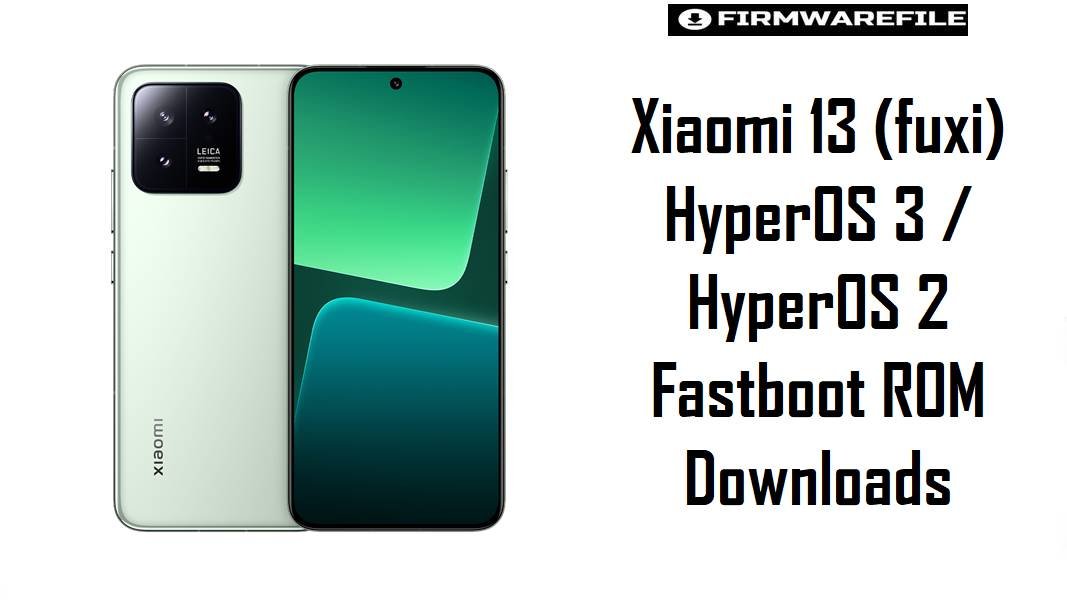
Xiaomi 13 (fuxi) HyperOS 3 / HyperOS 2 Fastboot ROM Downloads
Xiaomi 13 (codename fuxi) is a compact flagship powered by the Snapdragon 8 Gen 2 platform, built for high refresh‑rate smoothness and sustained performance. After major updates, recurring real‑world complaints include battery drain in standby, extra heat while charging, and occasional instability that persists across incremental OTAs.
The firmware packages on this page provide clean, region-matched fastboot installs (and an optional xiaomi.eu build) to stabilize performance, refresh system partitions, and apply the newest platform/security fixes available for each branch.
Download Firmware for Xiaomi 13 (fuxi)
Choose the newest ROM that matches the phone’s original region suffix (CNXM/MIXM/EUXM/RUXM/TWXM/TRXM). HyperOS 3 (Android 16) here is China-only and may behave like an internal/test build in the wild, so it is best reserved for advanced users who specifically need WMCCNXM. The Turkey V14.0.3.0.TMCTRXM package is an older MIUI 14 Android 13 build and should not be used as a general downgrade target from newer HyperOS branches due to downgrade/anti-rollback risks on Xiaomi devices.
| Filename | Region / Variant | Build Number | Build Date | Android Version | Flashing Method | Notes | File Size | Download |
|---|---|---|---|---|---|---|---|---|
| fuxi_images_OS3.0.2.0.WMCCNXM_20251127.0000.00_16.0_cn_f4799ae6de.tgz | China (CNXM) – Xiaomi 13 China | OS3.0.2.0.WMCCNXM | 2025-11-27 | Android 16 / HyperOS 3 | Xiaomi Flash Tool (Fastboot) | Latest China fastboot ROM for Xiaomi 13; firmware listings identify OS3.0.2.0.WMCCNXM as HyperOS 3 based on Android 16 with a 2025‑11‑27 fastboot release date. Some trackers label this as “internal test” detection, so stability may vary across devices and flashing setups. | 8.38 GB | Download From Xiaomi (CN Fastboot) |
| fuxi_ru_global_images_OS2.0.202.0.VMCRUXM_20251118.0000.00_15.0_ru_e1546d931d.tgz | Russia (RUXM) – Xiaomi 13 Russia | OS2.0.202.0.VMCRUXM | 2025-11-18 | Android 15 / HyperOS 2 | Xiaomi Flash Tool (Fastboot) | Stable HyperOS 2 fastboot ROM for Xiaomi 13 Russia, aligned with Android 15 branches shown on official/aggregator firmware tables for fuxi. Recommended when HyperOS updates triggered battery drain or heating behaviors that remained after normal resets. | 7.13 GB | Download From Xiaomi (RU Fastboot) |
| fuxi_tw_global_images_OS2.0.202.0.VMCTWXM_20251118.0000.00_15.0_tw_4d7ec2a032.tgz | Taiwan (TWXM) – Xiaomi 13 Taiwan | OS2.0.202.0.VMCTWXM | 2025-11-18 | Android 15 / HyperOS 2 | Xiaomi Flash Tool (Fastboot) | Stable HyperOS 2 Android 15 fastboot ROM for Taiwan. Best for TWXM devices that need a clean reinstall to fix stutters, notification delays, or update residue after multiple OTAs. | 6.57 GB | Download From Xiaomi (TW Fastboot) |
| fuxi_eea_global_images_OS2.0.204.0.VMCEUXM_20251103.0000.00_15.0_eea_53b8209ba4.tgz | EEA Europe (EUXM) – Xiaomi 13 Europe | OS2.0.204.0.VMCEUXM | 2025-11-03 | Android 15 / HyperOS 2 | Xiaomi Flash Tool (Fastboot) | EEA HyperOS 2 Android 15 fastboot ROM for Xiaomi 13. Recommended for EU devices needing a region-correct rebuild to improve stability and reduce battery drain reported by HyperOS 2 users. | 7.27 GB | Download From Xiaomi (EEA Fastboot) |
| fuxi_global_images_OS2.0.202.0.VMCMIXM_20251011.0000.00_15.0_global_7fe83f5b86.tgz | Global (MIXM) – Xiaomi 13 Global | OS2.0.202.0.VMCMIXM | 2025-10-11 | Android 15 / HyperOS 2 | Xiaomi Flash Tool (Fastboot) | Global HyperOS 2 Android 15 fastboot ROM for Xiaomi 13. A clean flash is often used to correct persistent heating while charging or unusual standby drain reported after HyperOS 2 updates. | 7.32 GB | Download From Xiaomi (Global Fastboot) |
| xiaomi.eu_FUXI_OS3.0.3.0.WMCCNXM_16.zip | xiaomi.eu custom ROM (China-based) | OS3.0.3.0.WMCCNXM (base) | 2026-01-31 (community thread timeframe) | Android 16 / HyperOS 3 (modded) | Custom Recovery (TWRP) | xiaomi.eu HyperOS 3 build for Xiaomi 13 based on the China WMCCNXM branch. Community reports include cases of fastboot loops on some installs, so this is best treated as an advanced, recovery-based option rather than a “safe default.” | 6.16 GB | Download From SourceForge (xiaomi.eu) |
| twrp-3.7.1_12-v9.0_A15-fuxi-skkk.img | Custom Recovery – TWRP (fuxi) | 3.7.1 (A15 build) | Current community build | – | Fastboot boot/flash recovery | TWRP image used to flash custom ZIPs (such as xiaomi.eu), backups, and maintenance tasks on Xiaomi 13. | 100 MB | Download TWRP for fuxi |
| fuxi_tr_global_images_V14.0.3.0.TMCTRXM_20230208.0000.00_13.0_tr_1f37ffbcff.tgz | Turkey (TRXM) – Xiaomi 13 Turkey | V14.0.3.0.TMCTRXM | 2023-02-08 | Android 13 / MIUI 14 | Xiaomi Flash Tool (Fastboot) | Older build: early MIUI 14 Android 13 fastboot ROM for Turkey. Downgrading from newer HyperOS branches to older MIUI can be blocked or risky due to Xiaomi anti-rollback protections, so use only for specific service/repair workflows where version compatibility is confirmed. | 6.16 GB | Download From Xiaomi (TR Fastboot) |
Variant selection notes: Xiaomi 13 is identified as fuxi in multiple ROM/device references. Region suffix must match the device’s original firmware channel (CNXM/MIXM/EUXM/RUXM/TWXM/TRXM) to avoid OTA issues, network quirks, and region compliance mismatches.
Complete Device & Firmware Overview
- Device Name:
- Xiaomi 13.
- Codename:
fuxi.- Chipset:
- Qualcomm Snapdragon 8 Gen 2 (SM8550).
- Firmware Types on this page:
- Official Fastboot ROMs (.tgz), custom ROM (.zip), custom recovery (.img).
- Android / HyperOS branches:
- HyperOS 3 Android 16 (CNXM), HyperOS 2 Android 15 (Global/EEA/RU/TW), plus an older MIUI 14 Android 13 (TRXM).
- Why clean flashing helps:
- Battery drain and overheating after HyperOS updates are widely discussed by users, and clean fastboot installs are commonly used to remove OTA residue and restore stability.
- Bootloader & downgrade rules:
- Xiaomi anti-rollback can reject unsafe downgrades via fastboot/Mi Flash, and downgrading with recovery tools can be riskier if rollback checks are bypassed.
- Mi Flash options:
- “Clean all and lock” wipes data and re-locks the bootloader; it is not appropriate for modified devices or mismatched regions.
- Required tools:
- Windows PC, Xiaomi drivers, Xiaomi Flash Tool for.tgz fastboot ROMs; ADB/Fastboot for recovery boot; TWRP for custom ZIP flashing.
CRUCIAL WARNING: These ROMs are strictly for Xiaomi 13 with codename fuxi; flashing the wrong region, a corrupted archive, or another codename can cause bootloops, lost network features, or an unrecoverable brick—verify fuxi and the correct CNXM/MIXM/EUXM/RUXM/TWXM/TRXM branch before flashing.
Preparation Before Flashing
Click here for the Xiaomi 13 (fuxi) pre-flash checklist
- Confirm codename + region suffix: Verify the device is Xiaomi 13 (
fuxi), then match the region code in Settings (CNXM/MIXM/EUXM/RUXM/TWXM/TRXM) with the ROM build suffix. - Create a full backup: Fastboot flashing usually wipes data; back up photos, authenticator codes, chats, and banking app credentials first.
- Battery level: Charge to at least 60% to prevent shutdown during multi‑gigabyte partition flashing.
- Install drivers and tools: Install Xiaomi USB/fastboot drivers and Xiaomi Flash Tool for official fastboot ROMs, plus ADB/Fastboot for recovery boot if using TWRP.
- Avoid risky downgrade paths: Confirm rollback compatibility before attempting any downgrade (especially from HyperOS 2/3 to MIUI 14), since Xiaomi anti‑rollback protections can hard‑brick devices when bypassed incorrectly.
How to flash Fastboot ROMs to Xiaomi 13 (fuxi)
This simplified guide covers flashing any listed fastboot ROM (TGZ), such as fuxi_global_images_OS2.0.202.0.VMCMIXM_20251011.0000.00_15.0_global_7fe83f5b86.tgz or fuxi_images_OS3.0.2.0.WMCCNXM_20251127.0000.00_16.0_cn_f4799ae6de.tgz, using Xiaomi Flash Tool on Windows.
- Prep PC: Install Xiaomi drivers and Xiaomi Flash Tool, then extract the TGZ ROM to a short folder path.
- Enter Fastboot: Boot the phone to fastboot mode and confirm it is Xiaomi 13 (
fuxi). - Select ROM + “clean all”: In Mi Flash, choose the extracted ROM folder and select clean all (avoid “clean all and lock” unless flashing fully stock, region-matched firmware).
- Flash: Start flashing and do not disconnect USB until success is shown.
- First boot: Allow several minutes for initial optimization, then re-check battery/heat behavior that may have appeared after earlier HyperOS updates.
For a complete, screenshot-based walkthrough of Xiaomi fastboot flashing, use the main Xiaomi Flash tool guide, and substitute the selected fuxi_*.tgz ROM path when prompted.
How to flash xiaomi.eu on Xiaomi 13 (fuxi)
This simplified guide covers flashing xiaomi.eu_FUXI_OS3.0.3.0.WMCCNXM_16.zip via TWRP, which is intended for advanced users and may show boot issues on some installs.
- Bootloader readiness: Ensure the device is prepared for custom recovery flashing before attempting a custom ROM install.
- Boot/flash TWRP: Use fastboot to boot the
twrp-*.imgforfuxi. - Transfer ZIP: Copy the xiaomi.eu ZIP to the device storage (or sideload, if supported by the recovery).
- Flash + reboot: Flash the ZIP from recovery and reboot; if a fastboot loop occurs, revert to a stock fastboot ROM for recovery.
- Stabilize setup: After first boot, allow time for optimization and confirm heat/battery behavior, especially if HyperOS 2 previously caused elevated temperatures during charging.
For the full Xiaomi fastboot flashing tutorial (used for recovery back to stock), follow: Xiaomi Flash tool.
Frequently Asked Questions (FAQs)
- Q1. What device is codename
fuxi? fuxiis Xiaomi 13, a Snapdragon 8 Gen 2 flagship listed under device ROM catalogs and Android ROM documentation.- Q2. Which ROM is safest for daily use: HyperOS 3 (Android 16) or HyperOS 2 (Android 15)?
- For most users, the safest daily driver is the newest region-matched HyperOS 2 Android 15 fastboot ROM (MIXM/EUXM/RUXM/TWXM), while HyperOS 3 Android 16 WMCCNXM is China-only and has been detected as an internal/test build in some trackers.
- Q3. Can a clean fastboot flash help Xiaomi 13 battery drain on HyperOS 2?
- Battery drain and heating complaints after HyperOS 2 updates are reported by users (including Xiaomi 13 owners), and a clean fastboot flash is a common repair approach to eliminate OTA residue and restore stability.
- Q4. Is downgrading from HyperOS back to MIUI 14 safe on Xiaomi 13?
- Xiaomi anti-rollback protections can reject or brick unsafe downgrades, especially when attempting to move to an older base via methods that bypass rollback checks.
- Q5. Why does xiaomi.eu HyperOS 3 sometimes bootloop on Xiaomi 13?
- Community reports for Xiaomi 13 mention fastboot loops after installing the xiaomi.eu HyperOS 3 build, suggesting device-specific or build-specific compatibility issues that may require reverting to stock fastboot ROMs.
- Q6. Which ROM should be used to recover a Xiaomi 13 stuck in fastboot?
- Region-matched official fastboot ROMs (TGZ) are the primary recovery option, since they fully rewrite the necessary partitions via Mi Flash.