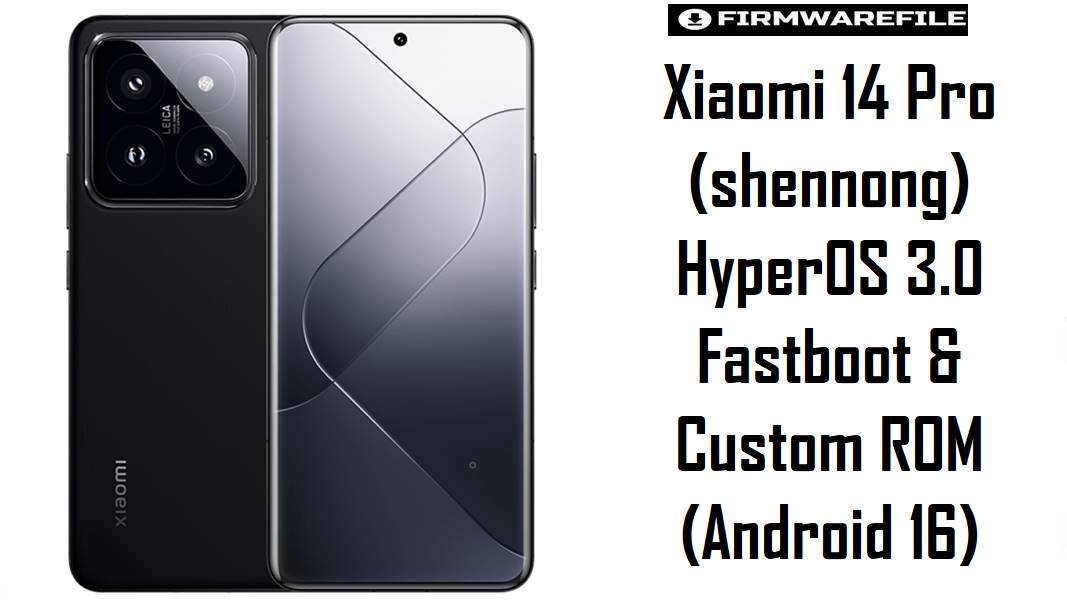
Xiaomi 14 Pro (shennong) HyperOS 3.0 Fastboot & Custom ROM (Android 16)
The Xiaomi 14 Pro (codename shennong) is Xiaomi’s Snapdragon 8 Gen 3 flagship-class device, so most owners expect smooth animations, stable thermals, and reliable camera performance day-to-day. When updates introduce battery drain, UI stutters, gesture glitches, or odd display/animation bugs, flashing a clean stock fastboot build (or a reputable CN-based custom build) is often the fastest way to reset stability and get back to predictable performance.
Download Firmware for Xiaomi 14 Pro (shennong)
Both files below are the same core build family (OS3.0.4.0.WNBCNXM, China branch) and target Xiaomi 14 Pro (shennong). Choose the official .tgz fastboot ROM for the most “stock” restoration path, and choose the Xiaomi.eu ZIP if you specifically want a CN-based community ROM workflow (multi-language/modified package) that typically requires an unlocked bootloader.
| Filename | Region/Variant | Build Number | Build Date | Android Version | Flashing Method | Notes | File Size | Download |
|---|---|---|---|---|---|---|---|---|
| shennong_images_OS3.0.4.0.WNBCNXM_20251111.0000.00_16.0_cn_f0536c2d82.tgz | China (CNXM) | OS3.0.4.0.WNBCNXM | 2025-11-11 (from filename) | Android 16.0 | Xiaomi Flash Tool (Fastboot) | Official fastboot package for Xiaomi 14 Pro (shennong) with MD5 f0536c2d824f3857ed3e649073eca949. Best for “back to stock” recovery, stubborn bugs after OTA, or cleaning up update residue. | 9.27GB | Download From MIUI (BigOTA) |
| xiaomi.eu_SHENNONG_OS3.0.9.0.WNBCNXM_16.zip | Xiaomi.eu (CN base) | OS3.0.9.0.WNBCNXM | Matches base build | Android 16 | Custom Recovery / Xiaomi.eu Fastboot Script | Xiaomi.eu installs are commonly done either via TWRP/OrangeFox (recovery ZIP) or via the included fastboot install scripts (first install typically formats data). Some users report app/payment integrity issues on certain Xiaomi.eu setups (varies by configuration), so validate banking/pay apps after flashing. | 6.54GB | Download From SourceForge |
Variant match tip: These builds are for Xiaomi 14 Pro shennong on the China branch (CNXM), so avoid cross-flashing to other Xiaomi 14-series codenames/variants.
Complete Device & Firmware Overview
- Device name
- Xiaomi 14 Pro
- Codename
shennong- Chipset
- Qualcomm Snapdragon 8 Gen 3 (SM8650-AB)
- Firmware type
- Official: Fastboot ROM (
.tgz)
Community: Xiaomi.eu ROM (.zip) - Build / ROM version
OS3.0.4.0.WNBCNXM(China branch)- Android version
- Android 16.0
- Official fastboot package name
shennong_images_OS3.0.4.0.WNBCNXM_20251111.0000.00_16.0_cn_f0536c2d82.tgz- Official release date (tracker)
- 2025-11-21 (as listed by firmware tracker)
- Official fastboot size
- 9.28 GB (tracker) / 9.27GB (mirror listing)
- Official MD5
f0536c2d824f3857ed3e649073eca949- Expected improvements (based on community changelog themes)
- Animation stability, gesture reliability, and reduced UI glitches are commonly listed among HyperOS 3.0.4.0 fixes/optimizations in community-shared changelogs.
- Tools (typical)
- Xiaomi Flash Tool for official fastboot packages (Windows).
ADB/Fastboot + custom recovery (TWRP/OrangeFox) or Xiaomi.eu fastboot scripts for Xiaomi.eu ZIP installs.
CRUCIAL WARNING: Flash only Xiaomi 14 Pro (shennong) ROMs matching OS3.0.4.0.WNBCNXM (CNXM). Wrong codename/region can break boot, radio/network, or permanently brick the phone—double-check before you flash.
Preparation Before Flashing
- Confirm codename: in fastboot, verify the device reports
shennong(do not rely on box labels alone). - Back up everything: fastboot-based installs and “first install with data format” scripts can wipe user data completely.
- Download once, verify integrity: for the official fastboot ROM, compare the downloaded file’s checksum against the published MD5 to reduce corruption-risk.
- Use a stable PC + cable: avoid front-panel USB ports and disconnecting mid-flash, because interruptions can cause incomplete partition writes.
- Plan for secure apps: after Xiaomi.eu flashes, test banking/Google Pay-type apps immediately, since some users have reported compatibility issues depending on setup.
Quick Firmware Flash Instructions
Method A: Official Fastboot ROM (.tgz) via Xiaomi Flash Tool
- Install Xiaomi USB drivers and Xiaomi Flash Tool on a Windows PC, then extract the
.tgzto a short folder path. - Boot the phone into Fastboot mode (power off → hold Volume Down + Power), then connect USB.
- Open Xiaomi Flash Tool, select the extracted ROM folder, and confirm it matches
shennong/OS3.0.4.0.WNBCNXM. - Choose a safe flash option (commonly a clean install), then start flashing and do not interrupt until success is shown.
- Reboot and allow a long first boot while Android optimizes apps (this is normal after a clean flash).
For the full, step-by-step walkthrough, use the detailed guide: Xiaomi Flash tool.
Method B: Xiaomi.eu ZIP (Recovery / Fastboot Script)
- Ensure bootloader prerequisites are satisfied (many Xiaomi.eu installs assume an unlocked bootloader), then copy the ROM ZIP to PC/phone storage.
- If using recovery: boot into custom recovery and flash the Xiaomi.eu ZIP (follow your recovery’s install workflow).
- If using Xiaomi.eu fastboot install: unpack the ZIP on PC, boot phone to fastboot, and run the included “first install with data format” script for your OS.
- Wait for completion; the first install script commonly formats/wipes userdata, so restore data only after the ROM boots cleanly.
- After boot, verify calls/SMS/mobile data, camera, and payment apps before restoring all apps/settings.
If choosing the fastboot-script route, the Xiaomi fastboot fundamentals are covered here: Xiaomi Flash tool.
Frequently Asked Questions (FAQs)
- Q1. Is
OS3.0.4.0.WNBCNXMspecifically for Xiaomi 14 Pro (shennong), or Xiaomi 14 Ultra? - This build is tracked for Xiaomi 14 Pro with codename
shennong, and the listed fastboot package name explicitly targets that device line. - Q2. What’s the safest choice between the official BigOTA fastboot ROM and the Xiaomi.eu ZIP?
- The official fastboot ROM is typically safest for returning to a known-stock baseline, while Xiaomi.eu is a community ROM workflow that may involve extra variables (custom recovery/scripts and app integrity differences).
- Q3. Does the official fastboot ROM include an integrity hash to verify downloads?
- Yes—firmware trackers list an MD5 for the
shennong_images_OS3.0.4.0.WNBCNXM...fastboot package, which can be used to confirm file integrity after download. - Q4. Will flashing the Xiaomi.eu ZIP wipe my data?
- Many Xiaomi.eu “first install” fastboot scripts explicitly format userdata, and clean installs are commonly recommended when switching ROM bases.
- Q5. Can a clean flash help battery drain or overheating after an update?
- Users frequently report battery drain/heat spikes after certain Xiaomi updates and note that disabling/adjusting specific system components can help, so a clean flash to a stable build is often used as a reset step when symptoms persist.
- Q6. Are UI/gesture glitches addressed in HyperOS 3.0.4.0 builds?
- Community-shared HyperOS 3.0.4.0 changelogs commonly mention gesture fixes and animation/glitch stability improvements, which aligns with the kind of issues that trigger many users to reflash.
- Q7. Why might Google Pay or certain apps fail on Xiaomi.eu after flashing?
- Some Xiaomi.eu users have reported Google Pay (and certain apps) not working on their setup, so it’s best to validate payment/integrity-critical apps immediately after flashing and adjust configuration if needed.