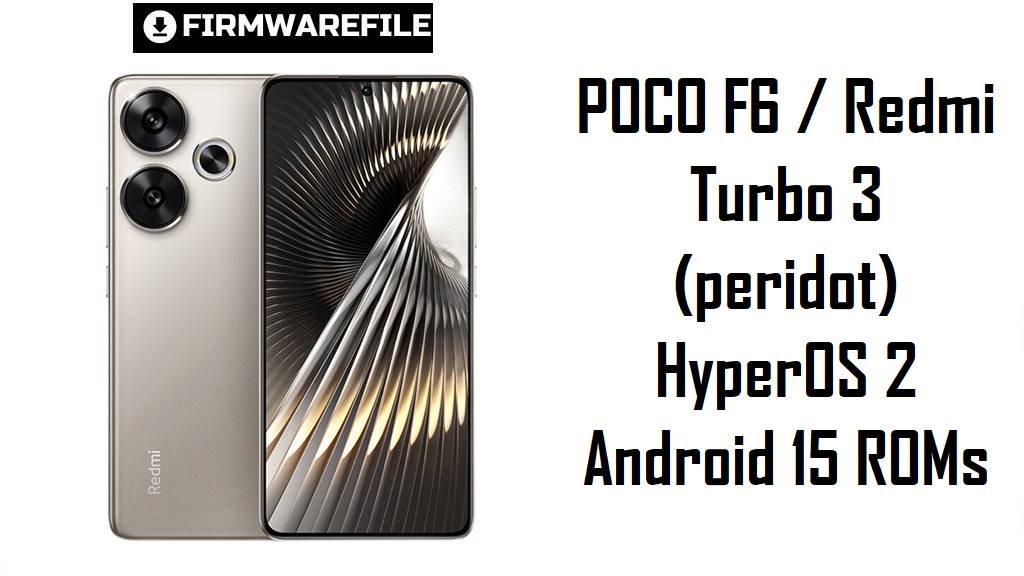
POCO F6 / Redmi Turbo 3 (peridot) HyperOS 2 Android 15 ROMs
POCO F6 and Redmi Turbo 3 are “flagship‑killer” phones built around a 6.67‑inch 1.5K AMOLED 120 Hz display, Snapdragon 8s Gen 3 chipset, up to 16 GB RAM and a 5000 mAh battery with 90 W charging.
The official HyperOS 2 Android 15 fastboot ROMs and the Xiaomi.eu custom build listed below for codename peridot let you clean‑flash a fresh system, fix broken OTAs and fine‑tune the experience for your exact region and needs.
Download Firmware Flash File for POCO F6 / Redmi Turbo 3
The table below lists official HyperOS 2 (Android 15) fastboot ROMs for Redmi Turbo 3 / POCO F6 (codename peridot) plus one Xiaomi.eu custom ROM based on the latest China build. OS2.0.207.0 builds (China, Global, EEA) are newer than OS2.0.205.0 (RU, IN, ID, TW) and are preferred where available, while the Xiaomi.eu ZIP targets advanced users who want a debloated, multi‑language experience on top of the CN firmware.
| Filename | Region / Variant | Build Number | Build Date | Android Version | Flashing Method | File Size | Notes | Download |
|---|---|---|---|---|---|---|---|---|
| peridot_images_OS2.0.207.0.VNPCNXM_20251031.0000.00_15.0_cn_9588361a38.tgz | China – Redmi Turbo 3 CN | OS2.0.207.0.VNPCNXM | 2025‑10‑31 | Android 15 (HyperOS 2, China) | Fastboot (Xiaomi Flash Tool) | 8.04 GB | Latest China HyperOS 2 fastboot ROM for peridot; HyperOS trackers show OS2.0.207.0.VNPCNXM as a newer stable over OS2.0.205.x, ideal for unbricking and clean installs on Redmi Turbo 3. | Download from Xiaomi |
| peridot_global_images_OS2.0.207.0.VNPMIXM_20251031.0000.00_15.0_global_a38efb9456.tgz | Global – POCO F6 Global | OS2.0.207.0.VNPMIXM | 2025‑10‑31 | Android 15 (HyperOS 2 Global) | Fastboot (Xiaomi Flash Tool) | 8.37 GB | Recommended clean‑flash base for international POCO F6; firmware sites list OS2.0.207.0.VNPMIXM as the current global HyperOS 2 stable with the newest security level. | Download from Xiaomi |
| peridot_eea_global_images_OS2.0.207.0.VNPEUXM_20251031.0000.00_15.0_eea_6d956a55e2.tgz | EEA / Europe – POCO F6 EU | OS2.0.207.0.VNPEUXM | 2025‑10‑31 | Android 15 (HyperOS 2 EEA) | Fastboot (Xiaomi Flash Tool) | 7.83 GB | Latest European HyperOS 2 fastboot ROM; VNPEUXM is tuned for EU regulations and bands and should be preferred over older OS2.0.205.x builds for EEA units. | Download from Xiaomi |
| peridot_ru_global_images_OS2.0.205.0.VNPRUXM_20251031.0000.00_15.0_ru_96a9430d90.tgz | Russia – POCO F6 RU | OS2.0.205.0.VNPRUXM | 2025‑10‑31 | Android 15 (HyperOS 2 Russia) | Fastboot (Xiaomi Flash Tool) | 8.65 GB | Late‑2025 Russian fastboot ROM; current stable for VNP RUXM devices and suitable for clean flashing or recovery, though a future OS2.0.207.x VNPRUXM may appear later. | Download from Xiaomi |
| peridot_in_global_images_OS2.0.205.0.VNPINXM_20251031.0000.00_15.0_in_13b2c7213d.tgz | India – POCO F6 IN | OS2.0.205.0.VNPINXM | 2025‑10‑31 | Android 15 (HyperOS 2 India) | Fastboot (Xiaomi Flash Tool) | 7.15 GB | Indian HyperOS 2 fastboot ROM; a stable VNPINXM build that upgrades older Android 14/early HyperOS releases on Indian POCO F6 units. | Download from Xiaomi |
| peridot_id_global_images_OS2.0.205.0.VNPIDXM_20251031.0000.00_15.0_id_e67ab0bed2.tgz | Indonesia – POCO F6 ID | OS2.0.205.0.VNPIDXM | 2025‑10‑31 | Android 15 (HyperOS 2 Indonesia) | Fastboot (Xiaomi Flash Tool) | 7.93 GB | Indonesia‑tuned fastboot ROM with regional network and legal settings; current VNPIDXM stable for local devices. | Download from Xiaomi |
| peridot_tw_global_images_OS2.0.205.0.VNPTWXM_20251031.0000.00_15.0_tw_d116080f54.tgz | Taiwan – POCO F6 TW | OS2.0.205.0.VNPTWXM | 2025‑10‑31 | Android 15 (HyperOS 2 Taiwan) | Fastboot (Xiaomi Flash Tool) | 7.88 GB | Taiwan fastboot ROM; late‑2025 OS2.0.205.0.VNPTWXM is the primary TW stable build available for peridot. | Download from Xiaomi |
| xiaomi.eu_PERIDOT_OS2.0.207.0.VNPCNXM_15.zip | Xiaomi.eu custom ROM based on China OS2.0.207.0 | OS2.0.207.0.VNPCNXM (Xiaomi.eu build) | 2025‑Q4 (based on CN 2025‑10‑31) | Android 15 (HyperOS 2, debloated) | Recovery (TWRP/fastboot‑booted recovery) | 6.03 GB | Community‑maintained multi‑language ROM that ports China OS2.0.207.0 to an EU‑style experience with removed ads/bloat; users report smoother behavior than some stock builds but also lag in certain Xiaomi.eu versions on peridot. | Download from SourceForge |
Choosing the right file: In Settings → About phone, check the suffix of your current build (VNPCNXM, VNPMIXM, VNPRUXM, VNPINXM, VNPIDXM, VNPTWXM, VNPEUXM). Flash the matching official ROM for maximum stability, and consider Xiaomi.eu only if you are comfortable with custom recoveries and community support.
Complete Device & Firmware Overview
- Device & codename
- POCO F6 (global/India) and Redmi Turbo 3 (China) share the codename peridot and use the same core hardware and firmware base.
- Model numbers & regions
- Common models include 24069PC21G (POCO F6 Global), 24069PC21I (POCO F6 India) and 24069RA21C/24069PC21C (Redmi Turbo 3 China), mapped to the regional ROMs above.
- Chipset & performance
- The phones run a Snapdragon 8s Gen 3 (4 nm) with an octa‑core CPU up to 3.0 GHz and Adreno 700‑series GPU, delivering near‑flagship performance for gaming and multitasking.
- Display
- A 6.67‑inch AMOLED “CrystalRes” panel at 1220×2712, 120 Hz and up to around 2400 nits peak brightness supports Dolby Vision, HDR10+ and Gorilla Glass Victus protection.
- Memory & storage
- Peridot devices ship with 8–16 GB LPDDR5X RAM and 256 GB to 1 TB UFS 4.0 storage, with no microSD slot.
- Cameras
- The rear system combines a 50 MP OIS main sensor and 8 MP ultrawide, while the front has a 20 MP selfie camera with up to 4K 60 fps video on the rear and 1080p 60 fps on the front.
- Battery & charging
- A 5000 mAh battery with 90 W wired charging can fill from 0–100% in about half an hour, though some HyperOS builds still show noticeable battery drain in daily use.
- Software baseline
- Devices launch on Android 14 with HyperOS, and OS2.0.205.0/207.0 VNP*** fastboot ROMs are part of the Android 15 HyperOS 2 generation.
- Common problems
- Owners complain about HyperOS lag in system apps, jittery control center, overheating on reboot, persistent battery drain and 60 fps caps that require workarounds.
- How these ROMs help
- Clean‑flashing the latest regional ROM resets bloated OTAs, can remove bugs introduced by previous updates and gives the Snapdragon 8s Gen 3 platform a stable base for sustained performance.
- Firmware types
- The Xiaomi ROMs are official fastboot packages (.tgz) for use with Xiaomi Flash Tool, while the Xiaomi.eu ZIP is a community custom ROM flashed through a custom recovery.
- Bootloader & anti‑rollback
- Fastboot and Xiaomi.eu flashing require an unlocked bootloader, and Xiaomi’s anti‑rollback can brick devices if you downgrade below the allowed OS2.0.x level or cross‑flash unsafe builds.
- Required tools
- For official ROMs you need a Windows PC, Xiaomi USB drivers, Xiaomi Flash Tool and a good USB‑C cable; Xiaomi.eu also needs a compatible custom recovery such as TWRP or fastboot‑booted recovery.
CRUCIAL WARNING: These ROMs are strictly for POCO F6 / Redmi Turbo 3 with codename peridot; do not flash them to POCO F6 Pro, Redmi Note 13 series or any other Xiaomi / POCO models, or you risk a permanent brick.
Each official build is region‑locked by its suffix (VNPCNXM, VNPMIXM, VNPRUXM, VNPINXM, VNPIDXM, VNPTWXM, VNPEUXM), so always choose the ROM that matches your phone’s original region and avoid cross‑region or large downgrade flashes while anti‑rollback is active.
All peridot_*.tgz fastboot packages wipe user data, and selecting “clean all and lock” on a mismatched ROM can relock the bootloader on unsupported firmware, causing boot loops, network issues or difficulty unlocking again.
Preparation Before Flashing
Click here for the POCO F6 / Redmi Turbo 3 pre‑flash checklist
- Confirm device & codename: Boot to fastboot and run fastboot getvar product; proceed only if it returns peridot, then confirm your region suffix (e.g., VNPMIXM, VNPEUXM, VNPINXM) in About phone.
- Match the right ROM: Download the fastboot ROM whose suffix exactly matches your current build; only advanced users with a full backup and recovery plan should consider Xiaomi.eu.
- Backup everything: Fastboot and custom ROM flashes erase apps, media and settings, so back up via Google, Xiaomi Cloud or a PC before starting.
- Charge the phone: Ensure at least 50–60% battery to avoid shutdown during flashing.
- Install drivers & tools: On Windows, install Xiaomi USB drivers and Xiaomi Flash Tool, and if using Xiaomi.eu prepare a compatible recovery (TWRP or fastboot‑booted recovery image).
Quick Firmware Flash Instructions
This high‑level guide covers flashing official fastboot ROMs such as peridot_global_images_OS2.0.207.0.VNPMIXM_20251031.0000.00_15.0_global_a38efb9456.tgz with Xiaomi’s fastboot tool on Windows.
- Prepare PC & ROM: Install Xiaomi USB drivers and Xiaomi Flash Tool, then download and fully extract the chosen peridot_…images_OS2.0.20x.0.VNP* .tgz into a short path such as C:\peridot_rom.
- Enter fastboot mode: Power off the phone, hold Volume Down + Power until the fastboot logo appears, then connect it to the PC with a good USB‑C cable.
- Load ROM in Xiaomi Flash: Open Xiaomi Flash Tool, click “Select” and choose the extracted ROM folder, then click “Refresh” and confirm one peridot device is detected.
- Flash with “clean all”: Select the “clean all” option (wipes data but keeps the bootloader unlocked), click “Flash” and wait for the success status without disconnecting the phone.
- First boot & checks: Let Android 15 HyperOS 2 boot and finish optimization, then open About phone to verify the codename, suffix and build number match the ROM you installed.
For detailed, screenshot‑rich instructions on using Xiaomi Flash Tool, including anti‑rollback checks and driver troubleshooting, follow the main Xiaomi fastboot firmware guide and select your extracted peridot_*.tgz folder when it asks for a ROM.
Frequently Asked Questions (FAQs)
- Q1. Which ROM here is safest for my POCO F6 / Redmi Turbo 3?
- The safest choice is the newest official ROM with the same suffix as your current build: OS2.0.207.0.VNPCNXM (China), OS2.0.207.0.VNPMIXM (Global), OS2.0.207.0.VNPEUXM (EEA) or OS2.0.205.0.VNPRUXM / VNPINXM / VNPIDXM / VNPTWXM for RU/IN/ID/TW.
- Q2. How is the Xiaomi.eu PERIDOT OS2.0.207.0 ROM different from stock?
- Xiaomi.eu is a community ROM based on the latest China firmware with extra languages, removed ads/bloat and some tweaks, but it is unofficial and some users report lags or bugs on certain HyperOS EU builds for peridot.
- Q3. Can fastboot flashing help with battery drain and overheating?
- Many battery‑drain complaints on peridot appear after OTAs; installing a full OS2.0.205/207 fastboot ROM often normalizes background processes and heat, though heavy 8s Gen 3 gaming will still be power‑hungry.
- Q4. Is it safe to flash China VNPCNXM on a Global or Indian POCO F6?
- Cross‑flashing CN firmware can affect bands, features and future updates, and anti‑rollback makes downgrades risky; most users should stick to their matching VNPMIXM, VNPEUXM, VNPINXM or other regional build.
- Q5. Do these builds upgrade my phone to Android 16 or HyperOS 3?
- No; OS2.0.205.0 and OS2.0.207.0 VNP*** are Android 15 HyperOS 2 ROMs. Android 16 / HyperOS 3 for peridot would come later as OS3.x or equivalent branches once officially released.