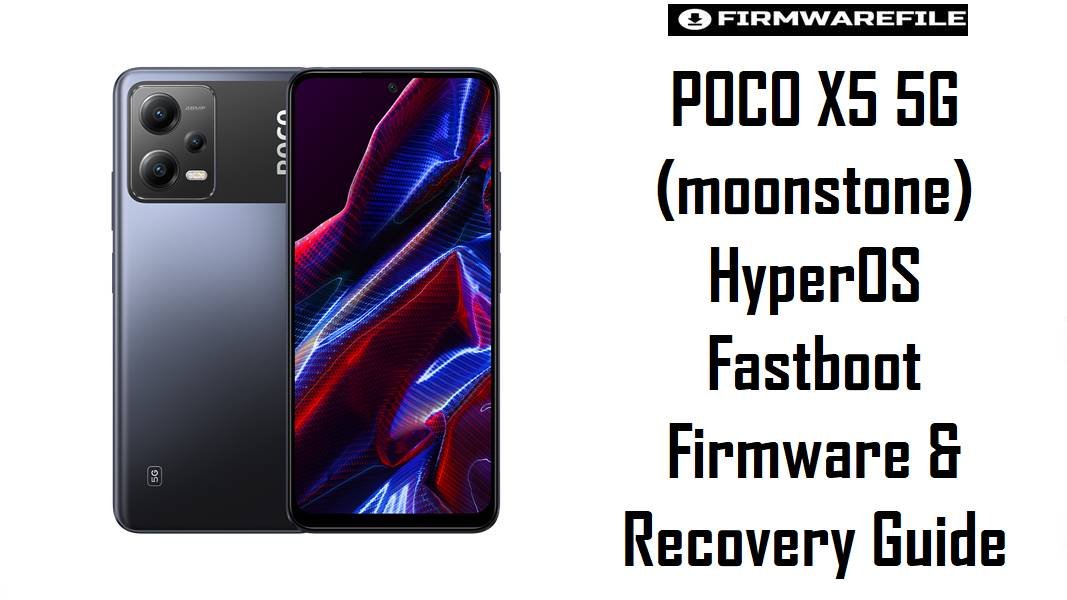
POCO X5 5G (moonstone) HyperOS Fastboot Firmware & Recovery Guide
The POCO X5 5G, codenamed moonstone, is a mid-range 5G phone built around the Qualcomm Snapdragon 695 platform, pairing a 6 nm SoC with a 120 Hz AMOLED display and a 5000 mAh battery. This hardware combination targets users who want smooth everyday performance, stable 5G connectivity, and good battery endurance rather than flagship-level gaming. With HyperOS 1.x based on Android 14 now available for moonstone across multiple regions, firmware packages have shifted from MIUI-style releases to HyperOS-specific fastboot builds with updated partition contents and tighter integrity handling.
HyperOS 1.0 for the POCO X5 5G introduces a lighter system, new scheduling optimizations, and refinements around animations and power management, which are important on a Snapdragon 695 device that balances efficiency with mid-range GPU capability. Each release is offered as separate fastboot ROMs for markets such as Global, EEA, India, Indonesia, Turkey, Taiwan, and Russia, each including its own modem configuration and regional compliance profile. Selecting the correct region build is critical for preserving 5G band support, VoLTE/VoWiFi behavior, and OTA compatibility, especially on a phone that may be imported or used while traveling.
This guide documents the available HyperOS 1.x fastboot packages and a major xiaomi.eu custom build for moonstone, explaining their intended use, realistic flashing scenarios, and cross-region implications on a Qualcomm-based 5G modem. It also provides a targeted checklist, model-specific warnings around anti-rollback and modem partitions, a short Mi Flash-style fastboot flashing sequence, and a link to a complete external Mi Flash guide for users who need more detailed step-by-step instructions.
Download Firmware
| Filename | Region / Variant | Build / Version | Release Date | Android / OS | Patch Level | Flashing Method | Size | Recommended Use | Download |
|---|---|---|---|---|---|---|---|---|---|
| moonstone_global_images_OS1.0.25.0.UMPMIXM_20251128.0000.00_14.0_global_b5bc240c4d.tgz | Global (MI) | OS1.0.25.0 UMPMIXM | 2025-11-28 | Android 14 / HyperOS 1.0 | Approx. Nov 2025 security patch (Global) | Fastboot via Mi Flash | 5.63 GB | Primary stock firmware for most POCO X5 5G units sold internationally; balanced modem configuration, full Google services, and wide language support. Ideal for recovery and clean reinstalls on Global hardware. | Download Global fastboot |
| moonstone_tw_global_images_OS1.0.21.0.UMPTWXM_20251127.0000.00_14.0_tw_5a62eaa890.tgz | Taiwan (TW) | OS1.0.21.0 UMPTWXM | 2025-11-27 | Android 14 / HyperOS 1.0 | Approx. Nov 2025 security patch (Taiwan) | Fastboot via Mi Flash | 5.03 GB | Firmware tuned for Taiwan carriers and local compliance like band allocation and NFC behavior; recommended for units originally sold for the TW market to keep network and OTA behavior predictable. | Download TW fastboot |
| moonstone_eea_global_images_OS1.0.24.0.UMPEUXM_20251128.0000.00_14.0_eea_8321e15c02.tgz | Europe (EEA) | OS1.0.24.0 UMPEUXM | 2025-11-28 | Android 14 / HyperOS 1.0 | Approx. Nov 2025 security patch (EEA) | Fastboot via Mi Flash | 5.30 GB | EEA-targeted ROM with GDPR-focused defaults, EU regulatory tuning (including SAR/CE-related behavior), and slightly different privacy and advertising settings compared to Global. Best choice for EU-sold POCO X5 5G devices. | Download EEA fastboot |
| moonstone_ru_global_images_OS1.0.21.0.UMPRUXM_20251128.0000.00_14.0_ru_690778af18.tgz | Russia (RU) | OS1.0.21.0 UMPRUXM | 2025-11-28 | Android 14 / HyperOS 1.0 | Approx. Nov 2025 security patch (Russia) | Fastboot via Mi Flash | 5.93 GB | Russian distribution firmware with local apps and operator presets; intended to maintain proper LTE/5G band behavior and OTA path on RU market devices. | Download RU fastboot |
| moonstone_in_global_images_OS1.0.22.0.UMPINXM_20251128.0000.00_14.0_in_b7af53b191.tgz | India (IN) | OS1.0.22.0 UMPINXM | 2025-11-28 | Android 14 / HyperOS 1.0 | Approx. Nov 2025 security patch (India) | Fastboot via Mi Flash | 4.77 GB | India-specific firmware tuned to the Indian POCO X5 5G model (22111317PI) with region-specific LTE/5G bands and bundled local services; preferred for stable carrier behavior in India. | Download IN fastboot |
| moonstone_id_global_images_OS1.0.21.0.UMPIDXM_20251128.0000.00_14.0_id_479e05af5f.tgz | Indonesia (ID) | OS1.0.21.0 UMPIDXM | 2025-11-28 | Android 14 / HyperOS 1.0 | Approx. Nov 2025 security patch (Indonesia) | Fastboot via Mi Flash | 5.48 GB | Indonesian ROM aligning with local operators and regulatory limits; recommended for Indonesian POCO X5 5G units to keep VoLTE, network discovery, and OTA behavior consistent. | Download ID fastboot |
| moonstone_tr_global_images_OS1.0.20.0.UMPTRXM_20251128.0000.00_14.0_tr_db5c5d9ab9.tgz | Turkey (TR) | OS1.0.20.0 UMPTRXM | 2025-11-28 | Android 14 / HyperOS 1.0 | Approx. Nov 2025 security patch (Turkey) | Fastboot via Mi Flash | 5.09 GB | Turkey-targeted firmware with local compliance and carrier setups; useful for restoring imported TR devices that have been modified or soft-bricked. | Download TR fastboot |
| xiaomi.eu_MOONSTONE_OS1.0.25.0.UMPMIXM_14.zip | xiaomi.eu Custom ROM | OS1.0.25.0 (Global base) / xiaomi.eu build | Based on 2025-11-28 Global release | Android 14 / HyperOS 1.0 (modified) | Follows Global security patch of base ROM | Flashed via custom recovery (TWRP) or sideload | 4.07 GB | Community-customized HyperOS build based on the Global fastboot ROM, adding multi-language, integrated Google services (where needed), and some debloating; aimed at experienced users comfortable with custom recoveries and manual updates. | Download xiaomi.eu |
| twrp-3.7.1_12-0-v1b-moonstone-Mechatron.img | Custom Recovery (TWRP) | TWRP 3.7.1_12-0 v1b for moonstone | Community build, HyperOS-compatible | N/A (Recovery image) | N/A | Flashed to recovery via fastboot | 128 MB | Touch-based custom recovery for full backups, ROM flashing (e.g. xiaomi.eu), and maintenance tasks on POCO X5 5G; requires unlocked bootloader and careful partition selection on this Qualcomm device. | Download TWRP for moonstone |
Region / Variant Notes
HyperOS builds for moonstone follow Xiaomi’s region coding convention, with UMPMIXM for Global, UMPEUXM for EEA, UMPINXM for India, UMPIDXM for Indonesia, UMPTRXM for Turkey, UMPTWXM for Taiwan, and UMPRUXM for Russia. Each code reflects not only language and preinstalled apps, but also region-specific modem tables and regulatory parameters such as supported LTE/5G bands and, in some regions, different NFC behavior or SAR tuning.
Cross-flashing between closely related regions, such as Global and EEA, often works on the same hardware (for example model 22111317PG) but may change OTA channels and privacy defaults, while more distant cross-region moves, like TW firmware on an Indian device, can alter band support or carrier features like VoLTE/VoWiFi. When dealing with a 5G-capable Snapdragon 695 modem, incorrect regional firmware can result in loss of 5G on certain bands or unstable roaming performance, so region changes should be attempted only by users who have verified band compatibility and kept a backup of the original region’s ROM.
Complete Device & Firmware Overview
- Device Name
- POCO X5 5G (moonstone)
- Codename
- moonstone
- Chipset / Platform
- Qualcomm Snapdragon 695 5G (SM6375), 6 nm octa-core CPU with Adreno 619 GPU, balancing efficient 5G connectivity and mid-range gaming performance; Qualcomm-based partitioning and EDL support influence unbrick options.
- Display & Panel
- 6.67-inch AMOLED with 120 Hz refresh rate and FHD+ resolution; display driver and color calibration are contained in vendor/system components, so incompatible firmware can cause brightness or color issues.
- Battery & Charging
- 5000 mAh Li-Po battery paired with 33 W wired charging, typically reaching full charge in around an hour; firmware coordinates thermal limits and charging curves, which is important for long-term health on a device many users keep for several years.
- Storage & RAM
- 6/8 GB LPDDR4X RAM and up to 256 GB UFS 2.2 storage, with optional microSD expansion using a shared slot; HyperOS’s storage and memory optimisations help keep mid-range hardware responsive under multi-app workloads.
- Camera Stack
- 48 MP main, 8 MP ultrawide, and 2 MP macro rear cameras plus 13 MP front camera; ISP tuning is spread across vendor, system, and sometimes firmware blobs, meaning mismatched regional ROMs can subtly alter camera behavior or break region-dependent camera features.
- Connectivity & Modem
- GSM/HSPA/LTE/5G with different band sets for international and Indian variants, dual-band Wi‑Fi, Bluetooth 5.1, NFC in selected markets, and GPS/GLONASS; modem configuration is region-specific, so preserving the correct region firmware is key to reliable 5G and LTE.
- Bootloader & Lock State
- Ships with a locked bootloader; unlocking via Xiaomi’s official procedure is required for cross-region fastboot flashing, custom recovery installation, or xiaomi.eu ROM usage, and may impact safety checks used by banking apps.
- OS Transition
- Originally launched with MIUI for POCO based on Android 12; subsequently updated through MIUI 14 and now to HyperOS 1.0 based on Android 14, which reworks system components while preserving the overall mid-range feature set.
- Partition Layout
- Qualcomm A/B-style layout with dynamic partitions; HyperOS fastboot images include boot, vendor_boot, super (system, vendor, product), vbmeta, modem, bluetooth, dsp and others, all orchestrated by the provided fastboot scripts.
- Anti-Rollback & Downgrades
- HyperOS builds can enforce anti-rollback levels; flashing a ROM with a lower anti-rollback index than currently stored on your phone may fail or result in boot issues, so downgrades should be planned only after consulting up-to-date firmware and ARB trackers.
- Typical Use Cases
- Daily use, 5G connectivity, social media, content streaming, and mid-range gaming; many owners flash firmware to recover from soft bricks, remove accumulated bloat, change between EEA and Global, or move to xiaomi.eu for a different software balance.
- Supported Flashing Tools
- Fastboot-based flashing via Xiaomi Mi Flash Tool for official HyperOS fastboot ROMs, custom recovery-based flashing (TWRP) for xiaomi.eu and similar builds, and Qualcomm EDL tools only in advanced unbrick situations not covered by this quick guide.
CRUCIAL WARNING
Flashing firmware on a Snapdragon 695-based 5G device like the POCO X5 5G carries real risk if done incorrectly. Full HyperOS fastboot packages for moonstone rewrite boot, vendor_boot, super, modem, vbmeta and other critical partitions; if the process is interrupted or the wrong regional build is used, the device can lose network connectivity, fail SafetyNet-style checks, or become stuck in a bootloop that may require advanced Qualcomm recovery methods.
Always choose a ROM whose region code (UMPMIXM, UMPEUXM, UMPINXM, UMPIDXM, UMPTRXM, UMPTWXM, UMPRUXM) matches your original product variant unless you fully understand cross-region behavior and have confirmed band compatibility. Avoid downgrading across anti-rollback boundaries and never disconnect the cable or power down the PC while partitions are being written; such interruptions can leave the phone only recoverable via EDL mode with tools and files beyond the scope of this short guide. You are fully responsible for any firmware changes you apply to your unit.
Preparation Before Flashing
Pre-flash checklist for POCO X5 5G (moonstone)
- Confirm that the device is indeed POCO X5 5G (model 22111317PG/PI or equivalent) and that the codename is moonstone, using Settings > About phone and, if needed, a trusted device info app.
- Check your current firmware version string (for example OS1.0.24.0.UMPEUXM) and select a matching or intentionally chosen target ROM from the download table, keeping region and anti-rollback considerations in mind.
- Back up all important data from internal storage, including photos, chats, authenticator apps, and documents, because typical fastboot scripts will wipe user data on the device.
- Unlock the bootloader via Xiaomi’s official process if you intend to change region or install xiaomi.eu; note that unlocking can change integrity status and may impact some payment and DRM-reliant apps.
- Charge the battery to at least 60–70% and ensure your PC is connected to reliable power and will not sleep or reboot during the flashing session.
- Install Xiaomi USB drivers and Qualcomm drivers on your Windows PC, then confirm that the phone is recognised in fastboot mode with
fastboot devicesbefore attempting a full flash. - Download the chosen HyperOS fastboot ROM and verify its size against trusted firmware listings; where possible, check checksums to avoid flashing partially downloaded or corrupted archives.
- Use a short, good-quality USB-C cable plugged directly into a mainboard USB port instead of a hub, as flaky connections during flashing can lead to incomplete writes and soft bricks.
Quick Firmware Flash Instructions
- On your Windows PC, install Xiaomi/Qualcomm USB drivers, then extract the selected moonstone fastboot ROM (
*.tgz) into a simple folder such asC:\moonstone_hyperos\, and verify that fastboot scripts likeflash_all.batandflash_all_except_storage.batare present in the root of that directory. - Power off the POCO X5 5G completely, then hold Volume Down + Power to enter fastboot mode; when the fastboot logo appears, connect the phone to the PC using a reliable USB cable and confirm that
fastboot devicesshows a valid device ID. - Launch Xiaomi Mi Flash Tool, click “Select” and point it to the extracted moonstone fastboot ROM folder, then click “Refresh” and ensure your device appears in the tool’s device list before proceeding.
- In Mi Flash, choose the appropriate flashing option at the bottom (for example “clean all” for most recovery scenarios on moonstone), double-check that the selected ROM region (Global, EEA, IN, ID, TR, TW, RU) matches your intended target, and then click “Flash” and wait for the process to complete without touching the cable or buttons.
- After Mi Flash reports success and the phone reboots, give HyperOS extra time for first boot on the Snapdragon 695 platform, then verify 5G/LTE connectivity, Wi‑Fi, NFC (if available in your region), cameras, fingerprint reader, and overall responsiveness before restoring backups or enabling root.
For a full, illustrated walkthrough of Xiaomi fastboot flashing (including common Mi Flash errors, driver issues, and recovery from typical mistakes), follow this dedicated external guide: Xiaomi MI Flash Tool firmware flashing guide.
Typical tools required for flashing firmware on POCO X5 5G include:
- Windows PC with Xiaomi USB drivers and Qualcomm drivers properly installed.
- Xiaomi Mi Flash Tool for handling official HyperOS fastboot packages.
- Android platform-tools (ADB/Fastboot) for detection, recovery flashing, and verification.
- Custom recovery image (twrp-3.7.1_12-0-v1b-moonstone-Mechatron) if you plan to install xiaomi.eu or other custom ROMs.
- Stable USB-C cable and reliable power for both PC and phone throughout the flashing process.
Frequently Asked Questions (FAQs)
- Will flashing HyperOS 1.0 fastboot ROM improve gaming performance on the POCO X5 5G?
- HyperOS can make the system feel smoother and may improve consistency in lighter games through better scheduling, but it does not change the fundamental Snapdragon 695 and Adreno 619 performance envelope; dramatic gaming gains should not be expected from firmware alone.
- Is it safe to switch from EEA (UMPEUXM) to Global (UMPMIXM) firmware?
- Many moonstone devices can operate with either EEA or Global firmware, but switching region can alter privacy defaults, advertising and analytics options, and OTA channels; there is also a small risk of differences in regulatory behavior, so it is best to back up fully and keep a copy of your original EEA ROM.
- What happens if I flash an incorrect region ROM, like TW on an Indian unit?
- If an incompatible regional ROM is flashed, the phone may still boot but can lose access to some 5G/LTE bands, show unstable roaming behavior, or experience issues with services like VoLTE; in worst cases, network registration may fail until the correct region firmware is restored via fastboot.
- Does unlocking the bootloader and using xiaomi.eu affect banking apps or DRM?
- Bootloader unlocking and custom ROMs such as xiaomi.eu can change integrity and attestation status, which may result in some banking apps, payment systems, or HD streaming services refusing to work by default; while some users rely on additional tools to mitigate this, such setups are not guaranteed and can break after updates.
- Can I downgrade from a newer HyperOS build to an older one on moonstone?
- Downgrading is constrained by anti-rollback; if your device has moved to a build with a higher anti-rollback index, flashing an older version may fail or risk boot issues, so only perform downgrades after verifying compatibility from up-to-date firmware trackers and understanding the consequences.
- When should I consider using TWRP on the POCO X5 5G?
- TWRP becomes relevant if you plan to run xiaomi.eu or other custom ROMs, perform full partition backups, or flash Magisk zip packages; for purely stock fastboot ROM flashes, Mi Flash and the official fastboot scripts are normally sufficient and simpler.
- What basic checks should I perform after flashing?
- After first boot, confirm SIM detection, 5G/LTE connectivity on your usual bands, Wi‑Fi stability, Bluetooth pairing, NFC (if your variant supports it), camera operation, and fingerprint unlock; resolving any core issue early is easier before restoring a full backup and installing many apps.
- Can this procedure be reused for other POCO or Xiaomi models?
- The overall logic of HyperOS fastboot flashing is similar across many Xiaomi devices, but each model has its own codename, modem configuration, and anti-rollback behavior; always use firmware and instructions specific to your device rather than attempting to apply moonstone ROMs or scripts to other hardware.