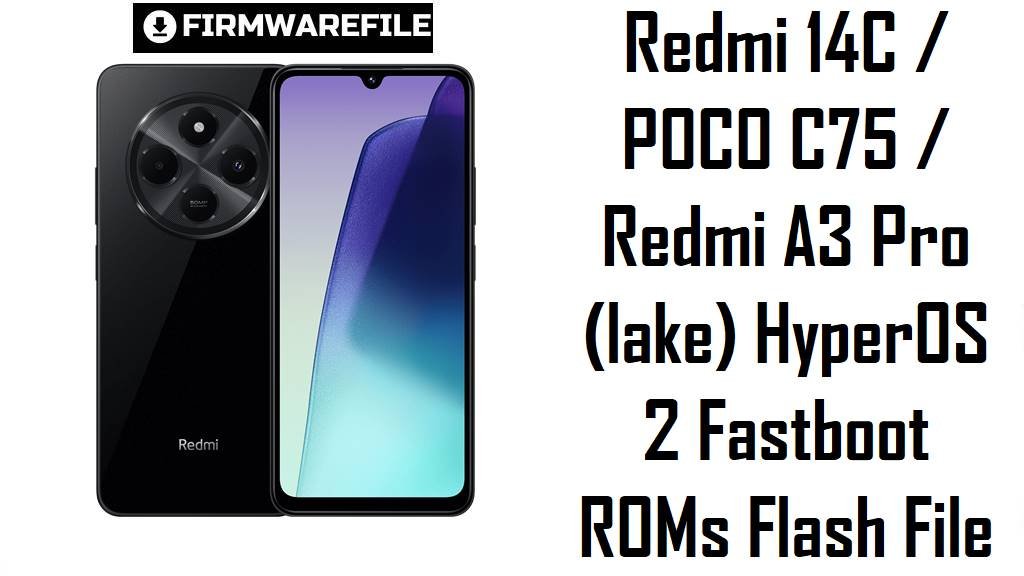
Redmi 14C / POCO C75 / Redmi A3 Pro (lake) HyperOS 2 Fastboot ROMs Flash File
Redmi 14C, POCO C75 and Redmi A3 Pro share the same budget‑5G platform and codename lake, delivering a large 90/120 Hz display, long battery life and HyperOS at an entry price. Owners still report typical low‑end HyperOS issues such as minor lag, slow animations and delayed security updates, especially on early Android 15 builds.
The official HyperOS 2 fastboot ROMs below let you clean‑flash region‑correct Android 15 firmware for China, Global, EEA, Indonesia, Russia, Taiwan and Turkey, fixing broken OTAs and moving to newer, more stable builds.
Download Firmware for Redmi 14C / POCO C75 / Redmi A3 Pro (lake)
All flash files here are official HyperOS 2 (Android 15) fastboot ROMs for devices with codename lake, used by Redmi 14C, POCO C75 and Redmi A3 Pro in different regions. Always match the region suffix in the filename (VGTMIXM, VGTCNXM, VGTEUXM, VGTIDXM, VGTRUXM, VGTTRXM, VGTTWXM) with the suffix shown in Settings → About phone → HyperOS version to avoid network and OTA problems.
| Filename | Region / Variant | Build Number | Build Date | Android Version | Flashing Method | File Size | Notes | Download |
|---|---|---|---|---|---|---|---|---|
| lake_tw_global_images_OS2.0.201.0.VGTTWXM_20251022.0000.00_15.0_tw_95ea94efa1.tgz | Taiwan – Redmi 14C / POCO C75 / A3 Pro TW | OS2.0.201.0.VGTTWXM | 2025‑10‑22 | Android 15.0 | Fastboot (Xiaomi Flash Tool) | 5.12 GB | Latest Taiwan HyperOS 2 fastboot ROM for lake; HyperOS firmware lists earlier OS2.0.200.0.VGTTWXM builds, so this 201.0 package is the newer, safer choice for a clean flash on TW devices. | Download from Xiaomi server |
| lake_id_global_images_OS2.0.201.0.VGTIDXM_20251022.0000.00_15.0_id_74da382fec.tgz | Indonesia – Redmi 14C / POCO C75 / A3 Pro ID | OS2.0.201.0.VGTIDXM | 2025‑10‑22 | Android 15.0 | Fastboot (Xiaomi Flash Tool) | 6.61 GB | Indonesia HyperOS 2 fastboot ROM; an evolution over OS2.0.200.0.VGTIDXM that firmware sites mark as the newest Android 15 stable for Indonesian lake units. | Download from Xiaomi server |
| lake_ru_global_images_OS2.0.201.0.VGTRUXM_20251022.0000.00_15.0_ru_1a9bc7e526.tgz | Russia – Redmi 14C / POCO C75 / A3 Pro RU | OS2.0.201.0.VGTRUXM | 2025‑10‑22 | Android 15.0 | Fastboot (Xiaomi Flash Tool) | 6.97 GB | Russia HyperOS 2 fastboot ROM; supersedes OS2.0.200.0.VGTRUXM, keeping Russian lake devices on the latest Android 15 stable with appropriate regional configuration. | Download from Xiaomi server |
| lake_tr_global_images_OS2.0.201.0.VGTTRXM_20251022.0000.00_15.0_tr_6d1c96abe1.tgz | Turkey – Redmi 14C / POCO C75 / A3 Pro TR | OS2.0.201.0.VGTTRXM | 2025‑10‑22 | Android 15.0 | Fastboot (Xiaomi Flash Tool) | 6.10 GB | Turkey HyperOS 2 fastboot ROM; follows OS2.0.200.0.VGTTRXM in firmware archives and is the recommended base for Turkish units that need a clean, up‑to‑date stock system. | Download from Xiaomi server |
| lake_global_images_OS2.0.203.0.VGTMIXM_20251017.0000.00_15.0_global_c86ba1b6d6.tgz | Global – Redmi 14C / POCO C75 / Redmi A3 Pro Global | OS2.0.203.0.VGTMIXM | 2025‑10‑17 | Android 15.0 | Fastboot (Xiaomi Flash Tool) | 7.17 GB | Newest Global HyperOS 2 fastboot ROM; XiaomiTime changelog for OS2.0.203.0.VGTMIXM notes that the security patch is updated to October 2025 and “increased system security”, making this the preferred global clean‑flash target. | Download from Xiaomi server |
| lake_eea_global_images_OS2.0.204.0.VGTEUXM_20251011.0000.00_15.0_eea_ef33fae41a.tgz | EEA / Europe – Redmi 14C / POCO C75 / A3 Pro EU | OS2.0.204.0.VGTEUXM | 2025‑10‑11 | Android 15.0 | Fastboot (Xiaomi Flash Tool) | 6.21 GB | EEA HyperOS 2 fastboot ROM; follows earlier OS2.0.203.0.VGTEUXM releases and is identified by firmware trackers as the current Android 15 stable for European lake devices. | Download from Xiaomi server |
| lake_images_OS2.0.201.0.VGTCNXM_20250912.0000.00_15.0_cn_b4a18d2076.tgz | China – Redmi 14C CN | OS2.0.201.0.VGTCNXM | 2025‑09‑12 | Android 15.0 | Fastboot (Xiaomi Flash Tool) | 5.74 GB | China HyperOS 2 fastboot ROM for lake; firmware pages list it as part of the early Android 15 wave for Redmi 14C, giving Chinese units a full clean‑install image beyond the default recovery OTAs. | Download from Xiaomi server |
If you are unsure, choose the newest fastboot ROM that matches the suffix of your current HyperOS version (for example OS2.0.203.0.VGTMIXM for Global or OS2.0.204.0.VGTEUXM for EEA) instead of older OS2.0.200.x builds listed on archives.
Complete Device & Firmware Overview
- Device family & codename
- Redmi 14C, POCO C75 and Redmi A3 Pro share the codename lake in Xiaomi’s firmware ecosystem.
- Market position
- These models sit in the entry‑level 4G/5G segment, focusing on big screens and battery life over camera or processing power.
- Core hardware (typical)
- Specs trackers list a 6.71–6.74‑inch HD+ or FHD‑class LCD up to 90 Hz, 4–8 GB RAM, up to 256 GB storage and a 5000–5200 mAh battery depending on variant.
- OS & UI versions
- Lake launched on HyperOS 1.0 (Android 14) and later received HyperOS 2.0 (Android 15) stable updates like OS2.0.202.0 and OS2.0.203.0 before test HyperOS 3 (Android 16) builds appeared.
- Regions / build suffixes
- VGTCNXM (China), VGTMIXM (Global), VGTEUXM (EEA), VGTIDXM (Indonesia), VGTRUXM (Russia), VGTTRXM (Turkey), VGTTWXM (Taiwan), each mapping to its retail market.
- Security patch level
- Changelog snippets for OS2.0.203.0.VGTMIXM mention the Android security patch updated to October 2025 and “increased system security”; similar late‑2025 builds move other regions to comparable patch levels.
- User‑reported pain points
- Reddit and Facebook discussions mention frustration about slow HyperOS update cadence for some 14C variants, plus general lag and basic feature set compared to more expensive Redmi devices.
- How these ROMs help
- Flashing the newest regional fastboot ROM lets you start fresh on the latest Android 15 baseline, clear leftover junk from incremental OTAs and benefit from Xiaomi’s stability and security fixes.
- Firmware type
- Every file listed is a fastboot ROM (.tgz) intended for clean installs and unbricking from a PC; corresponding recovery ROMs exist but are not included in this list.
- Bootloader rules
- HyperOS.fans explicitly notes that you must unlock the bootloader to flash fastboot ROMs on Redmi 14C, and anti‑rollback protection means you should avoid unsafe downgrades.
- Required tools
- Windows PC, Xiaomi USB drivers, Xiaomi Flash Tool (or compatible fastboot flasher), a reliable USB‑C cable and MD5/SHA checksums from trusted firmware sites to confirm file integrity.
CRUCIAL WARNING: These fastboot ROMs are strictly for Redmi 14C / POCO C75 / Redmi A3 Pro with codename lake; flashing them to other Redmi, POCO or Xiaomi models or to “pond” variants can permanently brick the device.
Each build is region‑locked by code (VGTMIXM, VGTCNXM, VGTEUXM, VGTIDXM, VGTRUXM, VGTTRXM, VGTTWXM), so you should normally flash the ROM that matches your phone’s original region and avoid cross‑region flashing while anti‑rollback is active on modern HyperOS devices.
All official lake_*.tgz fastboot packages will wipe user data when used with Xiaomi’s fastboot tools, and selecting options like “clean all and lock” on a mismatched firmware can relock the bootloader on the wrong ROM and cause boot loops or network loss.
Preparation Before Flashing
Click here for the Redmi 14C / POCO C75 / Redmi A3 Pro pre‑flash checklist
- Confirm codename & region: In fastboot mode, run fastboot getvar product and ensure it returns lake, then in Settings → About phone note whether your build ends in MIXM, CNXM, EUXM, IDXM, RUXM, TRXM or TWXM.
- Match the ROM to your suffix: Download only the fastboot ROM whose suffix matches your current HyperOS build (for example OS2.0.203.0.VGTMIXM for Global or OS2.0.204.0.VGTEUXM for EEA).
- Backup important data: Fastboot flashing performs a clean install and erases apps, media and settings, so back up to Xiaomi Cloud, Google Drive or a PC before starting.
- Charge to at least 50%: Ensure the battery is at 50–60% or higher to avoid shutdown during flashing, which can corrupt system partitions and hard‑brick the phone.
- Install drivers & tools: On a Windows PC, install Xiaomi USB drivers and Xiaomi Flash Tool (or another fastboot utility) and confirm that your lake device is detected correctly in fastboot mode.
Quick Firmware Flash Instructions
This high‑level guide covers flashing any of these fastboot ROMs, such as lake_global_images_OS2.0.203.0.VGTMIXM_20251017.0000.00_15.0_global_c86ba1b6d6.tgz, using Xiaomi’s fastboot flashing tool on a Windows PC.
- Prepare PC & ROM: Install Xiaomi USB drivers and Xiaomi Flash Tool, then download the correct lake_…images_… TGZ and extract it to a short path such as C:\lake_rom.
- Enter fastboot mode: Power off the phone, hold Volume Down + Power until the fastboot logo appears, then connect it to the PC with a reliable USB‑C cable.
- Select the firmware: Open Xiaomi Flash Tool, select the extracted ROM folder and confirm that one device with codename lake is listed as connected.
- Flash with “clean all”: Choose the option that wipes data but keeps the bootloader unlocked (usually “clean all”), click “flash” and wait for the success message without disconnecting the phone.
- Reboot & verify: Let HyperOS boot and complete optimization, then open About phone to verify that codename, region suffix and build number match the ROM you flashed.
For a detailed, screenshot‑rich walkthrough of Xiaomi fastboot flashing, including anti‑rollback checks and troubleshooting, follow the main Xiaomi fastboot firmware guide and simply select the extracted lake_*.tgz folder when prompted.
Frequently Asked Questions (FAQs)
- Q1. Which ROM is best for my Redmi 14C / POCO C75 / Redmi A3 Pro?
- The safest choice is the latest fastboot ROM that matches your original region: OS2.0.203.0.VGTMIXM for Global, OS2.0.204.0.VGTEUXM for EEA, OS2.0.201.0.VGTCNXM for China, OS2.0.201.0.VGTIDXM for Indonesia, OS2.0.201.0.VGTRUXM for Russia, OS2.0.201.0.VGTTRXM for Turkey or OS2.0.201.0.VGTTWXM for Taiwan.
- Q2. Will these ROMs upgrade me to HyperOS 3 (Android 16)?
- No; all listed files are HyperOS 2 on Android 15, while internal test builds like OS3.0.2.0.WGTMIXM are separate and not yet widely available as public fastboot ROMs.
- Q3. Can flashing OS2.0.203.0.VGTMIXM fix lag and security warnings?
- The OS2.0.203.0.VGTMIXM changelog states that the October 2025 security patch is applied and system security is increased, and a clean flash of this build often resolves bugs left behind by incremental OTAs.
- Q4. Is it safe to cross‑flash lake Global firmware on a “pond” Redmi 14C?
- Community threads warn that pond and lake are different codenames, and that most HyperOS support and ROMs currently target lake devices only, so cross‑flashing between them is not recommended.
- Q5. Do I need an unlocked bootloader to use these ROMs?
- HyperOS.fans and firmware tools note that bootloader unlocking is required for fastboot flashing on Redmi 14C, so you must unlock (which wipes data) before using these TGZ images.
- Q6. Where can I get older HyperOS 1 ROMs for lake?
- HyperOS Updates and other archives list HyperOS 1.0 builds like OS1.0.9.0.UGTMIXM and OS1.0.8.0.UGTEUXM for lake, which you can download as fastboot or recovery ROMs if you specifically need an Android 14 base.