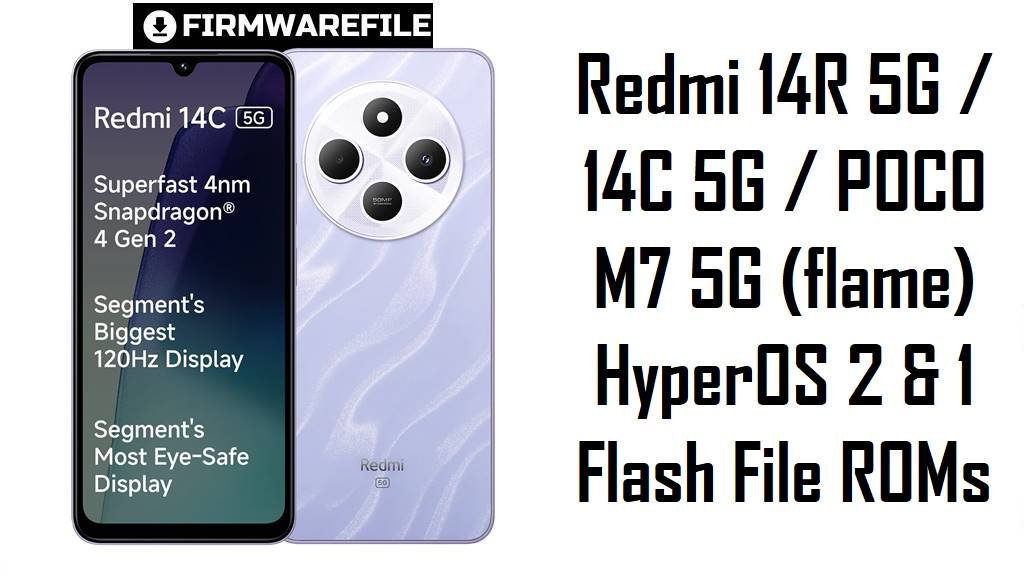
Redmi 14R 5G / 14C 5G / POCO M7 5G (flame) HyperOS 2 & 1 Flash File ROMs
Redmi 14R 5G, Redmi 14C 5G and POCO M7 5G share the same budget‑5G platform and codename flame, offering a big 6.88‑inch 120 Hz IPS display, Snapdragon 4 Gen 2‑class performance and a 5160 mAh battery at a low price. Real owners, however, mention HyperOS 1/2 slowdowns, lags on this entry‑level hardware, basic 1080p/30 video and typical battery and performance quirks on early firmware.
The official HyperOS 2 (Android 15) and HyperOS 1 (Android 14) ROMs below let you move to newer, more stable builds for China and India or deliberately roll back to an older India HyperOS 1 release when needed.
Download Firmware for Redmi 14R 5G / Redmi 14C 5G / POCO M7 5G
All packages here are official ROMs for codename flame; the two .tgz files are HyperOS 2 fastboot ROMs for clean installs, while the .zip file is a HyperOS 1 recovery ROM for India. Choose the newest HyperOS 2 build that matches your region suffix (VGUCNXM for China, VGUINXM for India) for daily use, and treat the older OS1.0.2.0.UGUINXM Android 14 ROM as a downgrade option only.
| Filename | Region / Variant | Build Number | Build Date | Android Version | Flashing Method | File Size | Notes | Download |
|---|---|---|---|---|---|---|---|---|
| flame_in_global_images_OS2.0.203.0.VGUINXM_20251022.0000.00_15.0_in_e36f0193b9.tgz | India – Redmi 14R 5G / Redmi 14C 5G / POCO M7 5G IN | OS2.0.203.0.VGUINXM | 2025‑10‑22 | Android 15 (HyperOS 2) | Fastboot (Xiaomi Flash Tool) | 5.96 GB | Latest India HyperOS 2 fastboot ROM; firmware trackers list OS2.0.203.0.VGUINXM as the current stable Android 15 build with updated security and bug fixes for Indian flame devices. | Download from Xiaomi server |
| flame_images_OS2.0.203.0.VGUCNXM_20250814.0000.00_15.0_cn_765ed795ef.tgz | China – Redmi 14R 5G CN | OS2.0.203.0.VGUCNXM | 2025‑08‑14 | Android 15 (HyperOS 2) | Fastboot (Xiaomi Flash Tool) | 5.95 GB | China HyperOS 2 fastboot ROM; part of the VGUCNXM series for Redmi 14R 5G China, used to move Chinese units from earlier HyperOS 2.0.20x builds to a newer Android 15 baseline. | Download from Xiaomi server |
| miui_FLAMEINGlobal_OS1.0.2.0.UGUINXM_f6015ae108_14.0.zip | India – Redmi 14C 5G / POCO M7 5G IN (HyperOS 1) | OS1.0.2.0.UGUINXM | 2025‑01‑07 (recovery) | Android 14 (HyperOS 1) | Recovery / Updater app | 3.86 GB | Older HyperOS 1 recovery ROM for flame India; official mirrors describe OS1.0.2.0.UGUINXM as a stable Android 14 update that raises the security patch to December 2024 and increases system security. Use only if you specifically need to stay or roll back to HyperOS 1, otherwise prefer the newer HyperOS 2 fastboot ROM above. | Download from Xiaomi server |
For most Indian users, OS2.0.203.0.VGUINXM is the best long‑term choice, with OS1.0.2.0.UGUINXM kept only as a fallback if certain apps or workflows require Android 14‑based HyperOS 1.
Complete Device & Firmware Overview
- Device family & codename
- Redmi 14R 5G, Redmi 14C 5G and POCO M7 5G share the same hardware platform and codename flame in Xiaomi’s firmware databases.
- Market position
- These phones target the budget 5G segment, pairing a big 6.88‑inch 120 Hz IPS LCD with Snapdragon 4 Gen 2‑class silicon and a 5160 mAh battery at around 140 EUR equivalent.
- Core specs
- Specs listings show a 6.88‑inch HD+ 120 Hz panel, Snapdragon 4 Gen 2 / 4s Gen 2 SoC, up to 8 GB RAM and 256 GB storage, dual‑SIM 5G, side fingerprint and 5160 mAh battery with about 18 W charging.
- Cameras
- Redmi 14R 5G uses a basic 13 MP + 2 MP rear setup with 1080p@30 fps video and a 5 MP selfie, reflecting its entry‑level positioning.
- Firmware branches here
- OS2.0.203.0.VGUCNXM (China, Android 15), OS2.0.203.0.VGUINXM (India, Android 15), and OS1.0.2.0.UGUINXM (India, Android 14, recovery).
- Security patches
- HyperOS 1 build OS1.0.2.0.UGUINXM updates the security patch to December 2024, while newer HyperOS 2 OS2.0.203.0 firmware for India and China is part of Xiaomi’s 2025 Android 15 security update wave.
- Typical user pain points
- Entry‑level HyperOS devices like Redmi 14C and similar models see complaints about sluggish performance, UI stutters, bugs and poor battery life blamed on the software layer rather than the basic hardware.
- How these builds help
- Incremental HyperOS 1 and 2 updates for flame aim to harden security and iron out bugs, and a clean flash of the latest matching ROM often fixes issues left behind by partial OTAs or failed updates.
- Firmware types
- HyperOS 2 files listed here are fastboot ROMs (.tgz) for clean installs via PC, while OS1.0.2.0.UGUINXM is an Android 14 HyperOS 1 recovery ROM (.zip) intended for the stock updater or recovery on India variants.
- Flash method & tools
- Fastboot ROMs require a Windows PC, Xiaomi USB drivers and Xiaomi Flash Tool (or similar fastboot utility), while the recovery ZIP can be applied from the system updater or stock recovery.
- Bootloader rules
- Manual fastboot flashing usually expects an unlocked bootloader on modern Xiaomi phones, and Xiaomi’s anti‑rollback system means downgrading or cross‑flashing unsafe builds can cause errors or bricks.
- Best use‑cases
- Use OS2.0.203.0.VGUINXM or OS2.0.203.0.VGUCNXM to fully reset a misbehaving HyperOS 2 system, or OS1.0.2.0.UGUINXM if you deliberately need an Android 14 base on an Indian Redmi 14C 5G / POCO M7 5G.
CRUCIAL WARNING: These ROMs are strictly for Redmi 14R 5G / Redmi 14C 5G / POCO M7 5G with codename flame; flashing them to other Xiaomi, Redmi or POCO models or different codenames can permanently brick the device.
Each build is region‑locked by code (VGUCNXM, VGUINXM, UGUINXM), so normally you should flash the ROM that matches your phone’s original region and avoid casual cross‑region or downgrade flashing while anti‑rollback is enabled on HyperOS phones.
All official flame_*.tgz fastboot packages wipe user data when used with Xiaomi’s tools, and selecting options like “clean all and lock” on a mismatched firmware can relock the bootloader on the wrong ROM and lead to boot loops or loss of network.
Preparation Before Flashing
Click here for the Redmi 14R 5G / 14C 5G / POCO M7 5G pre‑flash checklist
- Confirm codename & region: In fastboot mode, run fastboot getvar product and make sure it returns flame, then check Settings → About phone to see whether you are on China VGUCNXM or India VGUINXM / UGUINXM before downloading.
- Choose the right branch: Prefer HyperOS 2 fastboot ROMs (OS2.0.203.0.VGUINXM / OS2.0.203.0.VGUCNXM) for day‑to‑day use and only use OS1.0.2.0.UGUINXM if you truly need to stay on Android 14 HyperOS 1.
- Backup everything: Fastboot flashing will erase apps, internal storage and settings, so back up to Xiaomi Cloud, Google Drive or a PC before starting.
- Charge the battery: Keep at least 50–60% battery to avoid shutdown during flashing, which could corrupt partitions and hard‑brick the phone.
- Install drivers & tools: On Windows, install Xiaomi USB drivers and Xiaomi Flash Tool (or similar fastboot utility) and verify that the phone is recognized correctly in fastboot mode.
Quick Firmware Flash Instructions
This summary covers flashing a fastboot ROM such as flame_in_global_images_OS2.0.203.0.VGUINXM_20251022.0000.00_15.0_in_e36f0193b9.tgz with Xiaomi Flash Tool on a Windows PC.
- Prepare PC & ROM: Install Xiaomi USB drivers and Xiaomi Flash Tool, then download the correct flame_…images_… TGZ and extract it to a short path such as C:\flame_rom.
- Enter fastboot mode: Power off the phone, hold Volume Down + Power until the fastboot logo appears, then connect the device to your PC with a reliable USB‑C cable.
- Load the firmware: Open Xiaomi Flash Tool, click to select the extracted ROM folder and confirm that one device with codename flame is detected.
- Flash with “clean all”: Choose the “clean all” option (wipes data but leaves the bootloader unlocked), click “flash” and wait patiently until the tool reports success.
- Reboot & verify: Let the phone boot into HyperOS, allow a few minutes for optimization, then open About phone to check that codename flame, region suffix and build number match the ROM you flashed.
For the recovery ZIP miui_FLAMEINGlobal_OS1.0.2.0.UGUINXM_14.0.zip, you typically copy it to internal storage and apply it from the HyperOS updater or stock recovery on supported India devices, following a standard recovery‑ROM guide. For a detailed, screenshot‑rich Xiaomi fastboot tutorial, follow the main Xiaomi fastboot firmware guide and select the extracted flame_*.tgz folder when prompted.
Frequently Asked Questions (FAQs)
- Q1. Which ROM should I use on my Redmi 14R 5G / 14C 5G / POCO M7 5G?
- Use the latest HyperOS 2 fastboot ROM that matches your region: OS2.0.203.0.VGUCNXM for China or OS2.0.203.0.VGUINXM for India; only use OS1.0.2.0.UGUINXM if you specifically want Android 14 HyperOS 1 on an Indian device.
- Q2. Can I flash India VGUINXM on a China VGUCNXM phone (or vice versa)?
- Some advanced users cross‑flash between China and India on shared hardware, but firmware trackers and community threads strongly recommend staying on your original region suffix to avoid modem, network or OTA issues.
- Q3. Do I need to unlock the bootloader to use these files?
- Fastboot ROMs usually require an unlocked bootloader for manual flashing, while some HyperOS 1 recovery ROM updates can be installed via the system updater without unlocking when moving between official builds on the same region.
- Q4. How do I know if my device is really “flame”?
- Enter fastboot mode and run fastboot getvar product from a PC; Redmi 14R 5G / 14C 5G / POCO M7 5G should report flame, matching the codename shown on official firmware pages.