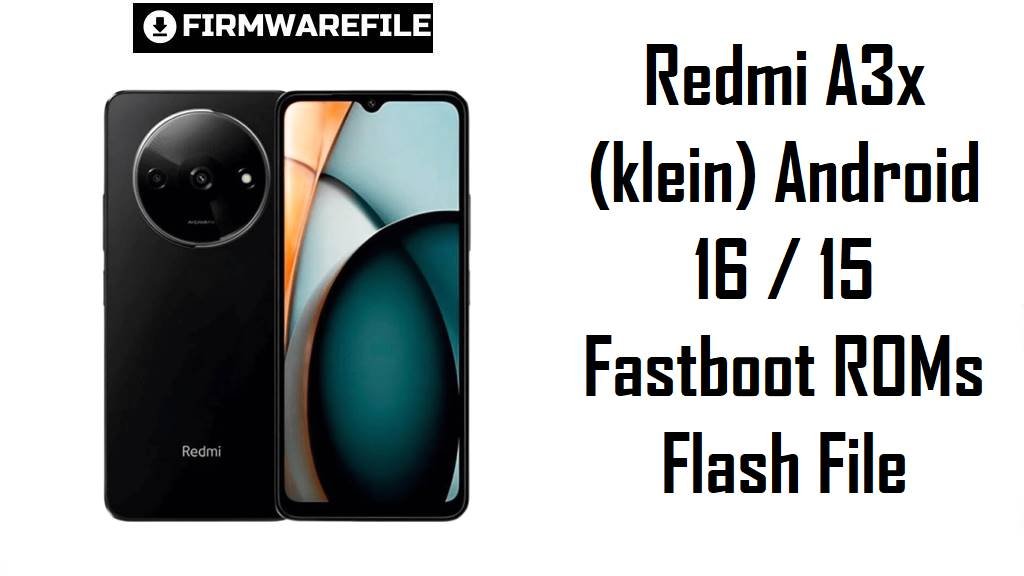
Redmi A3x (klein) Android 16 / 15 Fastboot ROMs Flash File
Redmi A3x is an ultra‑budget 4G phone built around a 6.71‑inch 90 Hz HD+ display, Unisoc T603 chipset, 3–4 GB RAM and a 5,000 mAh battery, aimed at first‑time Android users and light everyday tasks. Users frequently complain about slow app launches, UI lag, weak gaming performance, freezes and occasional overheating or network instability, especially once storage fills up and after several OTA updates.
The official V816 fastboot ROMs below for codename klein give you clean Android 16 (Global/Russia) and Android 15 (India) builds that can restore performance, apply newer security patches and fix broken systems.
Download Firmware Flash File for Redmi A3x (klein)
These are official V816 fastboot ROMs for Redmi A3x (codename klein). The Global and Russia packages are early Android 16 releases, while the India build is a mature Android 15 update with an October 2025 security patch. For stability, use the newest ROM that matches your region suffix (WGSMIXM, VGSINXM, WGSRUXM) instead of older V816.0.x.x builds.
| Filename | Region / Variant | Build Number | Build Date | Android Version | Flashing Method | File Size | Notes | Download |
|---|---|---|---|---|---|---|---|---|
| klein_global_images_V816.0.1.0.WGSMIXM_20251105.0000.00_16.0_global_a4553a94bb.tgz | Global – Redmi A3x Global (24048RN6CG) | V816.0.1.0.WGSMIXM | 2025‑11‑05 | Android 16 (V816 / HyperOS‑era) | Fastboot (Xiaomi Flash Tool) | 4.52 GB | First Android 16 fastboot ROM for Global Redmi A3x; ROM sites describe it as a stable V816 build with system‑stability improvements over Android 14 MIUI 14 and earlier V816 test builds. | Download from Xiaomi |
| klein_ru_global_images_V816.0.1.0.WGSRUXM_20251119.0000.00_16.0_ru_935ee71fe6.tgz | Russia – Redmi A3x RU | V816.0.1.0.WGSRUXM | 2025‑11‑19 | Android 16 (V816 / HyperOS‑era) | Fastboot (Xiaomi Flash Tool) | 4.31 GB | Android 16 launch build for Russian Redmi A3x; firmware trackers list V816.0.1.0.WGSRUXM as the current stable RU fastboot ROM, replacing earlier Android 14 UGSRUXM releases. | Download from Xiaomi |
| klein_in_global_images_V816.0.8.0.VGSINXM_20251020.0000.00_15.0_in_580cba02c0.tgz | India – Redmi A3x India (24048RN6CI) | V816.0.8.0.VGSINXM | 2025‑10‑20 | Android 15 (V816) | Fastboot (Xiaomi Flash Tool) | 3.43 GB | Android 15 fastboot ROM for India; Xiaomi firmware pages show V816.0.8.0.VGSINXM as a stable build with an October 2025 security patch and general system‑security improvements. | Download from Xiaomi |
If your About phone screen shows a V816 build ending with WGSMIXM, WGSRUXM or VGSINXM, choose the matching fastboot ROM above; do not downgrade to older V816.0.x.0 or MIUI 14 builds unless a guide explicitly requires it.
Complete Device & Firmware Overview
- Device & codename
- Redmi A3x uses the internal codename klein in all official firmware trackers and certification lists.
- Model numbers & regions
- Typical SKUs are 24048RN6CG (Global), 24048RN6CI (India) and regional variants for Russia, all mapped to the same klein platform.
- Chipset & performance
- The phone runs a Unisoc T603 octa‑core CPU (Cortex‑A55 up to around 1.8 GHz) with PowerVR/IMG8322 GPU, focused on efficiency rather than heavy gaming.
- Display & body
- It features a 6.71‑inch HD+ (720×1650) IPS LCD at 90 Hz with Gorilla Glass 3, plastic back and frame, and a basic side fingerprint sensor.
- Memory & storage
- Redmi A3x ships with 3–4 GB RAM and 64–128 GB eMMC 5.1 storage plus a dedicated microSD slot for expansion.
- Cameras
- The rear setup combines an 8 MP main sensor and 0.08 MP helper lens with 1080p 30 fps video, while the 5 MP selfie camera also supports 1080p 30 fps, suited to basic photos and video calls.
- Battery & charging
- A 5,000 mAh battery with 10 W wired charging is standard, but users report heat and faster drain if many apps run in the background.
- Software baseline
- The phone launched on Android 14 with MIUI 14 / V816‑era software, then later gained official Android 15 (VGSINXM India) and Android 16 (WGSMIXM, WGSRUXM) firmware.
- Firmware type here
- All three files are official V816 fastboot ROMs in .tgz format, meant to be flashed from a Windows PC using Xiaomi’s fastboot tools.
- Security patch level
- The India V816.0.8.0.VGSINXM changelog explicitly raises the security patch to October 2025 and notes higher system security; Android 16 WGSMIXM/WGSRUXM builds carry newer base patches.
- Typical pain points
- Users describe lag, poor network performance, app freezes, hanging and overheating; Xiaomi’s own FAQ explains that freezes are often due to low resources and too many installed apps.
- How these ROMs help
- Clean‑flashing the latest regional ROM removes accumulated junk and buggy app states, applies newer security fixes and gives the lightweight Unisoc platform the best chance to run smoothly within its limits.
- Bootloader & anti‑rollback
- Fastboot flashing typically requires an unlocked bootloader, and Xiaomi’s anti‑rollback system can block or brick large downgrades or cross‑region experiments outside supported versions.
- Required tools
- You need a Windows PC, Xiaomi USB drivers, Xiaomi Flash Tool (MiFlash or equivalent), a reliable USB‑C cable.
CRUCIAL WARNING: These fastboot ROMs are strictly for Redmi A3x with codename klein; they must not be flashed to Redmi A3, Redmi A3x 5G (if released), or any other Xiaomi / POCO devices, because cross‑flashing can permanently brick the phone.
Each build is region‑locked by code (WGSMIXM, WGSRUXM, VGSINXM), so normally you should flash the ROM that matches your phone’s original region suffix and avoid casual cross‑region or downgrade flashing while anti‑rollback is enabled on modern V816 devices.
All official klein_*.tgz fastboot packages wipe user data when used with Xiaomi’s tools, and choosing aggressive options like “clean all and lock” on a mismatched region can relock the bootloader on an unsupported ROM and cause network loss, boot loops, or problems unlocking again.
Preparation Before Flashing
Click here for the Redmi A3x pre‑flash checklist
- Confirm exact device and codename: In fastboot mode, run fastboot getvar product and continue only if it shows klein, then check About phone to read the region suffix (WGSMIXM, WGSRUXM or VGSINXM).
- Match the correct ROM: Download the fastboot ROM whose suffix matches your original regional build (Global, Russia, India) to preserve LTE bands and OTA behavior.
- Backup your data: A fastboot flash will erase apps, photos and settings, so back up using Google, Xiaomi Cloud or a PC before starting.
- Charge the battery: Ensure at least 50–60% charge so the phone does not shut down while writing system partitions.
- Install drivers and tools: On Windows, install Xiaomi USB drivers and Xiaomi Flash Tool, then confirm the device is detected correctly in fastboot mode.
- Verify the download: Compare file size and MD5/SHA checks from firmware sites (XM Firmware Updater, MIUI Downloader, XiaomiROM) to avoid flashing a corrupted .tgz.
Quick Firmware Flash Instructions
This simplified guide covers flashing a fastboot ROM such as klein_global_images_V816.0.1.0.WGSMIXM_20251105.0000.00_16.0_global_a4553a94bb.tgz using Xiaomi’s fastboot flashing tool on a Windows PC.
- Prepare PC and ROM: Install Xiaomi USB drivers and Xiaomi Flash Tool, then download and fully extract the chosen klein_…images_V816… .tgz into a simple folder such as C:\klein_rom.
- Enter fastboot mode: Power off Redmi A3x, hold Volume Down + Power until the fastboot logo appears, then connect it to the PC with a good USB‑C cable.
- Configure Xiaomi Flash: Open Xiaomi Flash Tool, click “Select” and choose the extracted ROM folder, then click “Refresh” to ensure your klein device is detected.
- Flash with “clean all”: Choose the “clean all” option (wipes data, keeps bootloader unlocked), click “Flash” and wait until the tool shows a success status without disconnecting the phone.
- First boot and checks: Let Android 15 or 16 boot and finish optimization, then open About phone to verify codename, region suffix and build number match the ROM you installed.
For a more detailed, screenshot‑rich walkthrough of Xiaomi fastboot flashing, follow the main Xiaomi Flash tool guide and simply point it to your extracted klein_*.tgz folder whenever the guide asks you to select a ROM.
Frequently Asked Questions (FAQs)
- Q1. Which of these fastboot ROMs should I choose for my Redmi A3x?
- Pick the newest ROM that matches your region suffix: V816.0.1.0.WGSMIXM for Global, V816.0.1.0.WGSRUXM for Russia, or V816.0.8.0.VGSINXM for India.
- Q2. Does V816.0.1.0.WGSMIXM / WGSRUXM really upgrade Redmi A3x to Android 16?
- Yes, firmware trackers label these builds as Android 16 for Redmi A3x, making them the first official Android 16 releases for Global and Russian units.
- Q3. Will Android 16 or Android 15 stop the lag and freezes on Redmi A3x?
- Newer V816 builds improve stability and security, but Redmi A3x still uses a low‑end Unisoc T603, so clean‑flashing helps reduce software‑caused lag but cannot make it feel like a mid‑range phone.
- Q4. Can I flash the Global Android 16 ROM on my Indian Redmi A3x?
- Cross‑flashing WGSMIXM onto an Indian VGSINXM device can affect bands, updates and anti‑rollback; community advice is to stay on your own region’s V816 series unless you fully understand the risks.
- Q5. Is V816.0.8.0.VGSINXM a good choice if my Indian phone is still on Android 14?
- Yes, V816.0.8.0.VGSINXM is a stable Android 15 fastboot ROM with a newer security patch and is a sensible upgrade path from older Android 14 MIUI 14 builds on Indian Redmi A3x units.
- Q6. Do I need to unlock the bootloader to flash these ROMs?
- Standard Xiaomi fastboot flashing assumes an unlocked bootloader, and the process will wipe user data, so unlock carefully and back up everything first.