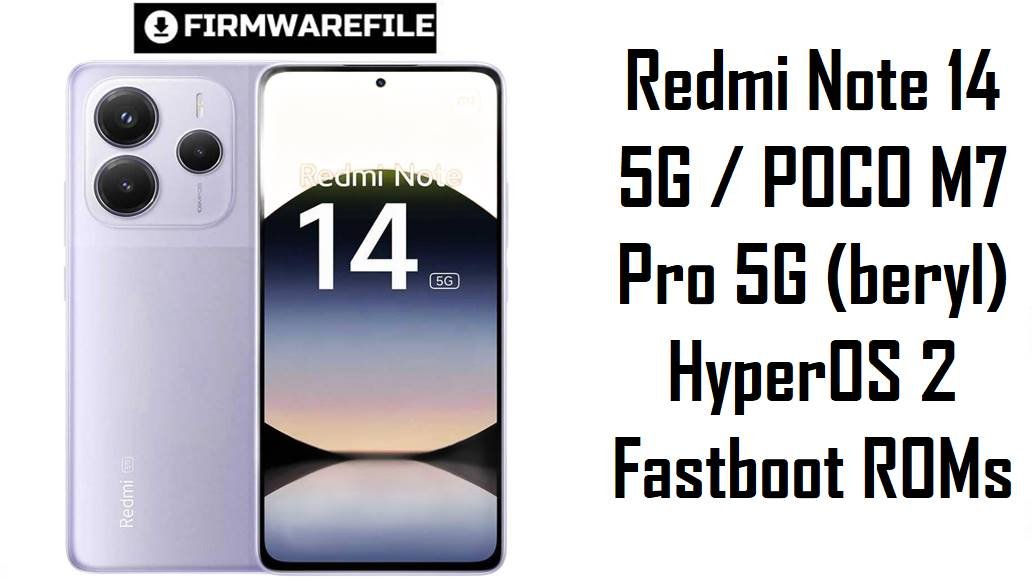
Redmi Note 14 5G / POCO M7 Pro 5G (beryl) HyperOS 2 Fastboot ROMs
Redmi Note 14 5G and POCO M7 Pro 5G sit in the budget‑to‑mid 5G segment, combining a 120 Hz AMOLED display, Dimensity 7025‑Ultra and a 5110 mAh battery to offer smooth daily performance at an affordable price. Users still complain about camera limitations (1080p/30 fps only, weak low‑light video), occasional lag in camera and UI, plus minor HyperOS 2 stutters during multitasking or video calls.
These official HyperOS 2 fastboot ROMs for codename beryl let you clean‑flash the latest Android 15 builds per region, restoring stability, applying newer security patches and clearing out bugs from earlier updates.
Download Firmware for Redmi Note 14 5G / POCO M7 Pro 5G
All files below are official HyperOS 2 (Android 15) fastboot ROMs for devices with codename beryl, used by Redmi Note 14 5G and POCO M7 Pro 5G in different markets. Pick the newest build that matches the region suffix in your current HyperOS version (VOQCNXM, VOQMIXM, VOQINXM, VOQEUXM, VOQTWXM, VOQMIDC, VOQIDXM, VOQTRXM, VOQRUXM) instead of mixing regions, unless you fully understand the risks of cross‑flashing.
| Filename | Region / Variant | Build Number | Build Date | Android Version | Flashing Method | File Size | Notes | Download |
|---|---|---|---|---|---|---|---|---|
| beryl_ru_global_images_OS2.0.205.0.VOQRUXM_20251120.0000.00_15.0_ru_93519eae77.tgz | Russia – Redmi Note 14 5G / POCO M7 Pro 5G RU | OS2.0.205.0.VOQRUXM | 2025‑11‑20 | Android 15 | Fastboot (Xiaomi Flash Tool) | 7.83 GB | Latest Russia HyperOS 2 fastboot ROM for beryl; listed as the current stable Android 15 build for RU, ideal for clean‑flashing or unbricking Russian units with updated security and stability. | Download from Xiaomi server |
| beryl_tw_global_images_OS2.0.204.0.VOQTWXM_20251119.0000.00_15.0_tw_2093aaf3c3.tgz | Taiwan – Redmi Note 14 5G / POCO M7 Pro 5G TW | OS2.0.204.0.VOQTWXM | 2025‑11‑19 | Android 15 | Fastboot (Xiaomi Flash Tool) | 5.70 GB | New Taiwan HyperOS 2 fastboot ROM; Telegram trackers show this as the latest stable TW fastboot package and recommend it to solve bugs and bring devices to a current patch level. | Download from Xiaomi server |
| beryl_tr_global_images_OS2.0.204.0.VOQTRXM_20251119.0000.00_15.0_tr_1da5caddd9.tgz | Turkey – Redmi Note 14 5G / POCO M7 Pro 5G TR | OS2.0.204.0.VOQTRXM | 2025‑11‑19 | Android 15 | Fastboot (Xiaomi Flash Tool) | 6.73 GB | Turkey HyperOS 2 ROM; firmware trackers list this as the newest TR fastboot build for beryl, making it the preferred base for Turkish phones needing a clean, region‑correct reinstall. | Download from Xiaomi server |
| beryl_eea_global_images_OS2.0.206.0.VOQEUXM_20251115.0000.00_15.0_eea_2af41361a1.tgz | EEA / Europe – Redmi Note 14 5G / POCO M7 Pro 5G EU | OS2.0.206.0.VOQEUXM | 2025‑11‑15 | Android 15 | Fastboot (Xiaomi Flash Tool) | 7.22 GB | Newest EEA HyperOS 2 fastboot ROM; similar EEA builds for beryl are described as stability and security updates, solving random errors and UI quirks reported on earlier OS2.0.20x versions. | Download from Xiaomi server |
| beryl_global_images_OS2.0.208.0.VOQMIXM_20251114.0000.00_15.0_global_a6af186b64.tgz | Global – Redmi Note 14 5G / POCO M7 Pro 5G Global | OS2.0.208.0.VOQMIXM | 2025‑11‑14 | Android 15 | Fastboot (Xiaomi Flash Tool) | 8.03 GB | Current Global HyperOS 2 fastboot ROM; firmware indexes list this as the latest stable Android 15 global build for beryl and the right choice to clean‑flash or unbrick international units. | Download from Xiaomi server |
| beryl_in_global_images_OS2.0.207.0.VOQINXM_20251112.0000.00_15.0_in_81ab0e3e1b.tgz | India – Redmi Note 14 5G / POCO M7 Pro 5G IN | OS2.0.207.0.VOQINXM | 2025‑11‑12 | Android 15 | Fastboot (Xiaomi Flash Tool) | 6.32 GB | Latest India HyperOS 2 fastboot ROM; HyperOS update trackers show this as the current Android 15 build for Indian beryl units, suitable for eliminating bugs from launch firmware. | Download from Xiaomi server |
| beryl_id_global_images_OS2.0.204.0.VOQIDXM_20251112.0000.00_15.0_id_e4c1c5625b.tgz | Indonesia – Redmi Note 14 5G / POCO M7 Pro 5G ID | OS2.0.204.0.VOQIDXM | 2025‑11‑12 | Android 15 | Fastboot (Xiaomi Flash Tool) | 7.18 GB | Indonesia HyperOS 2 fastboot ROM tuned for local carriers; Telegram changelogs group this as a system‑level stability and security update, making it the safe baseline for Indonesian phones. | Download from Xiaomi server |
| beryl_images_OS2.0.210.0.VOQCNXM_20251105.0000.00_15.0_cn_c95e69fa69.tgz | China – Redmi Note 14 5G CN | OS2.0.210.0.VOQCNXM | 2025‑11‑05 | Android 15 | Fastboot (Xiaomi Flash Tool) | 7.05 GB | Newest China HyperOS 2 fastboot ROM; China‑specific firmware listings show this as the latest Android 15 stable for Redmi Note 14 5G, recommended for resolving earlier HyperOS 2 bugs before any future major upgrade. | Download from Xiaomi server |
| beryl_dc_global_images_OS2.0.1.0.VOQMIDC_20250422.0000.00_15.0_global_dc_fef1cc26e2.tgz | Global MIDC / demo (special) | OS2.0.1.0.VOQMIDC | 2025‑04‑22 | Android 15 (early HyperOS 2) | Fastboot (Xiaomi Flash Tool) | 5.18 GB | Very early HyperOS 2 fastboot ROM for a special global MIDC variant; firmware sites mark VOQMIDC as separate from retail MIXM builds, so regular users should avoid this older file unless their device originally shipped with a MIDC ROM. | Download from Xiaomi server |
For day‑to‑day use, flash the latest fastboot ROM that matches your phone’s original region (for example VOQMIXM for Global or VOQEUXM for EEA) rather than older or MIDC builds, unless a specific troubleshooting case requires rolling back.
Complete Device & Firmware Overview
- Device & codename
- Redmi Note 14 5G and POCO M7 Pro 5G share the internal codename beryl across China and global markets, and all fastboot ROMs here target that codename only.
- Position in the lineup
- These phones sit below Redmi Note 14 Pro models, focusing on value with 5G, a 120 Hz AMOLED and long battery life rather than flagship cameras.
- Chipset & performance
- Both devices use the MediaTek Dimensity 7025‑Ultra (6 nm) with an octa‑core CPU and IMG BXM‑8‑256 GPU, delivering solid mid‑range gaming and smooth 120 Hz scrolling.
- Display & battery
- 6.67‑inch FHD+ 120 Hz AMOLED panel with up to around 2100 nits peak brightness, powered by a 5110 mAh battery and 45 W wired charging.
- Camera limitations
- The rear setup centers on a 108 MP main camera but is capped at 1080p 30 fps video, with reviewers and users noting weak low‑light video and average detail compared with higher‑end Notes.
- HyperOS & Android version
- All ROMs listed are HyperOS 2.x based on Android 15 for beryl, which replaces MIUI and ships as the default OS on newer production units.
- Regions / build suffixes
- VOQCNXM (China), VOQMIXM (Global), VOQINXM (India), VOQEUXM (EEA), VOQTWXM (Taiwan), VOQMIDC (Global MIDC), VOQIDXM (Indonesia), VOQTRXM (Turkey), VOQRUXM (Russia).
- Security & patches
- These late‑2025 HyperOS 2 updates raise security patches beyond early VOQMIDC/VOQCNXM builds and are tagged as “stable” in firmware trackers, focusing on bug fixes and protection.
- Typical user pain points
- Owners report laggy camera UI, basic 1080p/30 video only, occasional HyperOS stutters during video calls or social apps, and generic HyperOS 2 bugs like freezes and battery drain on some builds.
- What these builds improve
- Update trackers group these versions as system‑stability and security releases that address random errors, reboots and layout issues, while keeping the lighter HyperOS 2 feature set for this hardware class.
- Firmware type
- All files are official fastboot ROMs in .tgz format, designed for use with Xiaomi’s fastboot‑based flashing tools on a Windows PC, not via the in‑phone updater app.
- Bootloader & ARB rules
- Manual fastboot flashing usually requires an unlocked bootloader, and Xiaomi enforces anti‑rollback on modern HyperOS devices, so unsafe downgrades or cross‑region moves can trigger errors or bricks.
- Required tools
- You need a Windows PC, Xiaomi USB drivers, Xiaomi Flash Tool (or a similar fastboot flasher), a reliable USB‑C cable and MD5/SHA checksums from trusted sites to verify downloads.
CRUCIAL WARNING: These fastboot ROMs are strictly for Redmi Note 14 5G / POCO M7 Pro 5G with codename beryl; they must not be flashed to other Redmi, POCO or Xiaomi models, because cross‑flashing can permanently brick the device.
Each build is region‑locked by code (VOQCNXM, VOQMIXM, VOQINXM, VOQEUXM, VOQTWXM, VOQMIDC, VOQIDXM, VOQTRXM, VOQRUXM), so you should normally flash the ROM that matches your phone’s original region and avoid unnecessary cross‑region flashing while anti‑rollback is enforced on HyperOS devices.
All official beryl_*.tgz fastboot packages will wipe user data when used with Xiaomi’s tools, and selecting options like “clean all and lock” on a mismatched firmware can relock the bootloader on an unsupported ROM and cause network loss or boot loops.
Preparation Before Flashing
Click here for the Redmi Note 14 5G / POCO M7 Pro 5G pre‑flash checklist
- Confirm exact model & codename: In fastboot mode, run fastboot getvar product and make sure it returns beryl, then check Settings → About phone to read your current build suffix (VOQMIXM, VOQCNXM, VOQEUXM, etc.).
- Match the region: Download only the fastboot ROM whose region code matches your original firmware (Global, EEA, India, Russia, Indonesia, Taiwan, Turkey, Japan or China) to keep modem, NFC and OTA behavior correct.
- Backup all data: Fastboot flashing performs a clean install and erases apps, photos and settings, so back up to Xiaomi Cloud, Google Drive or a PC before flashing.
- Charge the battery: Aim for at least 50–60% charge so the phone does not shut down mid‑flash, which could corrupt partitions and cause a hard brick.
- Install drivers & tools: On a Windows PC, install Xiaomi USB drivers and Xiaomi Flash Tool (or another fastboot utility) and confirm that your device is recognized in fastboot mode.
Quick Firmware Flash Instructions
This high‑level guide covers flashing any of these fastboot ROMs, such as beryl_global_images_OS2.0.208.0.VOQMIXM_20251114.0000.00_15.0_global_a6af186b64.tgz, using Xiaomi’s fastboot flashing tool on a Windows PC.
- Prepare PC & ROM: Install Xiaomi USB drivers and Xiaomi Flash Tool, then download the correct beryl_…images_… TGZ and extract it to a short path such as C:\beryl_rom.
- Enter fastboot mode: Power off the phone, hold Volume Down + Power until the fastboot logo appears, and connect it to the PC with a good USB‑C cable.
- Select the firmware: Launch Xiaomi Flash Tool, click to select the extracted ROM folder, and verify that one device with codename beryl is listed as connected.
- Flash with “clean all”: Choose the option that wipes data but keeps the bootloader unlocked (usually “clean all”), then click “flash” and wait until the tool shows a success result.
- Reboot & verify: Let HyperOS boot and complete optimization (this may take several minutes), then open About phone to confirm codename, region suffix and build number match the ROM you installed.
For a fuller, screenshot‑rich walkthrough of Xiaomi fastboot flashing, including anti‑rollback checks and connection troubleshooting, follow the main Xiaomi fastboot firmware guide and simply point it to the extracted beryl_*.tgz folder when the guide asks you to select a ROM.
Frequently Asked Questions (FAQs)
- Q1. Which fastboot ROM should I choose for my Redmi Note 14 5G / POCO M7 Pro 5G?
- The safest choice is the newest ROM that matches your original region code: OS2.0.210.0.VOQCNXM for China, OS2.0.208.0.VOQMIXM for Global, OS2.0.206.0.VOQEUXM for EEA, OS2.0.207.0.VOQINXM for India, OS2.0.205.0.VOQRUXM for Russia, OS2.0.204.0.VOQIDXM for Indonesia, OS2.0.204.0.VOQTWXM for Taiwan or OS2.0.204.0.VOQTRXM for Turkey.
- Q2. Do these updates fix HyperOS 2 lag and small glitches?
- HyperOS bug reports and changelogs for similar 2.0.20x builds emphasize improved system stability, fewer random errors and better behavior of system apps, so a clean flash of the latest regional build can reduce the intermittent stutters some users report.
- Q3. Will installing these ROMs improve camera quality or unlock 4K video?
- The camera hardware on Redmi Note 14 5G is limited to 1080p/30 fps video, and reviews note that low‑light video remains a weak point; firmware updates can tweak processing but do not turn the camera into a flagship or add 4K modes.
- Q4. Can I flash the China VOQCNXM ROM on my POCO M7 Pro 5G Global?
- Technically, community members confirm that Redmi Note 14 5G and POCO M7 Pro 5G share the same beryl base, but cross‑flashing CNXM onto a global device can change network behavior and complicate OTAs, so it is recommended only for experienced users who understand the risks.
- Q5. Is the VOQMIDC build good for normal users?
- VOQMIDC is an early MIDC‑tagged global build that firmware sites associate with demo or special variants, so regular customers should stick to VOQMIXM or their own regional code instead of this older, more experimental ROM.
- Q6. What if my phone does not enter fastboot mode at all?
- The fastboot ROMs here are intended for devices that can still reach fastboot; if the phone is hard‑bricked and cannot enter fastboot, recovery may require EDL or specialist tools that are typically only available to service centers or advanced technicians.