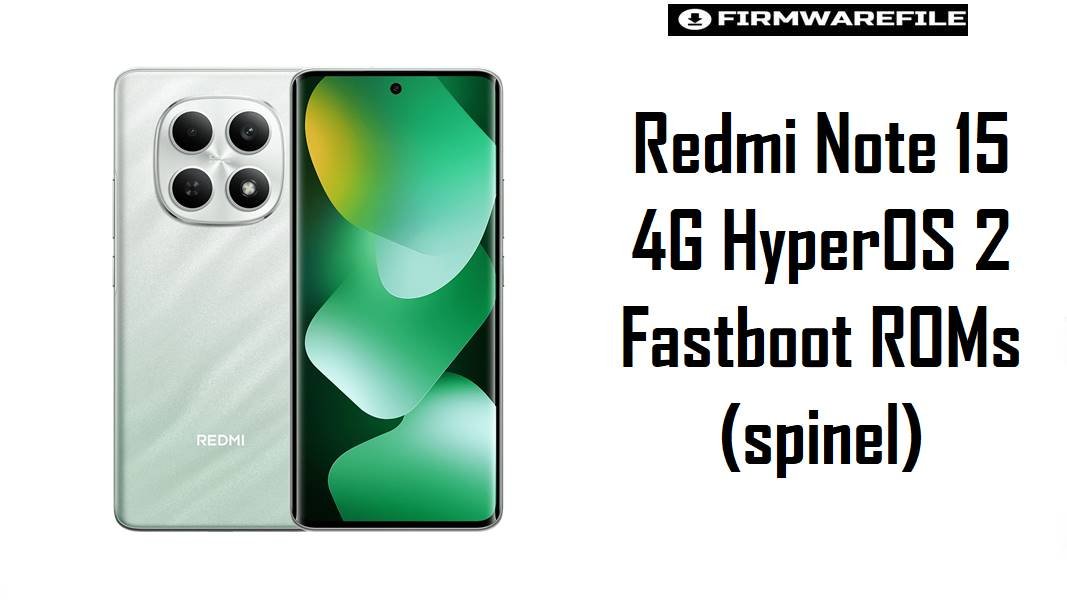
Redmi Note 15 4G HyperOS 2 Fastboot ROMs (spinel)
The Redmi Note 15 4G (codename spinel) is a new upper‑budget phone built around a Helio G‑series chip, aimed at users who want a large screen, decent gaming, and long‑term daily reliability without flagship prices. On Android 15 with HyperOS 2, correct region firmware is vital to keep battery life, network performance, and future OTA updates stable when recovering from bootloops or cleaning up after mods.
Download Firmware for Redmi Note 15 4G (spinel)
These are Android 15 HyperOS 2 fastboot ROMs for different Redmi Note 15 4G markets, ordered by branch and recency; all are official .tgz packages meant for Xiaomi’s fastboot tools. Choose the build that matches your phone’s original region; use older or alternate regions only when you have a clear, tested reason and a backup plan.
| Filename | Region | Build / Channel | Release Window | Android / OS | Flashing Method | Size | Patch Level (est.) | Best For | Notes / Download |
|---|---|---|---|---|---|---|---|---|---|
| spinel_eea_global_images_OS2.0.209.0.VPGEUXM_20260115.0000.00_15.0_eea_1448299be8.tgz | EEA (EU) | OS2.0.209.0 VPGEUXM – Stable | Mid Jan 2026 | Android 15 / HyperOS 2 | Fastboot (Mi Flash / fastboot) | 7.05 GB | Likely Jan 2026 | Redmi Note 15 4G units sold in EU/EEA needing CE‑compliant HyperOS 2 with the latest regional patches and carrier tuning. | This is currently one of the newest documented EEA HyperOS 2 fastboot builds and supersedes earlier VPGEUXM versions such as OS2.0.206.0 listed on firmware trackers. Treat it as the default choice for EEA devices coming from MIUI 14 or earlier HyperOS; keep older EEA ROMs only for staged downgrades or reproducing specific bugs. Download EEA Fastboot |
| spinel_global_images_OS2.0.208.0.VPGMIXM_20260106.0000.00_15.0_global_1ff908a93c.tgz | Global (MI) | OS2.0.208.0 VPGMIXM – Stable | Early Jan 2026 | Android 15 / HyperOS 2 | Fastboot (Mi Flash / fastboot) | 8.12 GB | Likely Dec 2025 / Jan 2026 | Most Redmi Note 15 4G global devices (e.g., 2510DRA23G) needing a clean, up‑to‑date HyperOS 2 base for daily use and light gaming. | Firmware archives list OS2.0.208.0 VPGMIXM as the latest Global fastboot ROM for spinel, newer than earlier OS2.0.205.0 VPGMIXM recovery packages. This should be your default fastboot choice to recover from bootloops or revert from custom ROMs; keep at least one copy offline if you plan to experiment with root or mods. Download Global Fastboot |
| spinel_ru_global_images_OS2.0.209.0.VPGRUXM_20251230.0000.00_15.0_ru_c0d5cf05e4.tgz | Russia (RU) | OS2.0.209.0 VPGRUXM – Stable | Late Dec 2025 | Android 15 / HyperOS 2 | Fastboot (Mi Flash / fastboot) | 8.02 GB | Likely Dec 2025 | Russian Redmi Note 15 4G units needing localized apps, store integration, and network tuning on a recent HyperOS 2 release. | MiFirm shows both 8.0 GB fastboot and smaller recovery packages for OS2.0.209.0 VPGRUXM, indicating this is a late‑2025 maintenance release for RU. Use it as your main RU baseline; only step back to earlier VPGRUXM versions if you trace an issue to this update and have confirmed reports of stability on older builds. Download Russia Fastboot |
| spinel_id_global_images_OS2.0.204.0.VPGIDXM_20251230.0000.00_15.0_id_9c2e7a843b.tgz | Indonesia (ID) | OS2.0.204.0 VPGIDXM – Stable | Late Dec 2025 | Android 15 / HyperOS 2 | Fastboot (Mi Flash / fastboot) | 7.40 GB | Likely Dec 2025 | Indonesian Redmi Note 15 4G devices needing local carriers and regulatory behavior tuned for the ID market. | Update trackers list OS2.0.204.0 VPGIDXM as a fresh Indonesian HyperOS 2 build for spinel, available as both fastboot and smaller recovery packages. Use this ROM to recover or clean flash Indonesian units instead of Global; mixing regions can affect VoLTE behavior and OTA compatibility over time. Download Indonesia Fastboot |
| spinel_tw_global_images_OS2.0.204.0.VPGTWXM_20251230.0000.00_15.0_tw_ae2399a2a0.tgz | Taiwan (TW) | OS2.0.204.0 VPGTWXM – Stable | Late Dec 2025 | Android 15 / HyperOS 2 | Fastboot (Mi Flash / fastboot) | 5.68 GB | Likely Dec 2025 | Taiwanese Redmi Note 15 4G units where region‑correct ROM and local services matter more than having the absolute newest Global build. | Firmware trackers show OS2.0.203.0 and 2.0.204.0 VPGTWXM as recent TW builds, with 2.0.204.0 being the newer fastboot option. This ROM is ideal when you need to restore a TW phone to a known‑good state; older TW ROMs are mainly for regressions and development testing now. Download Taiwan Fastboot |
| spinel_tr_global_images_OS2.0.202.0.VPGTRXM_20251230.0000.00_15.0_tr_82b6a1b5b2.tgz | Turkey (TR) | OS2.0.202.0 VPGTRXM – Stable | Late Dec 2025 | Android 15 / HyperOS 2 | Fastboot (Mi Flash / fastboot) | 6.90 GB | Likely late 2025 | Turkish Redmi Note 15 4G units that need a region‑specific ROM, close in age to the latest Global while preserving local compliance. | MiFirm lists OS2.0.202.0 VPGTRXM as a HyperOS 2 fastboot package for the Turkish branch, with both full fastboot and smaller recovery sizes. It is appropriate for clean installs, unbricking, and returning from custom ROMs on TR devices; older TR ROMs should mainly be used to debug new issues introduced by this update. Download Turkey Fastboot |
Complete Device & Firmware Overview
- Device Name
- Redmi Note 15 4G, codename
spinel. - Model Numbers
- Example: 2510DRA23G for Global, plus corresponding regional variants listed in certification and tracking tools.
- Chipset
- MediaTek Helio G100 Ultra (6 nm), octa‑core CPU (2 × Cortex‑A76 + 6 × Cortex‑A55) with Mali‑G57 MC2 GPU, positioned for efficient mid‑range gaming and multitasking.
- Memory & Storage
- Variants such as 6/8 GB RAM with 128 GB, 8 GB with 256/512 GB, targeting mid‑range users who keep multiple apps and games installed.
- Launch Timing
- Announced around late 2025, with HyperOS 2 Android 15 being available near launch in several regions.
- Original OS
- Ships with Android 15 and HyperOS out of the box in many markets, unlike older Redmi Note series that started on MIUI 13/14.
- Firmware Types Listed
- HyperOS 2 Android 15 fastboot ROMs (
.tgz) for Global, EEA, RU, ID, TW, TR; recovery ROMs of similar versions are available separately on firmware sites. - Security Patch Level
- OS2.0.2xx.x HyperOS 2 builds for spinel generally align with late‑2025 and early‑2026 patches, improving core system security over first‑wave releases.
- Bootloader Status
- Stock OTA updates are designed for locked bootloaders; these fastboot ROMs and any future custom ROMs require an unlocked bootloader to flash safely.
- Bootloader Rules
- “Clean all and lock” is only safe on official, unmodified firmware that matches your device’s sales region; doing this on cross‑region or altered firmware can lead to bootloops or network/EFS issues.
- Fastboot ROM Size
- Fastboot packages range from about 5.7 to 8.1 GB depending on region and included language/apps, so ensure adequate disk space and download bandwidth.
- Required Tools
- Windows PC, Xiaomi USB / MediaTek drivers, Xiaomi Mi Flash Tool or compatible fastboot scripts, plus ADB/fastboot and a reliable USB‑C cable.
- Recommended Use Cases
- Recovering from bootloops, undoing failed root or mod experiments, moving back from custom ROMs, or performing a full clean install to fix persistent instability.
- Who Should Stay on OTA
- Non‑technical owners who only need a stable, secure daily driver; in such cases, Settings > System update is safer than manual fastboot operations.
CRUCIAL WARNING: These HyperOS 2 fastboot ROMs are strictly for Redmi Note 15 4G devices with codename spinel. They must not be flashed to Redmi Note 15 5G (for example, codename kunzite) or to older Redmi Note models with different codenames, as cross‑flashing can permanently brick the phone or break modem/NV data.
All official spinel_*_images_*.tgz fastboot packages normally wipe user data when used with Xiaomi’s tools, and enabling “clean all and lock” on a mismatched region or modified firmware can relock the bootloader on unsupported images and cause boot failure, encryption errors, or loss of mobile network.
Preparation Before Flashing
Show essential preparation checklist for Redmi Note 15 4G (spinel)
- Confirm in Settings > About phone that the device is Redmi Note 15 4G, then boot into fastboot and run
fastboot getvar productto verify the codename isspinel(notkunziteor another Note 15 variant). - Check your current build string (for example, OS2.0.208.0 VPGMIXM or OS2.0.209.0 VPGEUXM) and pick the matching fastboot ROM branch; avoid crossing from EEA to Global or RU/ID/TW/TR unless you understand modem and OTA implications.
- Back up internal data, including photos, messaging apps, 2FA codes, and game saves, because a clean fastboot flash or region change will usually erase user partitions.
- Install the necessary USB/MediaTek drivers, Mi Flash Tool, and ADB/fastboot on a stable Windows PC; verify that the phone is detected in fastboot mode before loading any firmware.
- Charge the battery to at least 60–70% and use a high‑quality USB‑C cable; interruptions during flashing can leave the device stuck in a state that may require advanced recovery procedures.
Quick Firmware Flash Instructions
These short steps summarize fastboot flashing for official HyperOS 2 ROMs on spinel; rely on the detailed Mi Flash and fastboot tutorials for screenshots and troubleshooting.
Official HyperOS 2 fastboot ROMs (.tgz – Global / EEA / RU / ID / TW / TR)
- Download the correct regional fastboot ROM for your device (for example, OS2.0.208.0 VPGMIXM for most Global units, or OS2.0.209.0 VPGEUXM for EEA) and extract the
.tgzarchive to a short path on your PC. - Unlock the bootloader if not already done, then power off the Redmi Note 15 4G, hold Volume Down + Power to enter fastboot mode, and connect it to your computer with a reliable USB‑C cable.
- Open Xiaomi Mi Flash Tool, select the folder containing the extracted
spinel_*_images_*.tgzcontents, click “refresh” to ensure the device is detected, and choose a flash configuration that does not lock the bootloader if you are cross‑flashing or plan to modify the system later. - Start the flash and wait patiently until Mi Flash reports success; do not disconnect the cable or close the tool early, as this can corrupt system or modem partitions.
- After rebooting into HyperOS 2, complete setup, verify IMEI and mobile data, test calls and basic apps, and then check for OTA updates within the same region branch to stay fully current.
For full step‑by‑step instructions with screenshots on Xiaomi fastboot flashing, follow the dedicated Mi Flash guide: How to flash Xiaomi firmware with Mi Flash Tool.
Frequently Asked Questions (FAQs)
1. How do I be sure my Redmi Note 15 is the 4G spinel variant and not the 5G model?
Check the marketing name and model in Settings > About phone and in fastboot use fastboot getvar product; this page applies only if the codename is spinel. Certification trackers list REDMI Note 15 5G separately (for example, codename kunzite), which must use its own firmware branch.
2. Is OS2.0.208.0 VPGMIXM a big upgrade over earlier Global HyperOS 2 builds for performance?
OS2.0.208.0 VPGMIXM is a newer maintenance release, so it can refine stability, security, and some performance aspects compared with earlier Global builds like OS2.0.205.0. However, actual gaming performance is still mainly limited by the Helio G100 Ultra and cooling; firmware alone cannot turn this phone into a flagship‑level gaming device.
3. Can I flash EEA VPGEUXM on a Global VPGMIXM Redmi Note 15 4G to get EU‑specific features?
Global hardware usually boots EEA firmware, but you may affect regulatory settings, OTA behavior, and certain region‑specific apps or services. If the device was sold outside the EU, staying on VPGMIXM or using other customization options is generally safer than switching the entire region just for minor software differences.
4. Will these fastboot ROMs fix battery drain or network issues after a bad app or mod?
A clean flash of the correct regional HyperOS 2 fastboot ROM often solves problems caused by system modifications, incompatible kernels, or corrupt updates because it restores all partitions to stock. If issues persist even on freshly flashed official firmware, the cause is more likely hardware, poor coverage, or a specific app rather than the ROM itself.
5. Is it safe to relock the bootloader after flashing one of these HyperOS 2 ROMs?
Relocking can improve security, but only if you are on untouched official firmware for your device’s original region and have not installed custom recovery or root. Relocking a spinel phone on cross‑region or modified firmware risks bootloops or NV/EFS problems and should be avoided by users who experiment with mods.
6. How do I choose between fastboot ROM and recovery ROM for updates on spinel?
Recovery ROMs are better for in‑place updates when the system still boots, while fastboot ROMs are intended for full wipes, unbricking, and major branch changes. Since all files referenced here are fastboot packages, use them when the device is stuck in fastboot or cannot update reliably via recovery/OTA anymore.
7. What is the safest approach if I plan to mod Redmi Note 15 4G soon after buying it?
Before unlocking or rooting, download and archive at least one matching fastboot ROM for your region (for example, OS2.0.208.0 VPGMIXM Global or OS2.0.209.0 VPGEUXM EEA) along with drivers and Mi Flash. That way, if a custom kernel, Magisk module, or custom ROM fails, you can quickly restore the phone to a known‑good HyperOS 2 baseline.