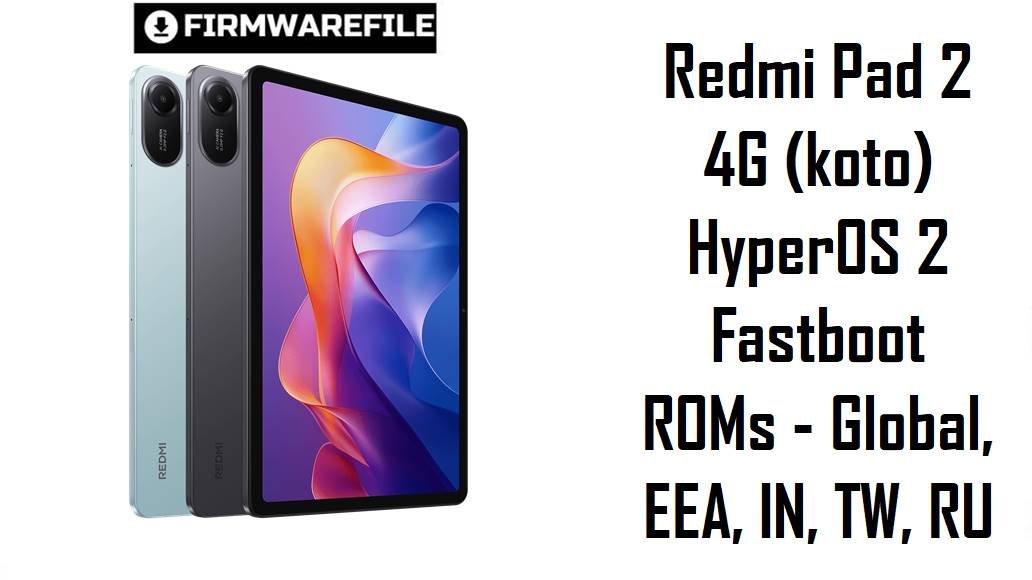
Redmi Pad 2 4G (koto) HyperOS 2 Fastboot ROMs – Global, EEA, IN, TW, RU
The Redmi Pad 2 4G (codename koto) is Xiaomi’s budget 11‑inch LTE tablet, combining a 2.5K 90 Hz display, MediaTek Helio G100‑Ultra chipset and a massive 9000 mAh battery for students, casual gamers and media lovers who need internet on the go. Owners praise the long battery life and great value, but reviews also point out pain points like a relatively dim screen outdoors, average gaming performance, very slow 18 W charging, imperfect stylus accuracy, auto‑brightness quirks and occasional HyperOS 2 gesture bugs after updates.
The official HyperOS 2 fastboot ROMs below let you clean‑flash a stable Android 15 system by region (Global, EEA, India, Taiwan, Russia) to fix software issues, stabilize performance and get the latest security patches on your Redmi Pad 2 4G.
Complete Device & Firmware Overview
- Device Name
- Redmi Pad 2 4G – 11‑inch LTE Android tablet for budget multimedia and light productivity.
- Codename
- koto – used across all HyperOS 2 ROMs listed here (VOWMIXM, VOWEUXM, VOWTWXM, VOWINXM, VOWRUXM).
- Chipset
- MediaTek Helio G100‑Ultra (MT6789H), 6 nm, octa‑core (2× Cortex‑A76 @ 2.2 GHz + 6× Cortex‑A55 @ 2.0 GHz) with Mali‑G57 MC2 GPU.
- Memory & Storage
- 4/128 GB and 8/256 GB common for 4G models, with microSD expansion up to 2 TB, giving plenty of room for offline media and apps.
- Display
- 11.0‑inch 2.5K IPS LCD (2560×1600) at 90 Hz with TÜV eye‑comfort certification; reviewers like the resolution but criticize brightness and viewing angles versus Xiaomi’s claims.
- Battery & Charging
- 9000 mAh (typ) battery rated for up to 17 hours of video playback, but limited to 18 W wired charging which multiple reviews call slow for this capacity.
- Connectivity
- 4G LTE, Wi‑Fi, Bluetooth, GPS‑less configuration aimed more at media/office than navigation; some reviews lament the lack of GPS on a cellular tablet.
- Software Base
- Ships with Android 15 and HyperOS 2.x; listed ROMs are all HyperOS OS2.0.x builds (Android 15.0) for different regions.
- Common User Complaints
- Sluggishness under heavy multitasking due to mid‑range Helio G‑series chip, dark display outdoors, slow 18 W charging, stylus wobble/jitter, no PC desktop mode and occasional gesture/navigation glitches on some HyperOS 2 updates.
- How HyperOS 2 ROMs Help
- Clean‑flashing the right regional fastboot ROM can clear leftover OTA bugs, restore smoothness, fix gesture issues addressed in later builds, and bring newer security patches while keeping Android 15.
- Included ROM Types
- All files are official fastboot ROMs in .tgz format for Xiaomi’s Windows flashing tools, containing full images for system, vendor, boot, vbmeta, etc.
- Regions / Codes in This List
- VOWMIXM – Global, VOWEUXM – EEA/Europe, VOWTWXM – Taiwan, VOWINXM – India, VOWRUXM – Russia.
- Security & Update Timeline
- OS2.0.205.0 and OS2.0.206.0 builds are late‑2025 releases with updated Android 15 security patches and bug fixes; OS2.0.203.0 RU is slightly older but still 2025.
- Flashing Requirements
- Unlocked bootloader, Windows PC, Xiaomi USB drivers, Mi Flash / Xiaomi Flash Tool, and a full backup since fastboot flashes typically wipe user data.
Flashing mismatched or corrupted firmware on the Redmi Pad 2 4G can hard‑brick the tablet, break LTE connectivity or gesture navigation, and permanently erase your data, so always match codename koto, region code and Android version before you flash.
CRUCIAL WARNING: These fastboot ROMs are strictly for Redmi Pad 2 4G with codename koto; they must not be flashed to the Wi‑Fi‑only Redmi Pad 2 (other codenames like taiko) or to unrelated Redmi / Xiaomi tablets or phones, because cross‑flashing can permanently brick the device.
Each ROM is region‑locked by code (VOWMIXM Global, VOWEUXM EEA, VOWTWXM Taiwan, VOWINXM India, VOWRUXM Russia), so you should normally stay with the same region your tablet shipped with and avoid unnecessary cross‑region flashing, especially while HyperOS 2 gesture and layout bugs are still being actively fixed.
All official koto_*.tgz fastboot packages will overwrite system partitions and usually wipe user data when flashed with Xiaomi’s tools, and selecting “clean all and lock” with a non‑stock or cross‑region ROM can relock the bootloader on an unsupported build and cause boot loops, account‑binding problems or network issues.
Download Firmware for Redmi Pad 2 4G (koto)
To avoid confusion, always choose the newest stable HyperOS 2 ROM that matches your tablet’s region string (Global, EEA, IN, TW, RU) in Settings > About tablet; older OS2.0.20x builds are mainly useful if you need to downgrade to reproduce or avoid specific bugs.
| Filename | Region / Variant | Build Number | Build Date | Android / HyperOS | Flashing Method | File Size | Notes | Download |
|---|---|---|---|---|---|---|---|---|
| koto_global_images_OS2.0.205.0.VOWMIXM_20251110.0000.00_15.0_global_619bfab5a5.tgz | Global – Redmi Pad 2 4G (koto) | OS2.0.205.0.VOWMIXM (Global Stable) | 10 Nov 2025 build, released late Nov 2025 | Android 15.0 / HyperOS 2.0 | Xiaomi fastboot tool (Mi Flash / Xiaomi Flash) | ≈6.0–6.5 GB | Latest Global fastboot ROM for Redmi Pad 2 4G; best choice if your tablet shows Global VOWMIXM in the version string and you want a clean, stable HyperOS 2 base with updated security. | Download from Xiaomi (Global) |
| koto_eea_global_images_OS2.0.205.0.VOWEUXM_20251014.0000.00_15.0_eea_9b2f48cd11.tgz | EEA / Europe – Redmi Pad 2 4G (koto) | OS2.0.205.0.VOWEUXM (EEA Stable) | 14 Oct 2025 build, EEA release Oct–Nov 2025 | Android 15.0 / HyperOS 2.0 | Xiaomi fastboot tool | ≈5.5–6.0 GB | Use this ROM if your tablet is an EEA unit with VOWEUXM in the build name; keeps EU regulations, region settings and OTA compatibility where available. | Download from Xiaomi (EEA) |
| koto_tw_global_images_OS2.0.204.0.VOWTWXM_20251114.0000.00_15.0_tw_fb1716e286.tgz | Taiwan – Redmi Pad 2 4G (koto) | OS2.0.204.0.VOWTWXM (TW Stable) | 14 Nov 2025 build, Taiwan stable branch | Android 15.0 / HyperOS 2.0 | Xiaomi fastboot tool | ≈5.3 GB | Region‑tuned Taiwan ROM; pick this if your About tablet page shows VOWTWXM to keep local content, language defaults and TW update track. | Download from Xiaomi (Taiwan) |
| koto_in_global_images_OS2.0.206.0.VOWINXM_20251029.0000.00_15.0_in_2c74529c4a.tgz | India – Redmi Pad 2 4G (koto) | OS2.0.206.0.VOWINXM (IN Stable) | 29 Oct 2025 build, India release late 2025 | Android 15.0 / HyperOS 2.0 | Xiaomi fastboot tool | ≈5.1 GB | Newest Indian fastboot ROM for Redmi Pad 2 4G; ideal if you bought the tablet in India (IN region string) and want the latest localised build with bug fixes and carrier settings. | Download from Xiaomi (India) |
| koto_ru_global_images_OS2.0.203.0.VOWRUXM_20251014.0000.00_15.0_ru_8dcbc340ce.tgz | Russia – Redmi Pad 2 4G (koto) | OS2.0.203.0.VOWRUXM (RU Stable) | 14 Oct 2025 build, Russia stable branch | Android 15.0 / HyperOS 2.0 | Xiaomi fastboot tool | ≈6.2 GB fastboot / ≈4.1 GB recovery | Use this on Russian units with VOWRUXM to preserve regional services and keyboard/layout defaults; slightly older than the latest Global/IN/EEA builds but still a 2025 Android 15 release. | Download from Xiaomi (Russia) |
Quick clarity: Check Settings > About tablet > HyperOS version – if it ends with VOWMIXM, VOWEUXM, VOWINXM, VOWTWXM or VOWRUXM, flash the matching file above; do not mix koto 4G ROMs with Wi‑Fi‑only Redmi Pad 2 firmware (different codename and modem setup).
Preparation Before Flashing
Click here for the Redmi Pad 2 4G (koto) pre‑flash checklist
- Confirm exact model and region: In Settings > About tablet and in fastboot (fastboot getvar product), confirm codename koto and note your region suffix (VOWMIXM, VOWEUXM, VOWINXM, VOWTWXM, VOWRUXM) before downloading.
- Backup your data: Fastboot ROMs usually wipe apps and data, so back up photos, notes, game saves and documents to Mi Cloud, Google or a PC first.
- Charge the tablet: Because Redmi Pad 2 4G charges slowly at 18 W, make sure you start well above 50% battery to avoid shutdown mid‑flash.
- Unlock the bootloader: Use Xiaomi’s Mi Unlock tool on Windows; remember unlocking itself erases user data and you may need to wait for Xiaomi’s unlock cooldown.
- Install drivers and extract ROM: Install Xiaomi USB drivers and Mi Flash / Xiaomi Flash Tool, then fully extract the koto_…tgz to a short path such as C:\koto_OS2.0.205.0, checking the archive size roughly matches the values above.
Quick Firmware Flash Instructions
These high‑level steps apply to any of the listed fastboot ROMs (for example koto_global_images_OS2.0.205.0.VOWMIXM_20251110… or koto_in_global_images_OS2.0.206.0.VOWINXM…) using Xiaomi’s fastboot tool on Windows.
- Prepare PC and ROM: Install Xiaomi USB drivers and Mi Flash / Xiaomi Flash, then extract the chosen koto_…tgz ROM into its own folder on a simple path (for example C:\koto_global_205).
- Enter fastboot mode: Power off the Redmi Pad 2 4G, then hold Volume Down + Power until the fastboot logo appears, and connect it to your PC via a good USB‑C cable.
- Load ROM in Mi Flash: Open Mi Flash, click Select and point it at the extracted ROM folder; check that your device is listed and set the bottom option to clean all (avoid “clean all and lock” unless returning to stock region).
- Flash the firmware: Click Refresh then Flash, and wait without disconnecting until Mi Flash shows a green success status indicating all partitions flashed correctly.
- First boot and setup: The tablet will reboot into HyperOS 2; the first boot may take several minutes while apps are optimized, after which you can go through setup and restore your backups.
For a detailed, screenshot‑rich tutorial (including driver fixes and error codes), follow the main Xiaomi fastboot firmware guide and apply the same procedure with the correct koto ROM folder.
Frequently Asked Questions (FAQs)
- Q1. Which HyperOS 2 ROM should I choose for my Redmi Pad 2 4G?
- The safest option is always the newest OS2.0.x build that matches your tablet’s original region code: OS2.0.205.0.VOWMIXM for Global, OS2.0.205.0.VOWEUXM for EEA, OS2.0.206.0.VOWINXM for India, OS2.0.204.0.VOWTWXM for Taiwan or OS2.0.203.0.VOWRUXM for Russia. Mixing regions can introduce subtle network or language quirks and may affect OTA behavior, so most users should stay on their own region branch.
- Q2. Can a clean fastboot flash fix HyperOS 2 gesture or navigation bugs?
- Several HyperOS 2 updates across Xiaomi devices, including tablets, have suffered from gesture glitches like swipe‑up not working from apps or unexpected split‑screen triggers, which Xiaomi later patched in newer releases. Flashing the latest OS2.0.205/206 fastboot ROM for your region can clear out bad OTA states and bring in those gesture fixes, improving navigation reliability on the Redmi Pad 2 4G.
- Q3. Will these ROMs improve my tablet’s gaming performance or just stability?
- HyperOS 2 updates can refine scheduler and GPU tuning for smoother frame pacing, but reviews consistently stress that the Helio G100‑Ultra is a mid‑range chip with only average gaming headroom. After a clean flash you may see fewer stutters and crashes, but you still need to lower graphics settings or frame rates in heavy games for consistently smooth play.
- Q4. My Redmi Pad 2 4G feels sluggish after a year. Will reinstalling stock ROM help?
- Yes, re‑installing the correct stock ROM often helps tablets that have accumulated background apps, misconfigured settings or leftover test builds, as it wipes bloat and restores a fresh system image. Many owners note that battery life and smoothness are strong out of the box but degrade over time, so a clean flash plus uninstalling heavy apps can bring performance closer to launch levels.
- Q5. Does flashing these ROMs fix hardware‑level issues like a dark screen or slow charging?
- No – reviewers point out that maximum brightness, viewing angles and 18 W charging speed are hardware and design limitations, not firmware bugs, so no ROM will make the screen dramatically brighter or charging significantly faster. What firmware can improve is auto‑brightness behavior, idle drain and minor UI stutter, but the panel and charging specs remain the same.
- Q6. Can I flash the Wi‑Fi‑only Redmi Pad 2 ROM or another tablet’s ROM on koto to get different features?
- Cross‑flashing between koto (Redmi Pad 2 4G) and Wi‑Fi‑only Redmi Pad 2 codenames like taiko is unsafe because modem, partition layout and regional configs differ, and can easily hard‑brick the device or break LTE. If you want PC‑mode‑like behavior or better cloud integration, it is safer to use third‑party apps and launchers on top of the correct koto ROM instead of forcing another device’s firmware.