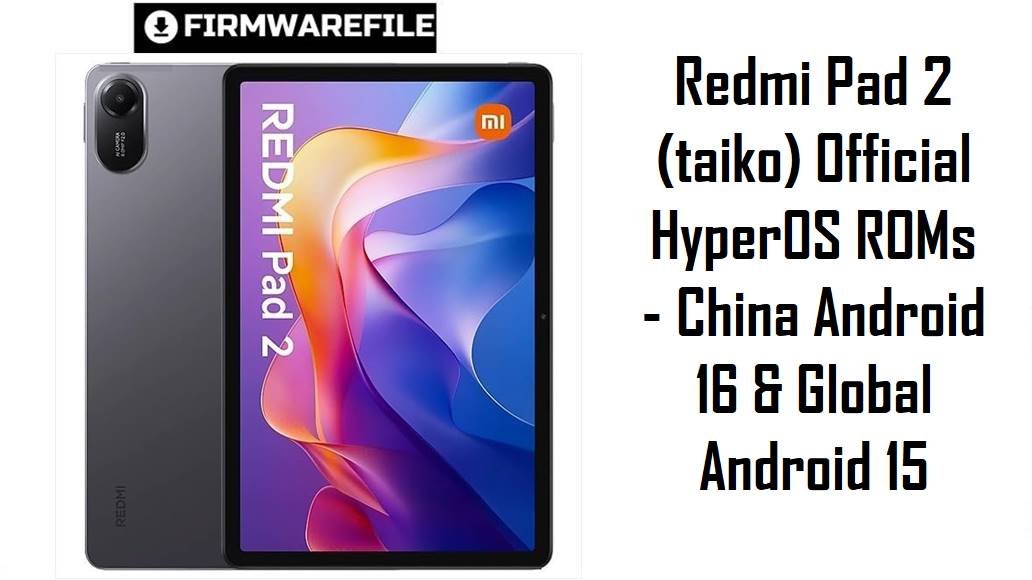
Redmi Pad 2 (taiko) Official HyperOS ROMs – China Android 16 & Global Android 15
The Redmi Pad 2 Wi‑Fi (codename taiko) is Xiaomi’s affordable 11‑inch tablet aimed at students, casual gamers and media lovers who do not need mobile data but want a big 2.5K display and long battery life. Reviews highlight solid value and battery endurance, but also recurring complaints about limited screen brightness outdoors, mid‑range gaming performance, slow 18 W charging and occasional HyperOS 2 gesture glitches on some builds.
The fastboot ROMs below let you install the latest official HyperOS for taiko by region—including a China‑only Android 16 HyperOS 3 build and multiple Android 15 HyperOS 2 ROMs for Global, EEA, India, Taiwan, Indonesia, Turkey and Russia—to fix bugs, clean up performance and restore a stable system.
Complete Device & Firmware Overview
- Device Name & Codename
- Redmi Pad 2 Wi‑Fi, internal codename taiko, the Wi‑Fi‑only sibling of the Redmi Pad 2 4G (koto).
- Position in the Lineup
- Budget 11‑inch Android tablet targeting media consumption, online classes and light productivity, sitting below Xiaomi’s flagship Pad series but above entry‑level 8‑inch devices.
- Display & Multimedia
- 11.0‑inch IPS LCD with 2560×1600 (2.5K) resolution and 90 Hz refresh, tuned for streaming and reading but criticized for limited peak brightness and only average contrast outdoors.
- Processor & Performance
- Mid‑range MediaTek G‑series chipset paired with 4–8 GB RAM, delivering smooth UI and light multitasking but only moderate frame rates in heavier 3D games. Benchmarks and reviews show that background apps and higher graphics settings can still push the SoC to its limits.
- Memory & Storage
- Configurations such as 4/128 GB and 8/256 GB with microSD expansion up to 2 TB, making it easy to store offline videos and apps.
- Battery & Charging
- Large 9000 mAh battery rated for up to around 17 hours of video playback, but limited to 18 W wired charging that reviewers consistently describe as slow for this capacity.
- Connectivity
- Wi‑Fi‑only (no LTE, no eSIM) with Bluetooth and USB‑C; some users miss GPS and cellular options for travel, which are provided instead by the separate Redmi Pad 2 4G (koto).
- Software & UI
- Ships with Android 15 and HyperOS 2.x on global models, while the China ROM listed here upgrades taiko to HyperOS 3 and Android 16.
- Common User Pain Points
- Real‑world owners mention that the UI can stutter under many apps, the screen looks dim in bright daylight, stylus accuracy is only average, and HyperOS 2 sometimes suffers from gesture issues (for example, swipe‑up home failing after certain updates).
- How These ROMs Help
- Clean‑flashing the correct fastboot ROM often fixes lingering bugs from incremental OTAs, resets misconfigured settings, improves gesture reliability where Xiaomi has issued fixes, and brings a fresh security patch level.
- ROM Types in This List
- China fastboot ROM: taiko_images_OS3.0.2.0.WOVCNXM… (HyperOS 3, Android 16, CN). Global/Regional fastboot ROMs: taiko_*_global_images_OS2.0.20x.VOV*M* (HyperOS 2, Android 15, region‑specific).
- Regions & Codes
- WOVCNXM – China (CN). VOVMIXM – Global. VOVINXM – India. VOVEUXM – EEA/Europe. VOVTWXM – Taiwan. VOVIDXM – Indonesia. VOVTRXM – Turkey. VOVRUXM – Russia.
- Typical Use Cases
- Upgrading from early HyperOS 2 builds to a newer, more stable Android 15 version, doing a clean install after experiments with customizations, or switching a Chinese unit to the latest CN Android 16 HyperOS 3 base while staying on the same region branch.
- Flashing Method
- All packages are Xiaomi fastboot ROMs in .tgz format, meant to be flashed via Mi Flash / Xiaomi Flash Tool on a Windows PC with an unlocked bootloader.
CRUCIAL WARNING: These fastboot ROMs are strictly for the Wi‑Fi‑only Redmi Pad 2 with codename taiko; they must not be flashed to Redmi Pad 2 4G (codename koto) or to any other Redmi / Xiaomi tablets, phones or codenames, because cross‑flashing can permanently brick the device.
Each ROM is region‑locked by its suffix (MIXM, EUXM, INXM, TWXM, IDXM, TRXM, RUXM, CNXM), so you should normally use the ROM that matches your tablet’s original region and avoid unnecessary cross‑region flashing, especially while HyperOS 2/3 gesture and layout bugs are still being actively patched per region.
All official taiko_*.tgz fastboot packages overwrite system partitions and usually wipe user data when flashed with Xiaomi’s tools, and selecting options like “clean all and lock” with a mismatched or modified ROM can relock the bootloader on an unsupported build and cause boot loops, account‑binding issues or loss of recovery options.
Download Firmware for Redmi Pad 2 (taiko)
Pick the newest stable ROM that matches your current region string in Settings > About tablet; use the China Android 16 HyperOS 3 build only on Chinese taiko units, and the Android 15 HyperOS 2 builds for Global/EEA/IN/TW/ID/TR/RU devices that shipped with those codes.
| Filename | Region / Variant | Build Number | Build Date | Android / HyperOS | Flashing Method | File Size | Notes | Download |
|---|---|---|---|---|---|---|---|---|
| taiko_images_OS3.0.2.0.WOVCNXM_20251106.0000.00_16.0_cn_6e871f0b03.tgz | China – Redmi Pad 2 (taiko) | OS3.0.2.0.WOVCNXM | 06 Nov 2025 (Android 16 CN build) | Android 16.0 / HyperOS 3 (China) | Xiaomi fastboot tool | 6.80 GB | First known stable Android 16 HyperOS 3 fastboot ROM for Chinese taiko; ideal if you want the latest features and optimizations on a CN unit and are comfortable with the China ecosystem (no Google apps by default). | Download from Xiaomi (China) |
| taiko_global_images_OS2.0.206.0.VOVMIXM_20251110.0000.00_15.0_global_1b683391a5.tgz | Global – Redmi Pad 2 (taiko) | OS2.0.206.0.VOVMIXM | 10 Nov 2025 (Global build) | Android 15.0 / HyperOS 2.0 (Global) | Xiaomi fastboot tool | 5.95 GB | Latest Global fastboot ROM for taiko; recommended for most international Wi‑Fi units that show VOVMIXM in the version string and need a clean, stable Android 15 HyperOS 2 base. | Download from Xiaomi (Global) |
| taiko_in_global_images_OS2.0.206.0.VOVINXM_20251024.0000.00_15.0_in_c01c9f1da8.tgz | India – Redmi Pad 2 (taiko) | OS2.0.206.0.VOVINXM | 24 Oct 2025 (India build) | Android 15.0 / HyperOS 2.0 (India) | Xiaomi fastboot tool | 4.97 GB | Use this ROM if your tablet is an Indian unit showing VOVINXM; includes India‑specific settings and content while delivering the newest Android 15 HyperOS 2 bug fixes for that region. | Download from Xiaomi (India) |
| taiko_eea_global_images_OS2.0.204.0.VOVEUXM_20251009.0000.00_15.0_eea_c2d32dc791.tgz | EEA / Europe – Redmi Pad 2 (taiko) | OS2.0.204.0.VOVEUXM | 09 Oct 2025 (EEA build) | Android 15.0 / HyperOS 2.0 (EEA) | Xiaomi fastboot tool | 5.47 GB | Recommended for European EEA models with VOVEUXM; keeps EU‑specific regulations, languages and regional updates. | Download from Xiaomi (EEA) |
| taiko_tw_global_images_OS2.0.207.0.VOVTWXM_20251105.0000.00_15.0_tw_088492e622.tgz | Taiwan – Redmi Pad 2 (taiko) | OS2.0.207.0.VOVTWXM | 05 Nov 2025 (Taiwan build) | Android 15.0 / HyperOS 2.0 (Taiwan) | Xiaomi fastboot tool | 5.24 GB | Taiwan‑specific HyperOS 2 ROM with local services and language defaults; choose this if About tablet shows VOVTWXM. | Download from Xiaomi (Taiwan) |
| taiko_id_global_images_OS2.0.208.0.VOVIDXM_20251029.0000.00_15.0_id_81650141c6.tgz | Indonesia – Redmi Pad 2 (taiko) | OS2.0.208.0.VOVIDXM | 29 Oct 2025 (Indonesia build) | Android 15.0 / HyperOS 2.0 (Indonesia) | Xiaomi fastboot tool | 5.48 GB | Latest Indonesian HyperOS 2 ROM for taiko; match this to VOVIDXM devices to keep local regulatory and language settings. | Download from Xiaomi (Indonesia) |
| taiko_tr_global_images_OS2.0.205.0.VOVTRXM_20251114.0000.00_15.0_tr_d6ceed71af.tgz | Turkey – Redmi Pad 2 (taiko) | OS2.0.205.0.VOVTRXM | 14 Nov 2025 (Turkey build) | Android 15.0 / HyperOS 2.0 (Turkey) | Xiaomi fastboot tool | 5.56 GB | Turkey‑region ROM tuned for local services and regulations; use on units with VOVTRXM to stay in the official Turkish update path. | Download from Xiaomi (Turkey) |
| taiko_ru_global_images_OS2.0.206.0.VOVRUXM_20251119.0000.00_15.0_ru_31a958b4ef.tgz | Russia – Redmi Pad 2 (taiko) | OS2.0.206.0.VOVRUXM | 19 Nov 2025 (Russia build) | Android 15.0 / HyperOS 2.0 (Russia) | Xiaomi fastboot tool | 6.32 GB | Russian regional ROM for devices with VOVRUXM; includes Russia‑specific configuration and remains on the Android 15 HyperOS 2 branch. | Download from Xiaomi (Russia) |
Quick clarity: If your version string ends with WOVCNXM, use the Android 16 China ROM; if it ends with VOVMIXM, VOVINXM, VOVEUXM, VOVTWXM, VOVIDXM, VOVTRXM or VOVRUXM, stick to the matching Android 15 HyperOS 2 fastboot ROM above.
Preparation Before Flashing
Click here for the Redmi Pad 2 (taiko) pre‑flash checklist
- Confirm codename and region: In fastboot mode, run fastboot getvar product to verify it returns taiko, and in Settings > About tablet note your current region code (for example OS2.0.206.0.VOVMIXM or OS3.0.2.0.WOVCNXM) before choosing a ROM.
- Backup your data: Fastboot ROMs usually wipe user data, so back up photos, notes, app data and downloads to Mi Cloud, Google Drive or a PC before starting.
- Charge the tablet: Because charging tops out at 18 W, make sure the battery is well above 50% to avoid shutdown during flashing, which can cause boot issues.
- Unlock the bootloader: Use Xiaomi’s official Mi Unlock tool on Windows; unlocking itself erases all data and may require an account waiting period.
- Install drivers and extract ROM: Install Xiaomi USB drivers and Mi Flash / Xiaomi Flash Tool, then fully extract the chosen taiko_…tgz ROM into a short folder path like C:\taiko_OS2.0.206.0 before launching the tool.
Quick Firmware Flash Instructions
This simplified guide applies to any of the listed fastboot ROMs, such as taiko_global_images_OS2.0.206.0.VOVMIXM_20251110… or taiko_images_OS3.0.2.0.WOVCNXM_20251106…, using Xiaomi’s fastboot flashing tool on a Windows PC.
- Prepare PC and ROM: Install Xiaomi USB drivers and Mi Flash / Xiaomi Flash on your Windows PC, then extract the downloaded .tgz ROM to a simple folder path (for example C:\taiko_global_206).
- Enter fastboot mode: Power off the Redmi Pad 2, then hold Volume Down + Power until the fastboot logo appears, and connect the tablet to your PC via a reliable USB‑C cable.
- Load the ROM in Mi Flash: Open Mi Flash, click Select and point it to the extracted taiko_… folder, then verify that your device is listed and set the bottom option to clean all (not “clean all and lock” unless returning to stock region).
- Flash the firmware: Click Refresh and then Flash; wait patiently until Mi Flash shows a green success status and do not disconnect the cable or allow the PC to sleep during the process.
- First boot & setup: After flashing completes, the tablet will reboot into HyperOS; the first boot can take several minutes while apps are optimized, then you can complete setup and restore your backups.
For a more detailed, screenshot‑rich guide to Xiaomi fastboot flashing (drivers, error codes, troubleshooting), follow the main Xiaomi fastboot firmware guide and apply the same procedure with your extracted taiko ROM folder.
Frequently Asked Questions (FAQs)
- Q1. Which ROM is best for my Redmi Pad 2 (taiko)?
- For most users, the safest option is the newest HyperOS 2 Android 15 ROM that matches your region string—OS2.0.206.0.VOVMIXM for Global, OS2.0.206.0.VOVINXM for India, OS2.0.204.0.VOVEUXM for EEA, OS2.0.207.0.VOVTWXM for Taiwan, OS2.0.208.0.VOVIDXM for Indonesia, or OS2.0.206.0.VOVRUXM for Russia. Only Chinese units that originally shipped with WOVCNXM should use the Android 16 HyperOS 3 ROM.
- Q2. Should I upgrade a Chinese Redmi Pad 2 (taiko) to Android 16 HyperOS 3?
- Android 16 HyperOS 3 is designed to improve overall performance, animations and security, but early HyperOS 3 builds on other devices have also introduced new bugs, so it is wise to back up and read recent user feedback before upgrading. If you value stability above all else, you may choose to stay on a mature HyperOS 2 build until Xiaomi’s bug reports confirm major issues are resolved.
- Q3. Will a clean fastboot flash fix lag and gesture issues on HyperOS 2?
- Yes, many users with HyperOS 2 gesture bugs (such as swipe‑up not working correctly) report improvements after updating to newer OS2.0.x builds that include Xiaomi’s fixes, and a clean fastboot flash helps avoid leftover OTA corruption. It will not turn the tablet into a gaming powerhouse, but it often restores the smoothness seen in early reviews when the system was fresh.
- Q4. Can I flash the China Android 16 ROM on a Global/EEA device to get new features early?
- While enthusiasts sometimes cross‑flash China ROMs, doing so on a tablet designed for Global/EEA markets can remove Google services, change languages and complicate OTA updates, and is not recommended for typical users. Sticking to your own region’s HyperOS 2 track until an official Android 16 release appears is safer and avoids daily‑use headaches.
- Q5. Does any of these ROMs improve brightness or charging speed?
- No firmware can significantly raise the physical maximum brightness or override the 18 W charging limit, which reviewers identify as hardware constraints of the Redmi Pad 2 platform. Updates can refine auto‑brightness behavior and power management, but they cannot turn the panel into a flagship‑level display or make charging dramatically faster.
- Q6. Will flashing a taiko ROM add 4G or GPS to my Wi‑Fi Redmi Pad 2?
- No—cellular connectivity and GPS depend on physical modem and antenna hardware that Wi‑Fi‑only taiko devices do not have; flashing a 4G koto ROM is dangerous and can brick the tablet. If you need mobile data, you must use an external hotspot or choose the Redmi Pad 2 4G (koto) instead.