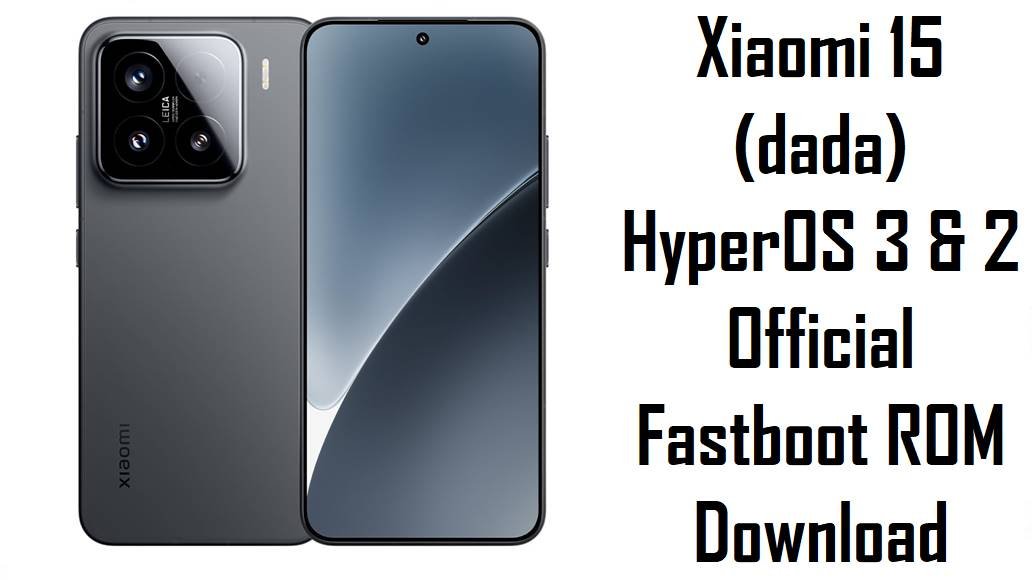
Xiaomi 15 (dada) HyperOS 3 & 2 Official Fastboot ROM Download
The Xiaomi 15, codename dada, is a compact flagship with a 6.4‑inch 120 Hz AMOLED display, Snapdragon 8 Elite (SM8750‑AB) processor, 16 GB LPDDR5X RAM, 1 TB UFS 4.0 storage, and a triple 50 MP camera system backed by IP68 water‑dust protection and 90 W wired plus 50 W wireless charging. This hardware makes the Xiaomi 15 a high‑end all‑rounder for photography, gaming, and 5G, with HyperOS based on Android 15 and Android 16 handling Xiaomi’s new UI features and performance tuning.
Real‑world users, however, have reported several software‑side issues: overheating and battery drain on some HyperOS 2/3 builds, charging features such as Battery Protection not reliably capping at 80%, and general HyperOS 2 complaints like lag, background app mismanagement and occasional bugs after OTAs. Many of these problems improve after a clean flash or upgrade to newer stable firmware, which brings updated security patches, revised power policies and bug fixes issued through Xiaomi’s ongoing HyperOS rollouts.
The official dada Fastboot ROMs below cover Android 16 HyperOS 3.0.5.0 for China, Android 16 HyperOS 2.0.227.0 for Global, and Android 15/16 stable releases for Russia, Indonesia, India, EEA, Taiwan, plus an Android 16 Xiaomi.eu custom ROM based on the same China build. Flashing the correct ROM with Mi Flash Tool or fastboot scripts can repair bootloops, recover from failed OTAs or mods, and apply optimizations such as the August 2025 security patch and system‑stability improvements noted for OS3.0.5.0.WOCCNXM.
Download Official Firmware for Xiaomi 15 (dada)
All .tgz packages listed here are official HyperOS Fastboot ROMs for Xiaomi 15 (codename dada), hosted on Xiaomi’s bigota servers and intended for flashing via Mi Flash Tool or fastboot scripts with an unlocked bootloader. The Xiaomi.eu .zip is an unofficial multi‑language ROM built from the China WOCCNXM base, offering additional languages and tweaks for advanced users.
| Filename | Region / Target Variant | Android / HyperOS | Build Date | File Size | Flashing Type | Notes | Download |
|---|---|---|---|---|---|---|---|
| dada_images_OS3.0.5.0.WOCCNXM_20251029.0000.00_16.0_cn_f85dc266e9.tgz | China ROM – Xiaomi 15 China (WOCCNXM) | Android 16.0, HyperOS 3.0.5.0.WOCCNXM | 2025‑10‑29 | 10.85 GB | Official Fastboot ROM (Mi Flash / fastboot) | Latest China stable; changelog mentions August 2025 security patch and general system‑stability improvements. | Download OS3.0.5.0.WOCCNXM (Xiaomi servers) |
| dada_global_images_OS2.0.227.0.WOCMIXM_20251021.0000.00_16.0_global_dec45dd30b.tgz | Global ROM – Xiaomi 15 Global (WOCMIXM) | Android 16.0, HyperOS 2.0.227.0.WOCMIXM | 2025‑10‑21 | 9.97 GB | Official Fastboot ROM (Mi Flash / fastboot) | Mature Android 16 global stable branch; newer than OS2.0.222.0.WOCMIXM and suitable for clean‑upgrades and unbricks on MIXM units. | Download OS2.0.227.0.WOCMIXM (Xiaomi servers) |
| dada_ru_global_images_OS2.0.204.0.VOCRUXM_20251109.0000.00_15.0_ru_7be5721bb0.tgz | Russia ROM – Xiaomi 15 RU (VOCRUXM) | Android 15.0, HyperOS 2.0.204.0.VOCRUXM | 2025‑11‑09 | 9.29 GB | Official Fastboot ROM (Mi Flash / fastboot) | Updated Russian stable; later than OS2.0.202.0.VOCRUXM listed by firmware trackers, adding bug fixes and patches. | Download OS2.0.204.0.VOCRUXM (Xiaomi servers) |
| dada_id_global_images_OS2.0.202.0.VOCIDXM_20251021.0000.00_15.0_id_5aac8396d7.tgz | Indonesia ROM – Xiaomi 15 ID (VOCIDXM) | Android 15.0, HyperOS 2.0.202.0.VOCIDXM | 2025‑10‑21 | 8.89 GB | Official Fastboot ROM (Mi Flash / fastboot) | Indonesia stable following OS2.0.201.0; recommended for fixing OTA issues and restoring stock on IDXM devices. | Download OS2.0.202.0.VOCIDXM (Xiaomi servers) |
| dada_in_global_images_OS2.0.204.0.VOCINXM_20251014.0000.00_15.0_in_6d65c8fa01.tgz | India ROM – Xiaomi 15 IN (VOCINXM) | Android 15.0, HyperOS 2.0.204.0.VOCINXM | 2025‑10‑14 | 7.68 GB | Official Fastboot ROM (Mi Flash / fastboot) | Newer than OS2.0.202.0.VOCINXM; useful for resolving charging‑feature bugs such as Battery Protection misbehaviour and other early‑build issues. | Download OS2.0.204.0.VOCINXM (Xiaomi servers) |
| dada_eea_global_images_OS3.0.6.0.WOCEUXM_20251113.0000.00_16.0_eea_f95f5d7f58.tgz | EEA ROM – Xiaomi 15 Europe (WOCEUXM) | Android 16.0, HyperOS 3.0.6.0.WOCEUXM | 2025‑11‑13 | 9.19 GB | Official Fastboot ROM (Mi Flash / fastboot) | EEA Android 16 HyperOS 3 release; succeeds OS2.0.222.0.WOCEUXM with further stability fixes and security updates for EUXM users. | Download OS3.0.6.0.WOCEUXM (Xiaomi servers) |
| dada_tw_global_images_OS2.0.202.0.VOCTWXM_20251021.0000.00_15.0_tw_0844210068.tgz | Taiwan ROM – Xiaomi 15 TW (VOCTWXM) | Android 15.0, HyperOS 2.0.202.0.VOCTWXM | 2025‑10‑21 | 9.21 GB | Official Fastboot ROM (Mi Flash / fastboot) | Taiwan‑specific stable; aligns firmware with local carriers and regulations, ideal for unbricking TWXM units. | Download OS2.0.202.0.VOCTWXM (Xiaomi servers) |
| xiaomi.eu_DADA_OS3.0.5.0.WOCCNXM_16.zip | Xiaomi.eu custom ROM – Xiaomi 15 (based on China WOCCNXM) | Android 16.0, HyperOS 3.0.5.0 (modified, multi‑language) | Built from OS3.0.5.0.WOCCNXM | 8.02 GB | Custom fastboot/recovery package (Xiaomi.eu scripts / custom recovery) | Community ROM with extra languages and tweaks; unofficial, may affect warranty and SafetyNet, requires unlocked bootloader and custom flashing. | Download xiaomi.eu_DADA_OS3.0.5.0.WOCCNXM_16 (SourceForge) |
Xiaomi 15 (dada) Firmware Details
| Device Name | Xiaomi 15 5G (Premium Edition and regional variants) |
|---|---|
| Codename | dada – official internal codename for all Xiaomi 15 firmwares. |
| Model Identifiers | Includes 24129PN74C (China) and related global/India model numbers referenced by firmware trackers. |
| Chipset | Qualcomm Snapdragon 8 Elite (SM8750‑AB), 3 nm octa‑core CPU with Adreno 830 GPU. |
| Display | 6.4‑inch 1200×2670 120 Hz AMOLED, ~460 PPI, scratch‑resistant glass with 90% screen‑to‑body ratio. |
| Battery & Charging | 5240 mAh silicon–carbon Li‑ion cell with 90 W wired and 50 W wireless plus reverse wireless charging. |
| Android / HyperOS Versions | Android 15 with HyperOS 2.0.x on VO* builds, Android 16 with HyperOS 2.0.227.0.WOCMIXM & 3.0.x WO* builds such as OS3.0.5.0.WOCCNXM and OS3.0.6.0.WOCEUXM. |
| Main Issues Reported | Battery overheating on some HyperOS 3 builds, standby drain, inconsistent battery‑protection capping, lag and bugs after HyperOS 2 OTAs, plus general Xiaomi HyperOS heating and drain complaints. |
| What New Builds Improve | OS3.0.5.0.WOCCNXM brings updated security patches and stability fixes, while newer VO* and WO* builds aim to refine performance, charging logic and overall bug behaviour compared to early HyperOS 2 releases. |
| Flash Methods | Official Fastboot ROMs via Mi Flash Tool or fastboot scripts; Xiaomi.eu via its own fastboot/recovery scripts on an unlocked device. |
| Bootloader Status | Bootloader unlock is required for any Fastboot or Xiaomi.eu flashing; stock OTAs typically install on locked, unmodified phones. |
| Use Cases for These Files | Unbrick soft‑bricked Xiaomi 15 units, fix bootloops and failed OTAs, move from buggy HyperOS builds to newer stable releases, and revert from mods to clean stock. |
Flashing Requirements
- Backup data: Fastboot and custom ROM flashes usually wipe apps and internal storage, so back up photos, chats and files first.
- Charge to 50% or more: Low battery during flashing risks shutdowns and permanent bricking.
- Windows PC & USB‑C cable: Required for Mi Flash Tool, drivers and fastboot commands to talk reliably to your Xiaomi 15.
- Unlocked bootloader: Use Xiaomi’s official unlock method before flashing any dada_*_images_*.tgz or Xiaomi.eu package.
📱 Quick Flashing Guides
Method 1: Official Fastboot ROM (Mi Flash Tool)
- Install tools & extract ROM: Set up Xiaomi USB drivers and Mi Flash Tool on your Windows PC, then extract the chosen dada_*_images_OS*.tgz into a simple folder.
- Unlock and enter fastboot: After unlocking the bootloader, power off the Xiaomi 15, hold Volume Down + Power to enter fastboot mode, and connect it to the PC via USB‑C.
- Load firmware in Mi Flash: Open Mi Flash, click Select, and point it to the extracted dada Fastboot ROM folder with the images and scripts.
- Pick a safe option: Choose “clean all” to refresh all partitions without auto‑relocking the bootloader, which can brick region‑swapped devices.
- Flash and reboot: Click Flash, wait for Mi Flash to finish, then let the phone reboot; the first boot into HyperOS 2 or 3 will take longer than usual.
For a fully illustrated Mi Flash walkthrough (including driver setup and common error fixes), use this dedicated guide: Full Tutorial: Flash Xiaomi Firmware with Mi Flash Tool.
Method 2: Xiaomi.eu / Fastboot Script (flash_all.bat‑style)
- Download and unpack ROM: On your PC, download xiaomi.eu_DADA_OS3.0.5.0.WOCCNXM_16.zip, extract it until you see fastboot batch/shell scripts and partition images.
- Install platform‑tools: Configure Google’s Android platform‑tools so that fastboot works in your terminal or command prompt.
- Enter fastboot with unlocked bootloader: Boot the Xiaomi 15 into fastboot mode, connect it to your PC, and confirm detection with fastboot devices.
- Run the script: Execute the provided Xiaomi.eu script (or a stock‑style flash_all.bat) to flash all required partitions automatically, then wait until the process completes.
- Let HyperOS settle: After rebooting into the new system, allow several charging cycles to evaluate thermals, battery life and overall performance.
For more detail on script‑based Fastboot flashing and its options, see this general tutorial: How to Flash Stock Firmware Using a Fastboot Script (flash_all.bat).
Frequently Asked Questions (FAQs)
What Xiaomi 15 issues can these firmwares help fix?
Clean‑flashing the right regional Fastboot ROM can resolve many software‑driven problems such as heavy battery drain, overheating after HyperOS updates, random reboots, bootloops, and charging‑feature glitches like Battery Protection not capping properly.
How do I choose the correct dada firmware for my phone?
Check Settings → About phone → Version and only flash ROMs whose code (WOCCNXM, WOCMIXM, WOCEUXM, VOCRUXM, VOCIDXM, VOCINXM, VOCTWXM) exactly matches your device’s region suffix to avoid network and OTA issues.
Is HyperOS 3.0.5.0.WOCCNXM better than HyperOS 2 on Xiaomi 15?
For China devices, OS3.0.5.0.WOCCNXM delivers Android 16 with newer security patches and stability tweaks over HyperOS 2 builds, which can help smooth animations, refine power usage and fix some early bugs, though individual results still depend on usage patterns.
Will flashing these ROMs erase my data?
Yes, Fastboot flashing with “clean all” or most Xiaomi.eu scripts wipes apps and internal storage, so always back up photos, files and app data before installing any dada_*_images_*.tgz or custom package.
Can these ROMs fix overheating with HyperOS 3?
Many users note that updated HyperOS 3 builds help reduce abnormal heat caused by software bugs, but some warming is normal under heavy load; if severe overheating persists even after flashing the latest stable, hardware checks or future patches may be needed.
Is the Xiaomi.eu HyperOS 3 ROM safe and official?
Xiaomi.eu ROMs are community‑maintained and based on official China firmware but modified for multi‑language and tuning, so they are not supported by Xiaomi and may affect warranty or security checks even though they are widely used by enthusiasts.
Can I move from Global to China or EEA firmware using these files?
Region‑switching is technically possible on an unlocked bootloader with Fastboot ROMs, but cross‑flashing can cause network or OTA issues and may brick the device when relocking, so staying on your native region is strongly recommended.