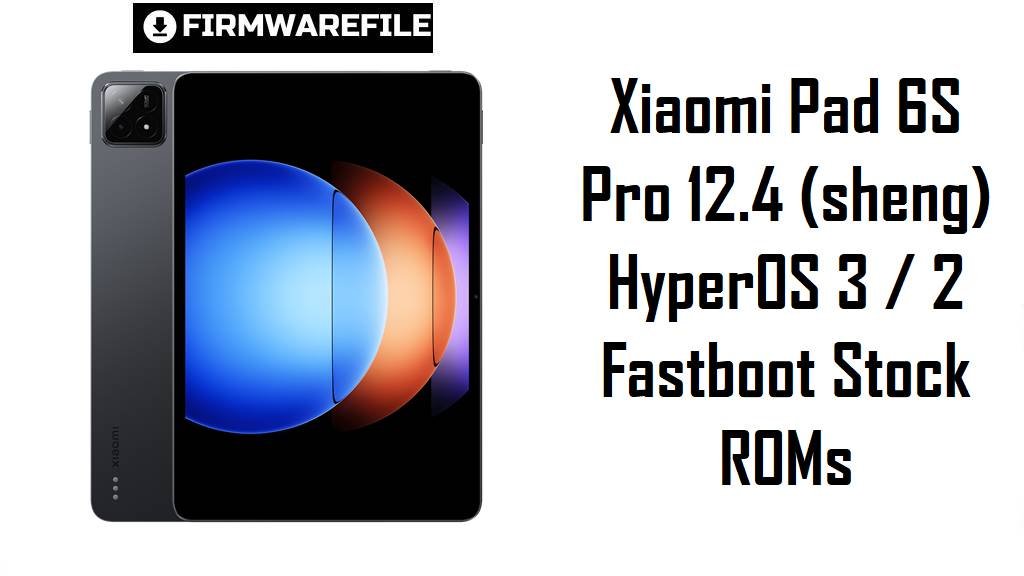
Xiaomi Pad 6S Pro 12.4 (sheng) HyperOS 3 / 2 Fastboot Stock ROMs
Xiaomi Pad 6S Pro 12.4 is a premium 12.4‑inch tablet with a 3K 144 Hz IPS display, Snapdragon 8 Gen 2, up to 16 GB RAM, UFS 4.0 storage and a 10,000 mAh battery with 120 W charging, aimed at power users and creators.
While reviews highlight excellent performance and battery life under load, early HyperOS builds and first‑time indexing can cause noticeable standby drain and occasional background app reloads, especially on lower‑RAM variants.
The official HyperOS 3 Android 16 and HyperOS 2 Android 15 fastboot ROMs below for codename sheng help you clean‑flash a stable system, fix broken OTAs and choose the right region build for your tablet.
Download Stock Firmware for Xiaomi Pad 6S Pro 12.4
All the flash files listed here are official HyperOS fastboot ROMs for Xiaomi Pad 6S Pro 12.4 with codename sheng. The WNX*** builds are Android 16 HyperOS 3 for China and Global, while the VNX*** packages are Android 15 HyperOS 2 for EEA, Russia and Indonesia and remain current late‑2025 regional stables.
| Filename | Region / Variant | Build Number | Build Date | Android Version | Flashing Method | File Size | Notes | Download |
|---|---|---|---|---|---|---|---|---|
| sheng_images_OS3.0.3.0.WNXCNXM_20251105.0000.00_16.0_cn_76a1c68111.tgz | China – Xiaomi Pad 6S Pro 12.4 CN | OS3.0.3.0.WNXCNXM | 2025‑11‑05 | Android 16 (HyperOS 3, China) | Fastboot (Xiaomi Flash Tool) | 8.85 GB | Latest China HyperOS 3 fastboot ROM for sheng; HyperOS firmware trackers list OS3.0.3.0.WNXCNXM as a stable Android 16 build with revamped visuals, smoother animations and the new HyperOS 3 window‑rendering engine. | Download from Xiaomi |
| sheng_global_images_OS3.0.3.0.WNXMIXM_20251118.0000.00_16.0_global_f86dcdfaaf.tgz | Global – Xiaomi Pad 6S Pro 12.4 Global | OS3.0.3.0.WNXMIXM | 2025‑11‑18 | Android 16 (HyperOS 3 Global) | Fastboot (Xiaomi Flash Tool) | 7.05 GB | Android 16 HyperOS 3 fastboot ROM for Global units; XM Firmware Updater shows OS3.0.3.0.WNXMIXM as the first HyperOS 3 stable for sheng_global with optimized animations, lower graphics load and improved windowed multitasking. | Download from Xiaomi |
| sheng_eea_global_images_OS2.0.212.0.VNXEUXM_20251106.0000.00_15.0_eea_3e1d3cda1b.tgz | EEA / Europe – Xiaomi Pad 6S Pro 12.4 EU | OS2.0.212.0.VNXEUXM | 2025‑11‑06 | Android 15 (HyperOS 2 EEA) | Fastboot (Xiaomi Flash Tool) | 6.75 GB | Late‑2025 EEA HyperOS 2 fastboot ROM; EEA firmware lists OS2.0.212.0.VNXEUXM as the newest VNXEUXM build, ideal as a stable Android 15 base while EEA HyperOS 3 is still rolling out. | Download from Xiaomi |
| sheng_ru_global_images_OS2.0.210.0.VNXRUXM_20251106.0000.00_15.0_ru_480360f5de.tgz | Russia – Xiaomi Pad 6S Pro 12.4 RU | OS2.0.210.0.VNXRUXM | 2025‑11‑06 | Android 15 (HyperOS 2 Russia) | Fastboot (Xiaomi Flash Tool) | 7.36 GB | Russian HyperOS 2 fastboot ROM; Russian firmware mirrors list OS2.0.210.0.VNXRUXM as a current late‑2025 RU stable, replacing earlier OS2.0.20x builds. | Download from Xiaomi |
| sheng_id_global_images_OS2.0.210.0.VNXIDXM_20251107.0000.00_15.0_id_d265db7b62.tgz | Indonesia – Xiaomi Pad 6S Pro 12.4 ID | OS2.0.210.0.VNXIDXM | 2025‑11‑07 | Android 15 (HyperOS 2 Indonesia) | Fastboot (Xiaomi Flash Tool) | 6.70 GB | Indonesia‑tuned HyperOS 2 fastboot ROM; HyperOS update tables mark OS2.0.210.0.VNXIDXM as a recent stable for Indonesian units with regional services and network tuning. | Download from Xiaomi |
Choosing between HyperOS 3 and 2: If your tablet is China or Global (suffix WNXCNXM or WNXMIXM), OS3.0.3.0 is the newest Android 16 build and generally preferred over any remaining OS2.0.20x ROMs; for EEA, RU and ID, OS2.0.212/210.0 are currently the latest stable Android 15 bases until their HyperOS 3 updates land.
Complete Device & Firmware Overview
- Device & codename
- Xiaomi Pad 6S Pro 12.4 is identified internally as sheng in Xiaomi’s firmware databases and codename lists.
- Model numbers
- Common model codes mapped to sheng include 24018RPACG and 24018RPACC for Global and China Wi‑Fi variants.
- Display
- The tablet uses a 12.4‑inch 3K IPS LCD at 2032×3048, 3:2 aspect ratio, 144 Hz, HDR10 and Dolby Vision support, protected by Gorilla Glass 5.
- Chipset & memory
- It runs Snapdragon 8 Gen 2 with Adreno 740 GPU, paired with 8–16 GB LPDDR5X RAM and up to 1 TB UFS 4.0 storage.
- Battery & charging
- A 10,000 mAh battery supports 120 W HyperCharge, with Xiaomi and independent tests measuring roughly 35–39 minutes for a full charge from near‑empty.
- Audio & connectivity
- The Pad 6S Pro 12.4 has six stereo speakers with Hi‑Res audio, Wi‑Fi 7, Bluetooth 5.3 and USB‑C 3.2, but no cellular modem or 3.5 mm jack.
- Accessories
- It supports an active Xiaomi Focus Pen and keyboard cover, turning the tablet into a productivity‑oriented workstation under HyperOS.
- Software baseline
- The device launched on Android 14 with HyperOS 1, has HyperOS 2 Android 15 builds like OS2.0.20x VNX*** and now moves to Android 16 HyperOS 3 via OS3.0.3.0 WNX*** for China and Global.
- Update policy
- Specs listings indicate up to three major Android upgrades from Android 14, so Android 16 (HyperOS 3) is the second step, with at least one more major version expected.
- Battery & performance pain points
- Xiaomi’s own FAQ warns that Pad 6S Pro 12.4 can drain battery faster in standby immediately after setup as data and apps index, and some HyperOS users report high background consumption until the system settles.
- How these ROMs help
- Clean‑flashing the latest regional fastboot ROM removes buggy OTA layers, resets indexing and applies HyperOS 2/3 power‑management optimizations, giving Snapdragon 8 Gen 2 a stable base for smooth multitasking.
- Firmware types here
- All listed flash files are official HyperOS fastboot ROMs in .tgz format, intended for Xiaomi’s fastboot tools on a PC rather than in‑tablet OTA installation.
- Bootloader & anti‑rollback
- HyperOS.fans and firmware trackers note that you must unlock the bootloader to flash fastboot ROMs, and Xiaomi’s anti‑rollback restricts unsafe downgrades between OS3.0 and OS2.0 lines.
- Required tools
- You need a Windows PC, Xiaomi USB drivers, Xiaomi Flash Tool (MiFlash or equivalent), a good USB‑C cable.
CRUCIAL WARNING: These fastboot ROMs are strictly for Xiaomi Pad 6S Pro 12.4 Wi‑Fi models with codename sheng; they must not be flashed to Redmi Pad Pro, POCO Pad, Xiaomi Pad 6, Pad 6 Max or any 5G phones, because cross‑flashing can permanently brick the device.
Each build is region‑locked by its suffix (WNXCNXM, WNXMIXM, VNXEUXM, VNXRUXM, VNXIDXM), so always choose the ROM that matches your tablet’s original region and avoid casual cross‑region or major downgrade flashing while anti‑rollback is active on HyperOS 2 and 3.
All official sheng_*.tgz fastboot packages will wipe user data when flashed, and using “clean all and lock” with a mismatched region can relock the bootloader on unsupported firmware and cause boot loops, loss of Wi‑Fi or pen/keyboard features, and difficulty unlocking again.
Preparation Before Flashing
Click here for the Xiaomi Pad 6S Pro 12.4 pre‑flash checklist
- Confirm codename & region: Boot to fastboot and run fastboot getvar product on your PC; proceed only if it reports sheng, then check Settings → About tablet to read your region suffix (WNXCNXM, WNXMIXM, VNXEUXM, VNXRUXM or VNXIDXM).
- Pick the matching ROM: Choose OS3.0.3.0.WNXCNXM or OS3.0.3.0.WNXMIXM only if your current build already belongs to the China or Global branch; use VNXEUXM, VNXRUXM or VNXIDXM fastboot ROMs for EEA, RU or ID devices.
- Backup important data: Fastboot flashing performs a clean install and will erase apps, media and settings, so back up via Xiaomi Cloud, Google or a PC beforehand.
- Charge the tablet: Ensure at least 50–60% battery to avoid shutdown during flashing, even though the 120 W charger can refill quickly later.
- Install drivers & tools: On Windows, install Xiaomi USB drivers and Xiaomi Flash Tool, then connect the Pad 6S Pro 12.4 in fastboot mode and confirm it is detected correctly.
Quick Firmware Flash File Instructions
This simplified guide covers flashing any of the listed fastboot ROMs, such as sheng_global_images_OS3.0.3.0.WNXMIXM_20251118.0000.00_16.0_global_f86dcdfaaf.tgz, using Xiaomi’s fastboot flashing tool on a Windows PC.
- Prepare PC & ROM: Install Xiaomi USB drivers and Xiaomi Flash Tool, then download and fully extract your chosen sheng_…images_OS3.0.3.0.WNX* or OS2.0.21x.0.VNX* .tgz into a simple folder such as C:\sheng_rom.
- Enter fastboot mode: Power off the tablet, hold Volume Down + Power until the fastboot logo appears, then connect it to the PC with a reliable USB‑C cable.
- Load the ROM in Xiaomi Flash: Open Xiaomi Flash Tool, click “Select” and choose the extracted ROM folder, then click “Refresh” and confirm that one sheng device is detected.
- Flash with “clean all”: In the bottom options, select “clean all” (wipes data, keeps bootloader unlocked), click “Flash” and wait patiently until the tool shows a success status.
- First boot & checks: Let HyperOS boot and finish optimization (this may take several minutes, especially after the first HyperOS 3 start), then open About tablet to verify codename, region suffix and build number.
For a detailed, screenshot‑rich walkthrough of Xiaomi fastboot flashing and anti‑rollback checks, follow the main Xiaomi Flash tool guide and simply point it to your extracted sheng_*.tgz folder when asked to select a ROM.
Frequently Asked Questions (FAQs)
- Q1. Which ROM should I choose for my Xiaomi Pad 6S Pro 12.4?
- If you have a China or Global unit, the safest and most future‑proof option is OS3.0.3.0.WNXCNXM or OS3.0.3.0.WNXMIXM that matches your region; EEA, RU and ID owners should use OS2.0.212.0.VNXEUXM or OS2.0.210.0.VNXRUXM / VNXIDXM until HyperOS 3 arrives for those branches.
- Q2. Is it worth upgrading from HyperOS 2 to HyperOS 3 on sheng?
- HyperOS 3 brings Android 16, updated animations, refined multitasking and cross‑device features similar to those on Xiaomi 15, but as with any major update you may see slightly higher background activity for a few days while the system re‑indexes.
- Q3. Will a clean fastboot flash help with standby battery drain on my Pad 6S Pro 12.4?
- Yes, many standby‑drain issues come from misconfigured apps and leftover data after OTAs; Xiaomi’s FAQ and battery‑calibration advice suggest that a clean install plus a few full charge cycles often restores normal idle consumption.
- Q4. Can I flash the Global WNXMIXM ROM on a Chinese Xiaomi Pad 6S Pro 12.4 for Google apps?
- Cross‑flashing CN↔Global can work for some advanced users with unlocked bootloaders, but it carries extra risk with anti‑rollback and may cause minor feature or regional glitches, so most owners are better off staying on their native branch.
- Q5. Does HyperOS 3 improve performance for heavy multitasking and pen/keyboard use?
- HyperOS 3’s new window‑rendering engine and animation tweaks aim to reduce graphics load and make multi‑window and casting smoother, which particularly benefits large tablets like the Pad 6S Pro 12.4 used with pen and keyboard.
- Q6. How many Android generations will my Xiaomi Pad 6S Pro 12.4 receive after installing HyperOS 3?
- The tablet launched on Android 14 with a promise of three major Android upgrades; moving to Android 16 via HyperOS 3 uses the second step, leaving at least one more major Android version expected in the future.