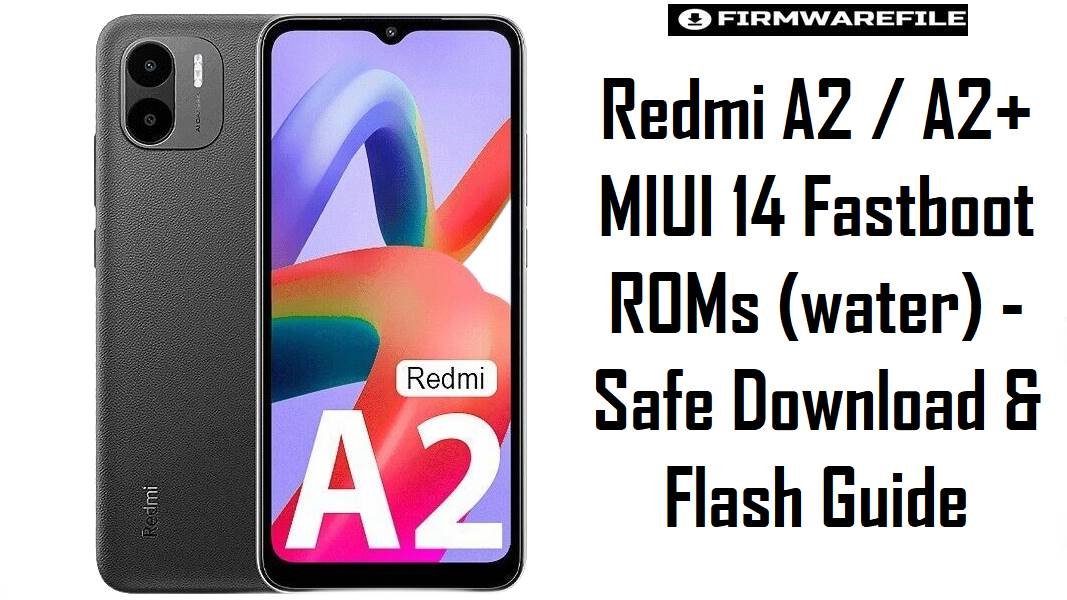
Redmi A2 / A2+ MIUI 14 Fastboot ROMs (water) – Safe Download & Flash Guide
The Redmi A2 and A2+ (codename water) sit at the entry level, built for basic apps, calls, and light gaming on a tight budget, not for heavy multitasking. Because these phones often serve as primary, long‑term devices for non‑technical users, choosing the correct regional firmware and flashing cautiously is essential to avoid network loss or data wipes during recovery.
Download Firmware for Redmi A2 / A2+ (water)
Below are MIUI 14 Android 13 (Go Edition) fastboot ROMs for the Redmi A2/A2+ (and POCO C51) ordered by branch and build number; all are official .tgz packages for use with Xiaomi’s fastboot tools. Each row explains who should use that build, so you do not downgrade or cross-flash regions without a clear reason.
| Filename | Region | MIUI Build | Release Window | Android / OS | Flashing Method | Size | Patch Level (est.) | Best For | Notes / Download |
|---|---|---|---|---|---|---|---|---|---|
| water_global_images_V14.0.41.0.TGOMIXM_20251024.0000.00_13.0_9dfd1a9bab.tgz | Global (MI) | V14.0.41.0 TGOMIXM – Stable | Late Oct 2025 | Android 13 (Go Edition) / MIUI 14 Go | Fastboot (Mi Flash / fastboot) | 2.08 GB | Around Oct/Nov 2025 | Most international Redmi A2/A2+ users needing a clean restore or latest Global firmware for stability and security. | This is a late‑cycle Global fastboot ROM for water, suitable as the default choice for phones sold outside region‑locked markets. Older Global builds (for example V14.0.37.0 or V14.0.25.0) are now mostly useful if you must reproduce a bug that appeared after this update.Download Global Fastboot |
| water_eea_global_images_V14.0.30.0.TGOEUXM_20251113.0000.00_13.0_6cfcf99b69.tgz | EEA (EU) | V14.0.30.0 TGOEUXM – Stable | Mid Nov 2025 | Android 13 (Go Edition) | Fastboot (Mi Flash / fastboot) | 2.10 GB | Around Nov 2025 | Redmi A2/A2+ units sold in EU/EEA markets that require CE‑compliant firmware and region‑specific services. | Choose this over the Global ROM if your device originated in the EU, as switching to MI (Global) can change preinstalled apps and sometimes affect OTA paths or local features. Earlier EEA packages are now secondary and primarily for testing regressions or downgrades under controlled conditions. Download EEA Fastboot |
| water_ru_global_images_V14.0.29.0.TGORUXM_20250910.0000.00_13.0_6146ea332a.tgz | Russia (RU) | V14.0.29.0 TGORUXM – Stable | Early Sep 2025 | Android 13 (Go Edition) | Fastboot (Mi Flash / fastboot) | 2.07 GB | Around Sep 2025 | Owners of Russian‑market Redmi A2/A2+ needing localized apps and modem configuration tuned for local operators. | Recommended only if your phone originally shipped with a RU build; cross‑flashing RU on non‑RU units solely to obtain region apps is not worthwhile given the risk to network behavior and OTA updates. Earlier RU builds should be treated as fallback options rather than daily drivers. Download Russia Fastboot |
| water_in_global_images_V14.0.24.0.TGOINXM_20250819.0000.00_13.0_ab63a5a9f8.tgz | India (IN) | V14.0.24.0 TGOINXM – Stable | Aug 2025 | Android 13 (Go Edition) | Fastboot (Mi Flash / fastboot) | 1.96 GB | Likely Aug/Sep 2025 | Indian Redmi A2/A2+ or POCO C51 units needing local network tuning and regional apps while staying on official MIUI 14 Go. | This is the safer target for devices with Indian model codes; mixing IN with Global/EU firmware just to remove a few apps can affect VoLTE or future OTA compatibility. Earlier Indian builds are still valid for troubleshooting, but not recommended for typical users once this release is available. Download India Fastboot |
| water_id_global_images_V14.0.21.0.TGOIDXM_20250829.0000.00_13.0_e4f7c2d156.tgz | Indonesia (ID) | V14.0.21.0 TGOIDXM – Stable | Late Aug 2025 | Android 13 (Go Edition) | Fastboot (Mi Flash / fastboot) | 2.04 GB | Likely Aug/Sep 2025 | Indonesian Redmi A2/A2+ users who need correct band configuration and local regulations support. | Recommended if your device originally ran an ID build; using Global or EEA on Indonesian hardware may break OTA and can require future clean flashes to return to a supported track. Earlier ID ROMs are mainly for downgrading carefully when a newer release introduces issues. Download Indonesia Fastboot |
| water_tw_global_images_V14.0.9.0.TGOTWXM_20250819.0000.00_13.0_817118a4cd.tgz | Taiwan (TW) | V14.0.9.0 TGOTWXM – Stable | Aug 2025 (older branch) | Android 13 (Go Edition) | Fastboot (Mi Flash / fastboot) | 1.96 GB | Earlier 2025 patch | Taiwan variants needing stock experience or recovery; older branch that may trail newer Global/EEA releases. | This TW build is older than the latest Global/EEA firmware and should mainly be used by Taiwan devices for recovery or when a newer regional upgrade introduces regressions. If your unit is not originally TW, flashing this just for minor software changes is not recommended. Download Taiwan Fastboot |
Complete Device & Firmware Overview
- Device Name
- Redmi A2 / Redmi A2+ (also POCO C51 in some markets).
- Codename
water– shared across Redmi A2, A2+, and POCO C51; always verify before flashing.- Model Numbers
- Examples include 22026RN54G (Redmi A2), 22026RN4DG/4DH/4DI and 23028RNCA* variants for Redmi A2+.
- Chipset
- MediaTek Helio G36, octa‑core Cortex‑A53 up to 2.2 GHz, designed for basic tasks and light games rather than intensive 3D titles.
- Display
- 6.52″ HD+ IPS LCD (720 × 1600) around 60 Hz, so firmware changes affect smoothness less than app/OS optimization.
- RAM / Storage
- Typical variants: 2–4 GB RAM with 32–128 GB eMMC 5.1, plus microSD expansion; low memory means background apps close quickly even on latest ROMs.
- Battery
- 5000 mAh with 10 W charging; MIUI updates mostly tweak standby drain and app behavior rather than raw battery capacity.
- Camera
- 8 MP rear camera with basic HDR and 5 MP front camera; firmware stability matters more for camera “not opening” bugs than for big quality jumps.
- Firmware Type
- Fastboot ROMs in
.tgzformat, MIUI 14 based on Android 13 Go Edition; suited for unbricking, downgrades, and full clean installs. - Android Version
- All listed ROMs are Android 13 Go; earlier stock releases shipped with Android 12 Go on older MIUI builds.
- Latest Known Global Baseline
- V14.0.41.0 TGOMIXM and later Global builds, which supersede older MIUI versions like V14.0.37.0 or V14.0.25.0.
- Security Patch Level
- Recent builds in the V14.0.4x.x range typically carry mid‑ to late‑2025 security patches, improving basic device hardening.
- Bootloader Requirements
- Fastboot flashing normally expects an unlocked bootloader; official OTA/recovery updates are the default for locked devices.
- Bootloader Rules
- Re‑locking (“clean all and lock”) on a ROM that does not match your original sales region can cause bootloops or network issues, especially on MediaTek‑based phones.
- Typical File Size
- Fastboot packages are around 2.0–2.2 GB, small compared to higher‑end phones but still large enough that a stable connection and disk space are required.
- Required Tools
- Windows PC, Xiaomi USB drivers, Mi Flash Tool (or compatible fastboot flasher), and a reliable USB‑A to microUSB cable.
- Use Cases for Fastboot ROMs
- Recovering from bootloops, fixing failed rooting attempts, and performing a fresh start on a slow, cluttered Redmi A2/A2+.
- Users Who Should Prefer OTA
- Non‑technical owners using the phone only for calls and messaging; OTA via Settings is safer than fastboot unless the device no longer boots.
CRUCIAL WARNING: These MIUI 14 fastboot ROMs are strictly for Redmi A2 / Redmi A2+ / POCO C51 devices with codename water. They must not be flashed to other Redmi, POCO, or Xiaomi models, even if they also use the Helio G36 chipset or have similar names.
All official water_*_images_*.tgz fastboot packages normally wipe user data when used with Xiaomi’s fastboot tools, and selecting aggressive options like “clean all and lock” on a mismatched region can re‑lock the bootloader on unsupported firmware and cause bootloops or mobile network loss.
Preparation Before Flashing
Show essential preparation checklist for Redmi A2 / A2+ (water)
- Confirm under Settings > About phone that the device is Redmi A2, Redmi A2+, or POCO C51, then in fastboot mode run
fastboot getvar productto ensure the codename iswater. - Identify the original region (Global TGOMIXM, EEA TGOEUXM, IN TGOINXM, RU TGORUXM, ID TGOIDXM, or TW TGOTWXM) and select the matching fastboot ROM, only switching regions deliberately when you understand the risks.
- Back up SMS, call logs, photos, and app data, as these low‑end units often have limited storage and a clean flash will normally erase everything on internal memory.
- Install Xiaomi USB drivers and Mi Flash Tool on a stable Windows PC, connect the phone in fastboot mode, and verify that it appears in the tool before starting any flash.
- Charge the battery to at least 60% and avoid moving the cable during flashing; budget devices with microUSB ports are particularly sensitive to loose connections mid‑flash.
Quick Firmware Flash Instructions
These steps summarize the process for MIUI 14 .tgz fastboot ROMs on Redmi A2/A2+; follow the linked guide for full screenshots and troubleshooting.
- Download the correct regional fastboot ROM for your unit (for most users this is Global V14.0.41.0 TGOMIXM or the matching EEA/IN/RU/ID/TW package) and extract the
.tgzarchive to a short path on your PC. - With the bootloader unlocked, power the phone off, then hold Volume Down + Power to enter fastboot mode and connect the Redmi A2/A2+ to your computer using a reliable microUSB cable.
- Open Xiaomi Mi Flash Tool, select the folder containing the extracted
water_*_images_*.tgzcontents, press “refresh” to detect the device, and make sure the flash option avoids re‑locking the bootloader when changing or testing regions. - Start the flash and wait until Mi Flash reports completion; do not disconnect early, as this MediaTek‑based device can become hard to recover if the process is interrupted.
- After the phone reboots, complete initial setup, check IMEI and network connectivity, and then verify if additional OTA updates are available within the same region branch.
For detailed, step‑by‑step instructions with images for Xiaomi/Redmi fastboot ROMs, use the dedicated Mi Flash tutorial: How to flash Xiaomi firmware with Mi Flash Tool.
Frequently Asked Questions (FAQs)
1. How do I make sure my phone is really the Redmi A2/A2+ “water” variant before flashing?
Boot to fastboot mode and run fastboot getvar product; the output should include water, matching these fastboot ROMs. You can also confirm the marketing name (Redmi A2 / A2+ / POCO C51) and model code in Settings > About phone against known water models like 22026RN54G and 23028RNCA*.
2. Will updating to V14.0.41.0 TGOMIXM speed up my Redmi A2/A2+ for games like Call of Duty Mobile?
MIUI and Android 13 Go optimizations can slightly improve stability and memory handling, but the Helio G36 and 2–3 GB RAM limit gaming performance more than firmware version. For smoother gameplay, closing background apps and using lower graphics settings will help more than repeatedly flashing new ROMs.
3. Can I flash Global TGOMIXM on an Indian Redmi A2+ to remove regional apps?
Cross‑flashing Global on Indian hardware usually works at a basic level, but there is a non‑trivial risk of losing optimal LTE band behavior or future OTA updates, especially on budget models. If you only dislike preinstalled apps, disabling or uninstalling them where possible is safer than changing the entire region.
4. Is fastboot flashing worth it for such a low‑end phone, or should I stick to OTA?
For users whose Redmi A2/A2+ still boots into system or recovery, OTA updates from Settings are safer and adequate for most issues. Fastboot ROMs make the most sense when the device is stuck in a bootloop, heavily modified, or needs a full clean reinstall after failed rooting or custom tweaks.
5. Does re‑locking the bootloader after flashing MIUI 14 improve security on Redmi A2/A2+?
Locking the bootloader enhances security against physical tampering, but only if the phone runs the exact official region firmware it was designed for (for example, original TGOINXM on an Indian unit). Locking the bootloader on a mismatched region ROM or after modifications can cause non‑booting states that are difficult to fix without advanced tools.
6. Why is the fastboot ROM only about 2 GB when other phones’ packages are much larger?
The Redmi A2 series uses Android Go with lightweight apps, small system partitions, and fewer advanced features, which keeps ROM size lower than mid‑range or flagship devices. Smaller firmware still carries all necessary partitions for a clean flash, so low size is not a sign of incomplete or unsafe images.
7. What is the safest way to recover from a bootloop after a failed factory reset or app update?
If stock recovery and factory reset fail, entering fastboot mode and flashing the correct regional water_*_images_*.tgz fastboot ROM (usually the latest available for your region) is the most reliable way to restore the system. After flashing, treat the phone as new: re‑configure accounts, restore backups, and avoid immediately reinstalling any app or modification that previously caused instability.