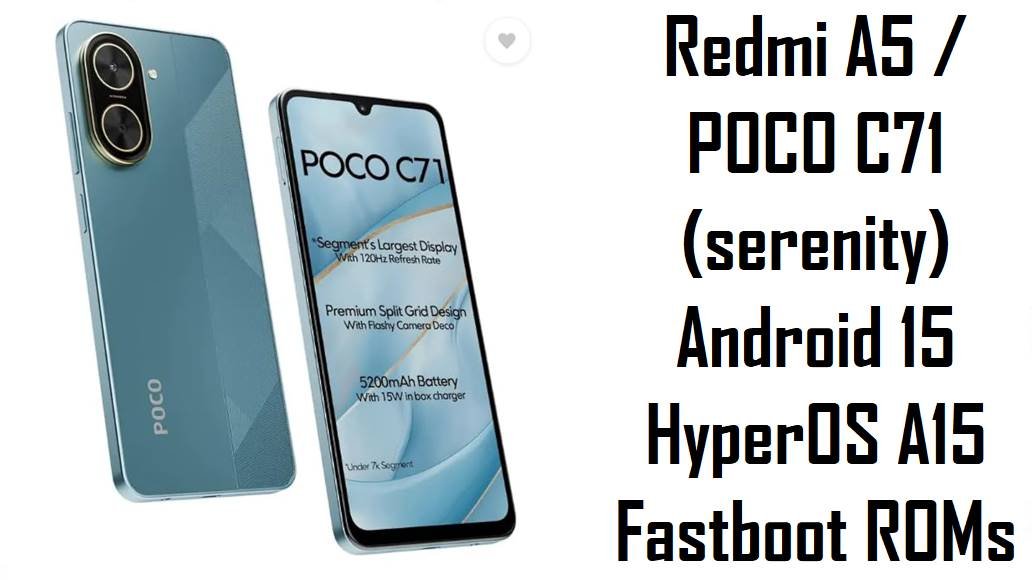
Redmi A5 / POCO C71 (serenity) Android 15 HyperOS A15 Fastboot ROMs
Redmi A5 and POCO C71 (codename serenity) are ultra‑budget phones that deliver a big 6.88‑inch 120 Hz HD+ display, UNISOC T7250 performance and a ~5200 mAh battery at a very low price. Reviews and user feedback praise their smoothness for basic tasks and battery life, but also complain about weak gaming performance, HD+ resolution, modest cameras, slow 10–15 W charging, and missing features like 5G and NFC.
The A15.0.x.0.VGW* fastboot ROMs below are official Android 15 HyperOS builds that update security, stabilize performance and let you clean‑flash the right firmware for your exact region (Global, India, Russia, EEA, Indonesia).
Complete Device & Firmware Overview
- Device Names
- Redmi A5 4G and POCO C71 – same hardware with different branding on some markets.
- Codename
- serenity – used by both Redmi A5 and POCO C71 across all these firmware packages.
- Model Numbers
- Redmi A5 series (e.g. 25028RN03G / 03I / 03L / 03Y) listed under codename serenity for various regions.
- SoC / Chipset
- UNISOC T7250 (Tiger T7250), octa‑core up to about 1.8–2.0 GHz, roughly comparable to Helio G88/G91 in light/medium workloads.
- RAM & Storage
- Common configs: 3/64 GB, 4/64 GB, 4/128 GB and 6/128 GB with eMMC 5.1 storage and microSD expansion.
- Display
- 6.88‑inch IPS LCD, 720 × 1640 (HD+, ~260 ppi), 120 Hz refresh rate; reviewers note good smoothness but only average brightness and sharpness outdoors.
- Battery & Charging
- ~5200 mAh battery (often rounded to 5000–5200 mAh) with 10–15 W wired charging; endurance is strong for light use, but charging is relatively slow.
- Cameras
- 32 MP main rear camera and 8 MP selfie, both limited to 1080p/30 fps video without advanced stabilization; acceptable for social media but weak in low light.
- Connectivity & Extras
- Dual‑SIM 4G, Wi‑Fi ac, BT 5.x, GPS, USB‑C, 3.5 mm jack and side fingerprint; no 5G or NFC, which some users see as missing in 2025.
- Platform & UI
- Android 15 with HyperOS skin (Android 15 Go‑class experience on some Redmi A5 variants), tuned for simple, low‑bloat usage on entry‑level hardware.
- Typical Pain Points
- Entry‑level gaming (low FPS in heavier titles), HD+ panel, basic camera quality, no split‑screen or advanced multitasking on Go builds, slow charging, and lack of “future‑proof” features like 5G/NFC.
- Firmware Family
- HyperOS / MIUI A15.0.x.0.VGW* series based on Android 15.0, distributed as both recovery zips and these full fastboot ROMs in .tgz format.
- Included Files in This Query
- Global: A15.0.14.0.VGWMIXM fastboot ROM. India: A15.0.12.0.VGWINXM fastboot ROM. Russia: A15.0.8.0.VGWRUXM fastboot ROM. EEA/Europe: A15.0.10.0.VGWEUXM fastboot ROM. Indonesia: A15.0.7.0.VGWIDXM fastboot ROM.
- Security Patch & Update Timing
- Global A15.0.14.0.VGWMIXM updates security to November 2025 for Redmi A5 / POCO C71 and “increases system security.” Other A15.0.7–12 builds are 2025 Android 15 releases with corresponding mid‑/late‑2025 security patches.
- Firmware Type
- All five packages are fastboot ROMs (full images of boot/system/vendor/product/vbmeta/modem, etc.) for Xiaomi Flash Tool on Windows.
- Why Use These ROMs
- To fix broken OTAs, recover from bootloops, remove bloat/customization leftovers, or update to the latest stable/beta Android 15 HyperOS version for your exact region.
- Required Tools
- Windows PC, Xiaomi USB drivers, Xiaomi Flash Tool (Mi Flash / Xiaomi Flash), and a good USB‑C cable.
- Bootloader / Unlock
- Fastboot flashing requires an unlocked bootloader; Xiaomi’s official Mi Unlock tool must be used, and unlocking wipes all user data.
If you flash the wrong codename, region or a corrupted file on Redmi A5 / POCO C71, you risk losing IMEI/network, breaking OTA updates, or hard‑bricking the phone beyond simple recovery, so always double‑check codename serenity, region suffix and Android version before proceeding.
CRUCIAL WARNING: These fastboot ROMs are strictly for Redmi A5 / POCO C71 devices with codename serenity; they must not be flashed to other Redmi, POCO or Xiaomi models (even if they look similar) because cross‑flashing can permanently brick the device.
Each build is region‑locked by code (VGWMIXM – Global, VGWINXM – India, VGWRUXM – Russia, VGWEUXM – EEA, VGWIDXM – Indonesia), so you should normally flash the ROM that matches your phone’s original region and avoid unnecessary cross‑region flashing, especially since Android 15 HyperOS uses anti‑rollback and modem differences between markets.
All official serenity_*images_*.tgz fastboot packages will wipe user data when used with Xiaomi’s flashing tools, and selecting options like “clean all and lock” on a mismatched system can relock the bootloader on an unsupported ROM and cause boot loops, account‑binding errors or loss of recovery options.
Download Firmware for Redmi A5 / POCO C71 (serenity)
Pick the newest A15.0.x.0 build that matches your phone’s region code; use older builds only if you specifically need to downgrade or replicate a particular behavior. Global A15.0.14.0.VGWMIXM is currently the most up‑to‑date and secure option for international Redmi A5 / POCO C71 units.
text
| Filename | Region / Variant | Build Number | Build Date | Android / HyperOS | Flashing Method | File Size | Notes | Download |
|---|---|---|---|---|---|---|---|---|
| serenity_global-images-A15.0.14.0.VGWMIXM-user-20251108.0000.00-15.0-global-630ac1f5b7.tgz | Global – Redmi A5 / POCO C71 (serenity) | A15.0.14.0.VGWMIXM (Global HyperOS, Beta fastboot) | 8 Nov 2025 build, released mid‑Nov 2025 | Android 15.0 / HyperOS (A15 series) | Xiaomi Flash Tool (fastboot, Windows PC) | ≈4.4 GB | Latest Global fastboot ROM with November 2025 security patch and “increased system security,” making it the recommended baseline for most non‑regional Redmi A5 / POCO C71 units that show VGWMIXM in About phone. | Download from Xiaomi (Global) |
| serenity_in_global-images-A15.0.12.0.VGWINXM-userroot-20251010.0000.00-15.0-in-9e7bf3be2c.tgz | India – Redmi A5 / POCO C71 (serenity) | A15.0.12.0.VGWINXM (India Stable) | 10 Oct 2025 build, India rollout Q4 2025 | Android 15.0 / HyperOS | Xiaomi Flash Tool (fastboot) | ≈3.26 GB | Use this ROM if your phone’s version string ends with VGWINXM; tuned for Indian carriers and settings, and a solid choice to clean‑flash after lag, app crashes or failed OTAs on Indian units. | Download from Xiaomi (India) |
| serenity_ru_global-images-A15.0.8.0.VGWRUXM-user-20251010.0000.00-15.0-ru-316f1a0ff7.tgz | Russia – Redmi A5 / POCO C71 (serenity) | A15.0.8.0.VGWRUXM (Russia Stable) | 10 Oct 2025 build, Russia stable wave | Android 15.0 / HyperOS | Xiaomi Flash Tool (fastboot) | ≈3.37 GB | For Russian units with VGWRUXM in About phone; keeps Russian region settings and services while giving a clean Android 15 install. | Download from Xiaomi (Russia) |
| serenity_eea_global-images-A15.0.10.0.VGWEUXM-user-20251108.0000.00-15.0-eea-997be950c3.tgz | EEA / Europe – Redmi A5 / POCO C71 (serenity) | A15.0.10.0.VGWEUXM (EEA Stable) | 8 Nov 2025 build, EU release late 2025 | Android 15.0 / HyperOS | Xiaomi Flash Tool (fastboot) | ≈3.65 GB | Matches EEA units with VGWEUXM; preserves EU‑specific regulations and update channel, making it the safest choice for European Redmi A5 / POCO C71 owners. | Download from Xiaomi (EEA) |
| serenity_id_global-images-A15.0.7.0.VGWIDXM-user-20251028.0000.00-15.0-id-d3a948e0a8.tgz | Indonesia – Redmi A5 / POCO C71 (serenity) | A15.0.7.0.VGWIDXM (Indonesia Stable) | 28 Oct 2025 build, Indonesia branch | Android 15.0 / HyperOS | Xiaomi Flash Tool (fastboot) | ≈3.63 GB | Use this ROM on Indonesian devices with VGWIDXM to keep local settings and content; slightly older than the latest Global build but still a current 2025 Android 15 release. | Download from Xiaomi (Indonesia) |
Clarity tip: Open Settings → About phone → HyperOS version and match the last block (VGWMIXM, VGWINXM, VGWRUXM, VGWEUXM or VGWIDXM) to the table above; never flash a different region unless you fully understand the risks.
Preparation Before Flashing
Click here for the Redmi A5 / POCO C71 (serenity) pre‑flash checklist
- Confirm codename and region: In fastboot, run fastboot getvar product and verify it returns serenity, then note your current region suffix (MIXM, INXM, RUXM, EUXM, IDXM) in About phone before choosing a ROM.
- Backup your data: Fastboot ROMs typically erase apps and internal storage; back up photos, WhatsApp, SMS, and documents to Google, Xiaomi Cloud or a PC before flashing.
- Charge the phone: With only 10–15 W charging, bring the battery above 50–60% so it does not die mid‑flash, which could cause serious software damage.
- Unlock the bootloader: Use Xiaomi’s Mi Unlock tool on Windows (requires a Xiaomi account and will wipe data) because fastboot flashing is blocked on locked bootloaders.
- Install drivers and extract ROM: Install Xiaomi USB drivers and Xiaomi Flash Tool, then fully extract the chosen serenity_*images_*.tgz into a short path such as C:\serenity_A15.0.14.0 before starting.
Quick Firmware Flash Instructions
This simplified guide covers flashing any of these fastboot ROMs, such as serenity_global-images-A15.0.14.0.VGWMIXM…, using Xiaomi’s fastboot flashing tool on a Windows PC.
- Prepare PC & ROM: Install Xiaomi USB drivers and Xiaomi Flash Tool, then download and extract your selected serenity_*images_…tgz into a simple folder (for example C:\serenity_A15_global).
- Enter fastboot mode: Power off the phone, hold Volume Down + Power until the fastboot logo appears, then connect it to your PC with a good USB‑C cable.
- Load ROM in Xiaomi Flash: Open Xiaomi Flash Tool, click Select and choose the extracted ROM folder, confirm the device is detected, and set the mode to clean all (recommended for a fresh install).
- Flash firmware: Click Refresh then Flash, and wait without disconnecting until Xiaomi Flash shows a green success status, indicating all partitions were written correctly.
- First boot & setup: The phone will reboot into Android 15 / HyperOS; the first boot can take several minutes while apps are optimized, after which you can go through setup and restore your backups.
For a detailed, screenshot‑rich Xiaomi Flash Tool tutorial (including driver troubleshooting and anti‑rollback notes), follow: Xiaomi Flash Tool complete guide and use your extracted serenity ROM folder when the guide asks for a fastboot package.
Frequently Asked Questions (FAQs)
- Q1. Which fastboot ROM should I choose for my Redmi A5 / POCO C71?
- Always choose the latest A15.0.x.0 build that matches your original region code: A15.0.14.0.VGWMIXM for Global, A15.0.12.0.VGWINXM for India, A15.0.8.0.VGWRUXM for Russia, A15.0.10.0.VGWEUXM for EEA, or A15.0.7.0.VGWIDXM for Indonesia. Cross‑region flashing is possible but can cause subtle network and OTA issues, so it is better left to advanced users.
- Q2. Will these ROMs make my Redmi A5 / POCO C71 good for gaming?
- No; the UNISOC T7250 is fine for social media, calls and light games, but tests of heavier titles show low FPS and stutter even on low settings. Updating firmware and clean‑flashing can improve stability, but the hardware is still entry‑level and not meant for serious gaming.
- Q3. Can a clean fastboot flash improve lag or random bugs after OTAs?
- Yes; if your phone became sluggish or unstable after several OTAs, a clean flash of the correct A15.0.x.0 fastboot ROM often removes leftover junk and restores the smoother experience seen in early Redmi A5 / POCO C71 reviews. It can also help if you installed a lot of bloat or changed system settings heavily over time.
- Q4. Do these ROMs add missing features like split‑screen or NFC?
- No; multi‑window limitations, lack of NFC and HD+ resolution are hardware/platform decisions, not simple firmware flags. The ROMs may tweak animations and stability, but they cannot turn an Android 15 Go‑level phone into a flagship feature set.
- Q5. Will flashing Global VGWMIXM on an Indian or Russian unit break anything?
- Advanced users sometimes cross‑flash Global firmware, but modem configuration, emergency numbers and legal content differ, so you may see subtle network quirks, broken OTA updates or compliance differences. For ordinary users it is safer to stay on VGWINXM, VGWRUXM, VGWEUXM or VGWIDXM as originally shipped.
- Q6. Can these fastboot ROMs unbrick a device stuck on the logo or bootloop?
- If your Redmi A5 / POCO C71 still enters fastboot mode, flashing the correct serenity_*images_*.tgz via Xiaomi Flash Tool is the standard way to recover from bootloops and failed OTAs. If fastboot is not accessible, EDL‑level recovery would be needed, which usually requires authorized tools and professional service.