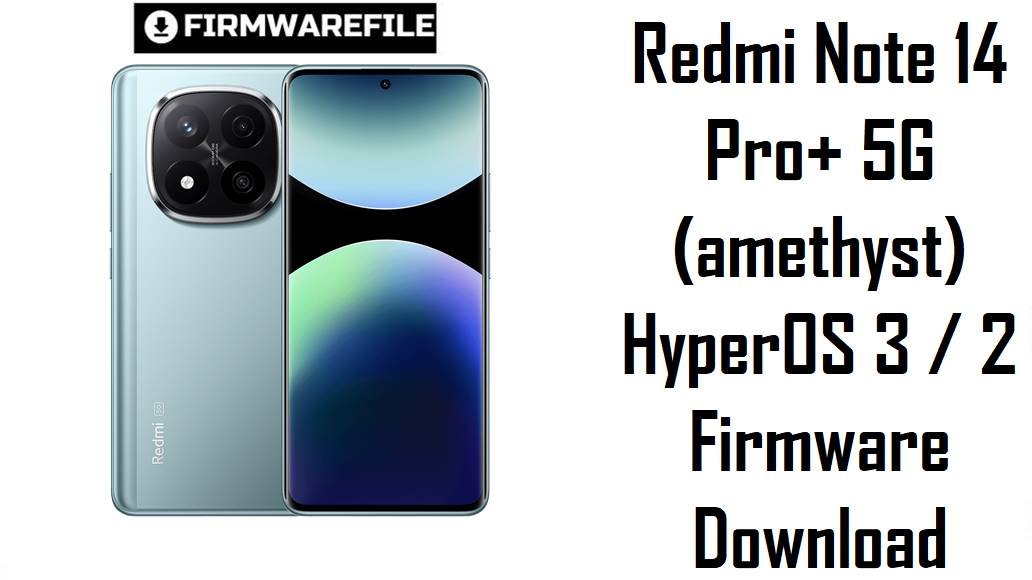
Redmi Note 14 Pro+ 5G (amethyst) HyperOS 3 / 2 Firmware Download
Redmi Note 14 Pro+ 5G, codename amethyst, brings a high‑refresh display and Snapdragon 7s Gen 3‑class performance to Xiaomi’s mid‑upper segment, but some owners report HyperOS 2 bugs like service‑framework errors, notification delays and typical battery/heat concerns.
These official HyperOS fastboot ROMs, plus a xiaomi.eu build, let you clean‑flash Android 15 or 16 for the right region, fix broken OTAs, and move safely to the latest stable firmware for Redmi Note 14 Pro+ 5G.
Download Firmware for Redmi Note 14 Pro+ 5G (amethyst)
All packages below are official fastboot ROMs for devices with codename amethyst (Redmi Note 14 Pro+ 5G, and in some markets Redmi Note 14 Pro 5G with the same platform). Match the region suffix (CNXM, MIXM, EUXM, RUXM, INXM, IDXM, TWXM, TRXM, MIDC) to your current HyperOS build before flashing to avoid modem, OTA and anti‑rollback issues.
| Filename | Region / Variant | Build Number | Build Date | Android Version | Flashing Method | File Size | Notes | Download |
|---|---|---|---|---|---|---|---|---|
| amethyst_global_images_OS3.0.2.0.WOPMIXM_20251106.0000.00_16.0_global_0bf617e0aa.tgz | Global (MIXM) | OS3.0.2.0.WOPMIXM | 2025‑11‑06 | Android 16.0 | Fastboot (Xiaomi Flash Tool) | 8.61 GB | First major Global HyperOS 3 fastboot ROM for Redmi Note 14 Pro+ 5G; update posts describe Android 16 with refined scheduling, animation and power optimizations, and it is now the recommended clean‑flash target for global units. | Download Global Fastboot |
| amethyst_images_OS2.0.211.0.VOPCNXM_20251105.0000.00_15.0_cn_da5845776c.tgz | China (CNXM) | OS2.0.211.0.VOPCNXM | 2025‑11‑05 | Android 15.0 | Fastboot (Xiaomi Flash Tool) | 7.79 GB | Latest China HyperOS 2.0.211.0 fastboot ROM; firmware trackers note this Android 15 build as a stability and security update over OS2.0.209.0, ideal for users who prefer a mature HyperOS 2 base rather than moving early to HyperOS 3 pilots. | Download China Fastboot |
| amethyst_eea_global_images_OS2.0.211.0.VOPEUXM_20251015.0000.00_15.0_eea_2fb87df921.tgz | EEA / Europe (EUXM) | OS2.0.211.0.VOPEUXM | 2025‑10‑15 | Android 15.0 | Fastboot (Xiaomi Flash Tool) | 7.53 GB | New EEA HyperOS 2 fastboot ROM; one of the highest Android 15 builds for Europe with improved stability and security, recommended as the default clean‑flash target for EU retail devices while HyperOS 3 rolls out in waves. | Download EEA Fastboot |
| amethyst_ru_global_images_OS2.0.203.0.VOPRUXM_20251017.0000.00_15.0_ru_b4f28f0c43.tgz | Russia (RUXM) | OS2.0.203.0.VOPRUXM | 2025‑10‑17 | Android 15.0 | Fastboot (Xiaomi Flash Tool) | 8.21 GB | Russia‑region HyperOS 2.0.203.0 ROM; moves devices from earlier 2.0.20x builds to a newer patch level, stabilizing performance and keeping Russian‑specific services and regulations intact. | Download Russia Fastboot |
| amethyst_in_global_images_OS2.0.204.0.VOPINXM_20251017.0000.00_15.0_in_06f0e45bf1.tgz | India (INXM) | OS2.0.204.0.VOPINXM | 2025‑10‑17 | Android 15.0 | Fastboot (Xiaomi Flash Tool) | 6.75 GB | India HyperOS 2.0.204.0 fastboot ROM; a stable Android 15 build tuned for Indian networks and local features, best for clean installs and unbricks on Indian Note 14 Pro+ 5G units. | Download India Fastboot |
| amethyst_id_global_images_OS2.0.202.0.VOPIDXM_20251016.0000.00_15.0_id_343e1341c4.tgz | Indonesia (IDXM) | OS2.0.202.0.VOPIDXM | 2025‑10‑16 | Android 15.0 | Fastboot (Xiaomi Flash Tool) | 7.61 GB | Indonesia HyperOS 2.0.202.0 ROM; recommended for Indonesian devices to preserve proper band support and OTA flow while applying recent stability and security fixes. | Download Indonesia Fastboot |
| amethyst_tw_global_images_OS2.0.202.0.VOPTWXM_20251016.0000.00_15.0_tw_61b6f5ceeb.tgz | Taiwan (TWXM) | OS2.0.202.0.VOPTWXM | 2025‑10‑16 | Android 15.0 | Fastboot (Xiaomi Flash Tool) | 6.12 GB | Taiwan HyperOS 2 fastboot ROM; tailored to Taiwanese operators and content rules, and the correct target for TW devices that need a clean reinstall. | Download Taiwan Fastboot |
| amethyst_tr_global_images_OS2.0.202.0.VOPTRXM_20251016.0000.00_15.0_tr_ca9413967f.tgz | Turkey (TRXM) | OS2.0.202.0.VOPTRXM | 2025‑10‑16 | Android 15.0 | Fastboot (Xiaomi Flash Tool) | 7.10 GB | Turkey HyperOS 2 fastboot ROM; replaces older Turkish builds with a newer patch level and bug fixes, and should be preferred to older VOPTRXM images unless you have a specific downgrade reason. | Download Turkey Fastboot |
| amethyst_dc_global_images_OS2.0.1.0.VOPMIDC_20250511.0000.00_15.0_global_dc_2e11b1a699.tgz | Global “DC” (special/demo) | OS2.0.1.0.VOPMIDC | 2025‑05‑11 | Android 15.0 | Fastboot (Xiaomi Flash Tool) | 5.69 GB | Early HyperOS 2 “MIDC” fastboot ROM likely for demo or special distribution units; significantly older than the other files and not recommended for regular retail phones unless you specifically know your device shipped with a DC build. | Download DC Fastboot (advanced) |
| xiaomi.eu_AMETHYST_OS2.0.211.0.VOPCNXM_15.zip | xiaomi.eu custom ROM (based on CN VOPCNXM) | OS2.0.211.0.VOPCNXM (xiaomi.eu) | 2025‑11 (community) | Android 15.0 | Fastboot script / custom recovery | 5.56 GB | Unofficial xiaomi.eu ROM repacked from China OS2.0.211.0.VOPCNXM, adding multi‑language support, Google services and tweaks; requires unlocked bootloader and is best for enthusiasts, not for users who want fully stock OTAs. | Download xiaomi.eu ROM |
If you want a simple, stable setup, choose the official fastboot ROM that matches your current region suffix (MIXM, CNXM, EUXM, RUXM, INXM, IDXM, TWXM, TRXM) and avoid DC and xiaomi.eu builds unless you fully understand their purpose.
Complete Device & Firmware Overview
- Device Name
- Redmi Note 14 Pro+ 5G / Redmi Note 14 Pro 5G platform, internal codename amethyst.
- Codename
- amethyst — this must match in fastboot mode and ROM filenames before flashing any file listed here.
- Regions / Suffixes
- China (VOPCNXM), Global (WOPMIXM for HyperOS 3, VOPMIXM for older HyperOS 2), EEA (VOPEUXM), Russia (VOPRUXM), India (VOPINXM), Indonesia (VOPIDXM), Taiwan (VOPTWXM), Turkey (VOPTRXM), special “MIDC” (VOPMIDC).
- Android & HyperOS Versions
- OS2.0.x builds are HyperOS 2 on Android 15, while OS3.0.2.0.WOPMIXM is HyperOS 3 on Android 16 for the Global variant.
- Key Pain Points on Early Builds
- CN users documented Xiaomi Service Framework issues, notification problems and typical HyperOS 2 bugs, and general Xiaomi bug trackers list battery drain, heat and minor UI defects across Android 15‑based HyperOS 2 releases.
- What Newer Builds Aim to Fix
- Recent amethyst updates raise security patch levels, improve system stability and apply global HyperOS improvements in scheduling, animation and power efficiency, which together help smooth out stutters and background drain.
- Firmware Types Here
- All listed Xiaomi ROMs are fastboot packages (*.tgz) for Windows flashing, plus one xiaomi.eu *.zip that bundles its own fastboot / recovery scripts.
- Required Tools
- Windows PC, Xiaomi USB drivers, Xiaomi Flash Tool (or similar fastboot flasher), a reliable USB‑C cable and MD5/SHA checksums from firmware sites to make sure downloads are intact.
Flashing a wrong‑region, wrong‑codename or corrupted ROM can permanently brick your Redmi Note 14 Pro+ 5G or break 5G/Wi‑Fi connectivity, so always verify amethyst, region suffix and checksum values before starting.
CRUCIAL WARNING: These ROMs are strictly for Redmi Note 14 Pro+ 5G / Pro 5G with codename amethyst; do not flash them to other Redmi / POCO / Xiaomi models or different codenames, because cross‑flashing can permanently brick the device.
HyperOS builds are tied to region codes (CNXM, MIXM, EUXM, RUXM, INXM, IDXM, TWXM, TRXM, MIDC), so only flash the ROM that matches your phone’s original region unless you fully understand anti‑rollback, modem partitions and recovery methods.
All official amethyst_*.tgz fastboot packages wipe user data when used with Xiaomi’s tools, and choosing “clean all and lock” with a mismatched or custom ROM can relock the bootloader on unsupported firmware and cause boot or network failures.
Preparation Before Flashing
Click here for the Redmi Note 14 Pro+ 5G pre‑flash checklist
- Confirm device and codename: In fastboot mode, run fastboot getvar product and ensure it reports amethyst, then check Settings > About phone to see your current region suffix (MIXM, CNXM, EUXM, etc.).
- Back up your data: Fastboot flashing will erase apps and internal storage, so back up to Xiaomi Cloud, Google or a PC before proceeding.
- Charge sufficiently: Keep the battery at least 50–60% to avoid shutdown during flash, which can corrupt partitions and hard‑brick the phone.
- Install drivers and tools: On a Windows PC, install Xiaomi USB drivers and Xiaomi Flash Tool (or equivalent fastboot utility) and check that the phone is detected in fastboot mode.
- Understand bootloader & ARB: Ensure the bootloader is unlocked for manual fastboot or xiaomi.eu flashing, and avoid downgrading below your current anti‑rollback index to prevent ARB errors.
Quick Firmware Flash Instructions
These steps summarize how to flash any of the official fastboot ROMs (for example amethyst_global_images_OS3.0.2.0.WOPMIXM_…) using Xiaomi’s fastboot tool on Windows.
- Prepare PC and ROM: Install Xiaomi USB drivers and Xiaomi Flash Tool, then download and extract the chosen amethyst_…images_… TGZ to a short path such as C:\amethyst_rom.
- Enter fastboot mode: Power off the phone, hold Volume Down + Power until the fastboot logo appears, and connect it to the PC with a reliable USB‑C cable.
- Load the ROM: Open Xiaomi Flash Tool, select the extracted ROM folder and confirm one device with codename amethyst is listed as connected.
- Flash with “clean all”: Choose the “clean all”‑type option (to wipe data but keep the bootloader unlocked), click the flash button and wait until the tool reports success without unplugging the device.
- First boot & checks: Allow HyperOS to boot and complete optimization (this may take several minutes), then open About phone to verify codename, region suffix and build number match the ROM you installed.
For a detailed, screenshot‑rich guide to Xiaomi fastboot flashing (drivers, anti‑rollback checks and troubleshooting), follow the main Xiaomi fastboot firmware guide and simply select the appropriate amethyst_*.tgz folder when prompted.
Frequently Asked Questions (FAQs)
- Q1. Which ROM is safest for my Redmi Note 14 Pro+ 5G?
- The safest choice is always the ROM that matches your original region: OS3.0.2.0.WOPMIXM for Global, OS2.0.211.0.VOPCNXM for China, OS2.0.211.0.VOPEUXM for EEA, OS2.0.203.0.VOPRUXM for Russia, OS2.0.204.0.VOPINXM for India, OS2.0.202.0.VOPIDXM for Indonesia, OS2.0.202.0.VOPTWXM for Taiwan or OS2.0.202.0.VOPTRXM for Turkey.
- Q2. Is HyperOS 3.0.2.0.WOPMIXM (Android 16) better than staying on HyperOS 2?
- HyperOS 3 on Global amethyst adds Android 16 along with refined scheduling, memory and animation behavior, and early Mi Pilot notes highlight improved smoothness, so most global users will benefit from moving to OS3.0.2.0 once they have proper backups.
- Q3. Will a clean fastboot flash help with service‑framework errors and lag?
- XDA reports on CN amethyst show Xiaomi Service Framework problems on certain HyperOS 2 builds, and a clean flash of the latest matching ROM can remove leftover app/data conflicts that trigger such bugs while also applying Xiaomi’s own fixes.
- Q4. Is the xiaomi.eu_AMETHYST_OS2.0.211.0.VOPCNXM_15.zip ROM safe for daily use?
- xiaomi.eu is widely used, but it is unofficial and requires an unlocked bootloader; it trades OTAs and full stock status for extra languages and Google services, so it is recommended only if you already understand custom ROM risks and recovery options.
- Q5. Can I cross‑flash Global WOPMIXM on an EEA or RU device?
- Some advanced users cross‑flash for earlier access to Android 16, but Xiaomi’s region‑specific modem configs and anti‑rollback mean that average users should stay with their native region ROM to avoid network and OTA issues.
- Q6. Where can I see the official changelog for OS3.0.2.0.WOPMIXM?
- HyperOS update trackers and community posts list OS3.0.2.0.WOPMIXM for amethyst with notes about smoother animations, improved power efficiency, updated Android 16 base and a recent security patch, all focused on stability rather than major new features.