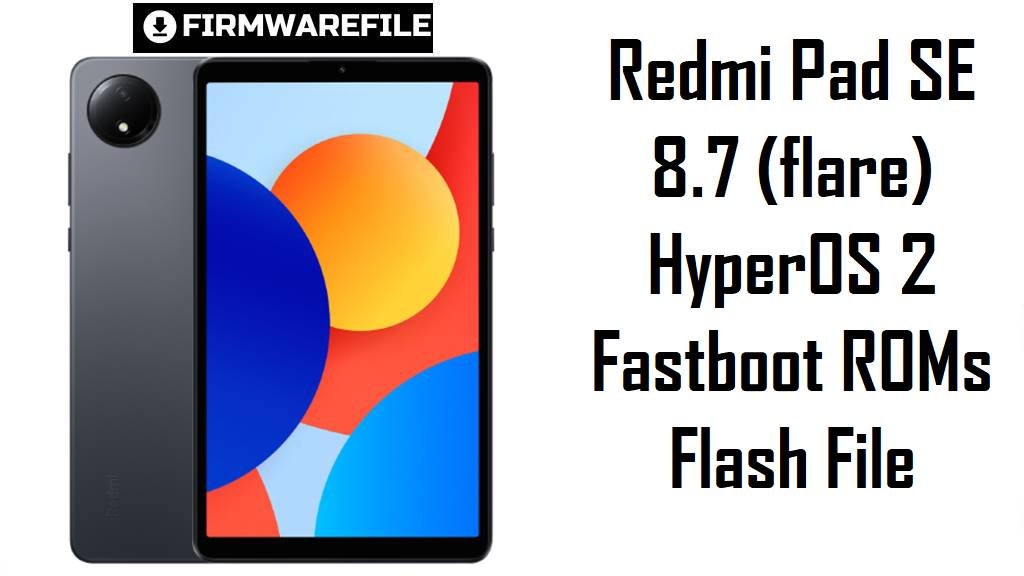
Redmi Pad SE 8.7 (flare) HyperOS 2 Fastboot ROMs Flash File
Redmi Pad SE 8.7 is a compact budget tablet built around an 8.7‑inch 90 Hz IPS display, a MediaTek Helio G85 chip and a 6650 mAh battery, positioned as an affordable media and study device. Real users praise the value but frequently complain about HyperOS lag, stutters in video apps and weaker gaming performance after updating from earlier software, especially on early HyperOS 1 and 2 builds.
The official HyperOS 2 fastboot ROMs below let you clean‑flash up‑to‑date Android 15 firmware for your exact region, which can stabilize performance, apply newer security patches and recover from failed OTA updates.
Download Firmware for Redmi Pad SE 8.7
All the files listed here are official HyperOS 2 (Android 15) fastboot ROMs for Redmi Pad SE 8.7 with codename flare, covering Global, EEA, Taiwan, Russia, Turkey and Indonesia variants. For most users, the best choice is the newest build that matches the suffix in Settings → About tablet → HyperOS version (VHXMIXM, VHXEUXM, VHXTWXM, VHXRUXM, VHXTRXM, VHXIDXM).
| Filename | Region / Variant | Build Number | Build Date | Android Version | Flashing Method | File Size | Notes | Download |
|---|---|---|---|---|---|---|---|---|
| flare_eea_global_images_OS2.0.205.0.VHXEUXM_20251024.0000.00_15.0_eea_ad1750acd3.tgz | EEA / Europe – Redmi Pad SE 8.7 EEA | OS2.0.205.0.VHXEUXM | 2025‑10‑24 | Android 15 (HyperOS 2.2) | Fastboot (Xiaomi Flash Tool) | 5.13 GB | Latest EEA HyperOS 2 fastboot ROM; the OTA changelog for OS2.0.205.0.VHXEUXM notes an October 2025 security patch and “increased system security”, making this the recommended clean‑flash target for European units. | Download from Xiaomi server |
| flare_global_images_OS2.0.203.0.VHXMIXM_20250922.0000.00_15.0_global_2fd7a82e8f.tgz | Global – Redmi Pad SE 8.7 Global | OS2.0.203.0.VHXMIXM | 2025‑09‑22 | Android 15 (HyperOS 2.2) | Fastboot (Xiaomi Flash Tool) | 5.28 GB | Latest Global HyperOS 2 fastboot ROM; firmware and support sites identify OS2.0.203.0.VHXMIXM as the current global Android 15 build and pair it with root/unroot packages for fixing deep software issues. | Download from Xiaomi server |
| flare_id_global_images_OS2.0.202.0.VHXIDXM_20251030.0000.00_15.0_id_0f4b319cda.tgz | Indonesia – Redmi Pad SE 8.7 ID | OS2.0.202.0.VHXIDXM | 2025‑10‑30 | Android 15 (HyperOS 2.2) | Fastboot (Xiaomi Flash Tool) | 5.09 GB | Indonesia HyperOS 2 fastboot ROM; part of the VHXIDXM series for flare and newer than early 2025 releases, tuned for Indonesian networks and regional services. | Download from Xiaomi server |
| flare_tr_global_images_OS2.0.202.0.VHXTRXM_20250917.0000.00_15.0_tr_6258f65cdc.tgz | Turkey – Redmi Pad SE 8.7 TR | OS2.0.202.0.VHXTRXM | 2025‑09‑17 | Android 15 (HyperOS 2.2) | Fastboot (Xiaomi Flash Tool) | 5.15 GB | Turkey HyperOS 2 fastboot ROM listed as the current Android 15 stable for VHXTRXM; Xiaomi ROM archives show this alongside other 2025 HyperOS 2 fastboot builds. | Download from Xiaomi server |
| flare_tw_global_images_OS2.0.1.0.VHXTWXM_20250318.0000.00_15.0_tw_25f2134582.tgz | Taiwan – Redmi Pad SE 8.7 TW | OS2.0.1.0.VHXTWXM | 2025‑03‑18 | Android 15 (early HyperOS 2) | Fastboot (Xiaomi Flash Tool) | 4.70 GB | Early Taiwan HyperOS 2 fastboot ROM; Telegram trackers categorize OS2.0.1.0.VHXTWXM as an initial stable/beta Android 15 build, so it is older than the 2025 Q3–Q4 releases for other regions and best used only when you must stay on this branch. | Download from Xiaomi server |
| flare_ru_global_images_OS2.0.2.0.VHXRUXM_20250311.0000.00_15.0_ru_c480df7212.tgz | Russia – Redmi Pad SE 8.7 RU | OS2.0.2.0.VHXRUXM | 2025‑03‑11 | Android 15 (early HyperOS 2) | Fastboot (Xiaomi Flash Tool) | 5.50 GB | Early Russia HyperOS 2 fastboot ROM; appears in 2025 Q1 archives as one of the first Android 15 builds for flare RU, so check newer OS2.0.20x releases before choosing this older package. | Download from Xiaomi server |
As a rule of thumb, Global users should choose OS2.0.203.0.VHXMIXM, EEA users OS2.0.205.0.VHXEUXM, and other regions their latest matching suffix; Taiwan and Russia files listed here are older early‑2025 HyperOS 2 builds and should be flashed only when you specifically need those versions.
Complete Device & Firmware Overview
- Device & codename
- All listed ROMs target Xiaomi Redmi Pad SE 8.7 with codename flare, including Wi‑Fi and 4G variants marketed in different regions.
- Model & positioning
- Redmi Pad SE 8.7 is a compact budget tablet with an 8.7‑inch IPS 90 Hz display, around 800×1340 resolution, and a typical price near 120 EUR.
- Chipset & performance
- The tablet uses a MediaTek Helio G85 with an octa‑core CPU (2×Cortex‑A75 + 6×Cortex‑A55) and Mali‑G52 GPU, paired with up to 6 GB of RAM and 128 GB storage, giving decent everyday performance but clear budget‑class gaming.
- Display & battery
- It features an 8.7‑inch 90 Hz IPS LCD panel and a 6650 mAh battery with up to 18 W wired charging, balancing smooth scrolling with long runtime for media and reading.
- Cameras & multimedia
- A single 8 MP rear camera and 5 MP selfie camera both record 1080p 30 fps video, with stereo speakers and a 3.5 mm jack for basic media needs.
- Current OS baseline
- Redmi Pad SE 8.7 launched with Android 14 and HyperOS, and now runs HyperOS 2.2 on Android 15 in recent global and EEA builds like OS2.0.202.0 and OS2.0.205.0.
- Security patch level
- Changelogs for global and EEA builds show security patches raised to around September–October 2025 on OS2.0.202.0/203.0.VHXMIXM and OS2.0.205.0.VHXEUXM, explicitly mentioning “updated the security patch to October 2025” and increased security.
- Common user complaints
- Users report that Redmi Pad SE performance can feel sluggish under HyperOS, with lags in video and educational apps and weaker game FPS after some HyperOS updates compared with earlier MIUI versions.
- How these ROMs help
- Flashing a clean, up‑to‑date fastboot ROM removes leftover data from incremental OTAs, aligns you with Xiaomi’s latest stable baseline, and can reduce random stutters and bugs introduced by prior updates.
- Firmware type
- All files listed are fastboot ROMs in .tgz format, designed for Xiaomi’s fastboot‑based flashing tools on Windows rather than direct installation through the tablet’s updater app.
- Bootloader & anti‑rollback
- Guides for flare emphasize that you must unlock the bootloader before flashing fastboot ROMs, and modern HyperOS devices enforce anti‑rollback, so unsafe downgrades or mismatched regions can cause errors or bricks.
- Required tools
- You need a Windows PC, Xiaomi USB drivers, Xiaomi Flash Tool (or a compatible fastboot tool), a reliable USB‑C cable.
CRUCIAL WARNING: These fastboot ROMs are strictly for Redmi Pad SE 8.7 with codename flare; they must not be flashed to other Redmi pads or Xiaomi tablets with different codenames, because cross‑flashing can permanently brick the device.
Each build is region‑locked by code (VHXMIXM, VHXEUXM, VHXTWXM, VHXRUXM, VHXTRXM, VHXIDXM), so normally you should flash the ROM that matches your tablet’s original region and avoid casual cross‑region flashing while anti‑rollback is enforced on HyperOS tablets.
All official flare_*.tgz fastboot packages wipe user data when flashed with Xiaomi tools, and choosing options like “clean all and lock” on a mismatched ROM can relock the bootloader on unsupported firmware and cause boot loops or connectivity issues.
Preparation Before Flashing
Click here for the Redmi Pad SE 8.7 pre‑flash checklist
- Confirm codename & region: Enter fastboot mode and run fastboot getvar product from your PC; continue only if it returns flare, then confirm your HyperOS build suffix (VHXMIXM, VHXEUXM, etc.) in Settings → About tablet.
- Match the ROM exactly: Download only the fastboot ROM whose suffix matches your current or original region (Global, EEA, ID, RU, TR, TW) to keep modem, Wi‑Fi and OTA behavior correct.
- Backup your data: Fastboot flashing performs a clean install and erases apps, files and settings, so back up important data to Xiaomi Cloud, Google Drive or a PC before starting.
- Charge the tablet: Ensure at least 50–60% battery to avoid shutdown during flashing, which can corrupt partitions and hard‑brick the tablet.
- Install drivers & tools: On a Windows PC, install Xiaomi USB drivers and Xiaomi Flash Tool (or another fastboot utility) and confirm the tablet is detected correctly in fastboot mode.
Quick Firmware Flash Instructions
This simplified guide covers flashing a fastboot ROM such as flare_global_images_OS2.0.203.0.VHXMIXM_20250922.0000.00_15.0_global_2fd7a82e8f.tgz using Xiaomi’s fastboot flashing tool on a Windows PC.
- Prepare PC & ROM: Install Xiaomi USB drivers and Xiaomi Flash Tool, then download the correct flare_…images_… TGZ and extract it to a short path such as C:\flare_rom.
- Enter fastboot mode: Power off the Redmi Pad SE 8.7, hold Volume Down + Power until the fastboot logo appears, and connect it to your PC with a reliable USB‑C cable.
- Select the firmware: Open Xiaomi Flash Tool, choose the extracted ROM folder, and confirm that a single device with codename flare is listed as connected.
- Flash with “clean all”: Choose the option that wipes data but keeps the bootloader unlocked (usually “clean all”), then click “flash” and wait patiently for the success message without disconnecting the tablet.
- Reboot & verify: Let HyperOS boot and finish optimization, then check About tablet to verify that codename, region suffix and build number match the ROM you installed.
For a more detailed, screenshot‑rich walkthrough of Xiaomi fastboot flashing, including anti‑rollback checks and common error fixes, follow the main Xiaomi fastboot firmware guide and simply point it to your extracted flare_*.tgz folder when prompted to select a ROM.
Frequently Asked Questions (FAQs)
- Q1. Which fastboot ROM should I choose for my Redmi Pad SE 8.7?
- The safest option is always the newest ROM that matches your original region suffix: OS2.0.203.0.VHXMIXM for Global, OS2.0.205.0.VHXEUXM for EEA, OS2.0.202.0.VHXIDXM for Indonesia, OS2.0.202.0.VHXTRXM for Turkey, OS2.0.201.0.VHXTWXM for Taiwan, or OS2.0.2.0.VHXRUXM for Russia.
- Q2. Do these HyperOS 2.2 ROMs fix the lag issues on Redmi Pad SE 8.7?
- User reports indicate that HyperOS 1 on Redmi Pad SE can feel very laggy, while HyperOS 2.2 is somewhat smoother but still limited by the Helio G85; a clean flash of the latest build can help, but it will not turn the tablet into a high‑end device.
- Q3. Will flashing these ROMs upgrade me to HyperOS 3 / Android 16?
- No; all listed files are HyperOS 2 on Android 15, while HyperOS 3 (Android 16) is part of a later rollout for eligible devices via newer builds not included here.
- Q4. Can I cross‑flash Global VHXMIXM on an EEA or Russian Redmi Pad SE 8.7?
- Although the hardware is similar, firmware trackers and community advice recommend staying on your original suffix because modem, regional settings and anti‑rollback can make cross‑flashing risky and may break OTA or connectivity.
- Q5. Is OS2.0.1.0.VHXTWXM too old to use?
- OS2.0.1.0.VHXTWXM is an early Taiwan HyperOS 2 build used as a stable beta, so TW users should check if newer OS2.0.20x fastboot or OTA builds exist before falling back to this older release.
- Q6. What if my tablet is extremely slow even after flashing the latest ROM?
- Some users find that Redmi Pad SE hardware simply struggles with heavier workloads under HyperOS, so beyond a clean flash, reducing background apps, disabling animations or trying lighter apps may be necessary; in extreme cases, alternative ROMs or a higher‑end tablet may be the only real fix.