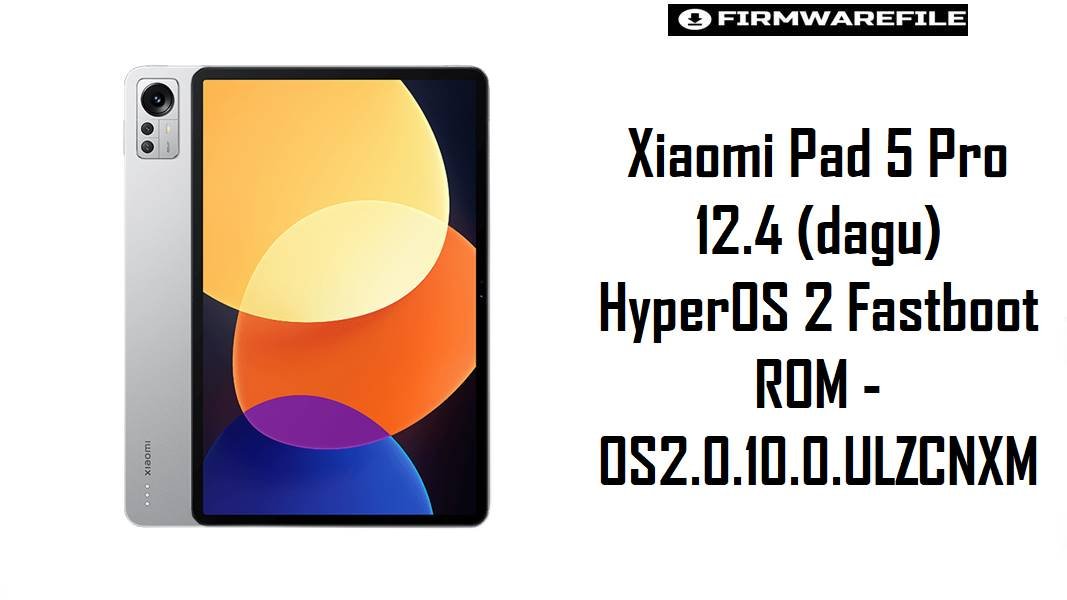
Xiaomi Pad 5 Pro 12.4 (dagu) HyperOS 2 Fastboot ROM – OS2.0.10.0.ULZCNXM
Xiaomi Pad 5 Pro 12.4 (codename dagu) is a large 12.4‑inch Snapdragon 870 tablet designed for multitasking and media, but users of Xiaomi tablets on HyperOS frequently report UI lag, gesture delays, and battery drain after major updates if only OTA patches are stacked. The HyperOS 2 fastboot package below lets owners perform a clean Android 14 install for China models, which often restores smooth animations, fixes bugs from previous builds, and reapplies updated power and security optimizations.
Download Firmware for Xiaomi Pad 5 Pro 12.4 (dagu)
This is the current China HyperOS 2 stable fastboot ROM for Xiaomi Pad 5 Pro 12.4. It is strictly for devices with codename dagu and the Chinese region; global Xiaomi Pad models or other Pad 5 variants (such as nabu, elish, enuma) require different firmware. OS2.0.10.0.ULZCNXM brings Android 14, a June 2025 security patch, and HyperOS 2 refinements tailored for large‑screen productivity.
| Filename | Region / Variant | Build Number | Build Date | Android Version | Flashing Method | Notes | File Size | Download |
|---|---|---|---|---|---|---|---|---|
| dagu_images_OS2.0.10.0.ULZCNXM_20250701.0000.00_14.0_cn_8b79098f43.tgz | China (CNXM) – Xiaomi Pad 5 Pro 12.4 | OS2.0.10.0.ULZCNXM | 2025-07-01 (fastboot package; rollout around 2025‑07‑09) | Android 14 / HyperOS 2 (Stable) | Xiaomi Flash Tool (Fastboot) | Official HyperOS 2.0 fastboot ROM for codename dagu, listed as current OS2.0.10.0 stable for Xiaomi Pad 5 Pro 12.4 China, with June 2025 security patch and full system image. Designed to improve system security and refine big‑screen HyperOS behavior, addressing complaints of sluggish gestures and periodic UI pauses noted on HyperOS tablets when updates accumulate. |
5.13 GB (fastboot; recovery package listed around 4.6 GB) | Download From Xiaomi Server |
Which devices this suits: This ROM should be used only on Xiaomi Pad 5 Pro 12.4 China units identified as codename dagu; global Xiaomi Pad 5 (nabu) or Pad 5 Pro Wi‑Fi/5G (elish/enuma) must use their own firmware lines to maintain compatibility and avoid bricks. For tablets experiencing HyperOS lag or gesture delay after OTAs, a clean fastboot flash of OS2.0.10.0 can help reapply optimizations and clear leftover MIUI data.
Complete Device & Firmware Overview
- Device Name:
- Xiaomi Pad 5 Pro 12.4 (China).
- Codename:
dagu– specific to Pad 5 Pro 12.4, distinct from Pad 5 (nabu) and Pad 5 Pro Wi‑Fi/5G (elish/enuma).- Display & Hardware:
- 12.4″ LCD, Snapdragon 870 5G chipset, 10000 mAh battery, up to 12 GB RAM and 512 GB storage, Gorilla Glass 3. The combination makes software optimization critical to avoid thermal throttling and lag during split‑screen use.
- Firmware Branch:
- HyperOS 2.0, Android 14 – OS2.0.10.0.ULZCNXM, China stable. Earlier branches include MIUI 13/14 developer and beta builds like V14.0.x.DEV for
dagu. - Security Patch Level:
- Changelog lists June 2025 Android security patch, raising system security compared with earlier HyperOS 1 or MIUI 14 releases.
- Typical HyperOS Tablet Complaints:
- Reports from HyperOS tablet and budget device owners mention frequent stutters while scrolling or watching video, long restarts, and battery drain even with available free RAM, often tied to suboptimal big‑screen scheduling and app behavior.
- How OS2.0.10.0 helps:
- The OS2.0.10.0 branch incorporates updated security, bug fixes, and HyperOS big‑screen refinements, which combined with a clean fastboot flash can resolve issues caused by partial OTAs, cache conflicts, or leftover MIUI system components.
- ROM Type:
- Fastboot ROM (
dagu_images_OS2.0.10.0.ULZCNXM_...tgz) for Xiaomi Flash Tool; a separate recovery/OTA packagedagu-ota_full-OS2.0.10.0.ULZCNXM-user-14.0-...zipis also available for updates via recovery or local update. - Bootloader & Anti‑rollback:
- HyperOS uses Xiaomi’s anti‑rollback (ARB); downgrading from OS2.0.10.0 to older MIUI/HyperOS builds without checking ARB can hard‑brick the tablet. Bootloader unlock is required only for cross‑branch/custom ROM experimentation, not for standard same‑branch repairs.
- Required Tools:
- Xiaomi USB/fastboot drivers, Xiaomi Flash Tool on a Windows PC, reliable USB‑C cable, and enough storage to extract the ~5 GB TGZ package.
CRUCIAL WARNING: This fastboot ROM is strictly for Xiaomi Pad 5 Pro 12.4 with codename dagu; it must not be flashed to Xiaomi Pad 5 (nabu), Pad 5 Pro Wi‑Fi/5G (elish/enuma), Xiaomi Pad 6 series, or any phone, because cross‑flashing across different codenames and screen classes can permanently brick the device through incompatible partitions and kernel configuration.
Official dagu_images_*.tgz fastboot packages usually wipe user data when flashed with Xiaomi’s tools, and choosing aggressive options such as “clean all and lock” while running a mismatched region or modified system can relock the bootloader on an unsupported firmware and cause bootloops, network loss (for cellular variants), or anti‑rollback‑related bricks.
Preparation Before Flashing
Click here for the Xiaomi Pad 5 Pro 12.4 (dagu) pre‑flash checklist
- Confirm codename and region: In fastboot mode or via ADB, verify that the tablet reports codename
daguand is the China Pad 5 Pro 12.4 model, not a smaller Pad 5/6 or a Wi‑Fi/5G Pro variant with different codename. - Backup all important data: Fastboot flashing typically performs a full wipe; back up documents, stylus notes, app data, and media using Mi Cloud, Google account sync, and a PC or external drive before starting.
- Charge to at least 60%: Large tablets flashing multi‑gigabyte ROMs should have ample charge to avoid shutdown mid‑flash, which could corrupt system or vendor partitions.
- Install drivers and tools on PC: Set up Xiaomi USB/ADB and fastboot drivers plus Xiaomi Flash Tool on a Windows PC; confirm that
fastboot devicessees the tablet correctly before loading the ROM. - Use a stable USB‑C cable and port: Prefer the original Xiaomi cable and a direct motherboard USB port to reduce the risk of random disconnections while the HyperOS 2.0.10.0 image is being written.
Quick Firmware Flash Instructions
This high‑level guide summarizes flashing the dagu_images_OS2.0.10.0.ULZCNXM_... fastboot ROM with Xiaomi’s fastboot tool on a Windows PC, which is the recommended repair or clean‑install method for HyperOS 2 on Xiaomi Pad 5 Pro 12.4 China.
- Prepare PC & ROM: On the PC, install Xiaomi USB/fastboot drivers and Xiaomi Flash Tool, then download the
dagu_images_OS2.0.10.0.ULZCNXM_...file and fully extract it into a short folder path such asC:\dagu_romto avoid path‑length or permission issues. - Enter fastboot mode: Power off the tablet, then hold Volume Down + Power until the fastboot screen appears, and connect it to the PC with a reliable USB‑C cable.
- Configure Xiaomi Flash Tool: Launch the tool, select the extracted ROM folder (root directory containing the flash scripts and images), and choose the “clean all” option to perform a fresh HyperOS install without forcing a relock unless the tablet is fully stock and region‑matched.
- Start the flash: Click “refresh” to confirm the device is detected, then press “flash” and wait for the process to complete; do not disconnect the cable or close the program while multiple tablet partitions (system, vendor, product, etc.) are being written.
- First boot & optimization: After a successful flash, Xiaomi Pad 5 Pro 12.4 reboots into HyperOS 2; the first boot may take several minutes while apps and big‑screen features are optimized, after which performance and battery behavior should be monitored to confirm improvements over prior builds.
For a more detailed, screenshot‑based walkthrough of Xiaomi fastboot firmware flashing—including anti‑rollback awareness, driver troubleshooting, and typical Mi Flash error codes—refer to the main Xiaomi Fastboot Firmware Guide, which describes the Xiaomi Flash Tool process step by step and can be followed directly for these dagu ROMs.
Frequently Asked Questions (FAQs)
- Q1. Is OS2.0.10.0.ULZCNXM the latest HyperOS firmware for Xiaomi Pad 5 Pro 12.4 (dagu)?
- OS2.0.10.0.ULZCNXM is listed as the current stable HyperOS 2.0 Android 14 release for Xiaomi Pad 5 Pro 12.4 China on major firmware trackers, including both recovery and fastboot forms.
- Q2. Will a clean HyperOS 2 fastboot flash help with lag and gesture stutter on dagu?
- HyperOS discussions and lag reports across Xiaomi tablets suggest that a clean fastboot install of a mature build with updated security can significantly reduce periodic stutters and bugs caused by layered OTAs and leftover MIUI components, especially on Snapdragon 870 big‑screen devices.
- Q3. Can this dagu HyperOS ROM be installed on the smaller Xiaomi Pad 5 or Pad 6?
- No; those devices use different codenames and hardware (for example,
nabufor Pad 5,pipafor Pad 6), and flashingdagu_images_OS2.0.10.0.ULZCNXMon them risks permanent brick due to incompatible partitions and display/kernel differences. - Q4. Does OS2.0.10.0.ULZCNXM change battery life compared with MIUI 14 on dagu?
- HyperOS 2 on tablets is tuned to better manage background tasks and animations, and combined with the June 2025 patch this build is expected to maintain or improve endurance versus older MIUI 14, especially after a clean install and basic battery optimization steps.
- Q5. Is downgrading from OS2.0.10.0 back to MIUI 14 safe?
- Downgrading is risky because anti‑rollback may block installation of older builds; firmware sites emphasize checking ARB levels and following codename‑specific guides, since flashing a package with a lower ARB than the current system can permanently brick the tablet.
- Q6. How does Xiaomi Pad 5 Pro 12.4 compare to cheaper Redmi tablets on HyperOS?
- Complaints from Redmi Pad SE users indicate that weaker chipsets struggle more with HyperOS, causing fps drops and long restarts, whereas the Snapdragon 870 in dagu has more headroom and benefits more from HyperOS 2 refinements once the firmware is cleanly installed.
- Q7. What signs show that a fresh fastboot flash may be needed on dagu?
- Symptoms such as constant UI jank during simple tasks, frequent app reloads despite ample RAM, long reboots, and abnormal battery drain after updates are strong indicators that a clean HyperOS 2 fastboot install could resolve accumulated software issues.