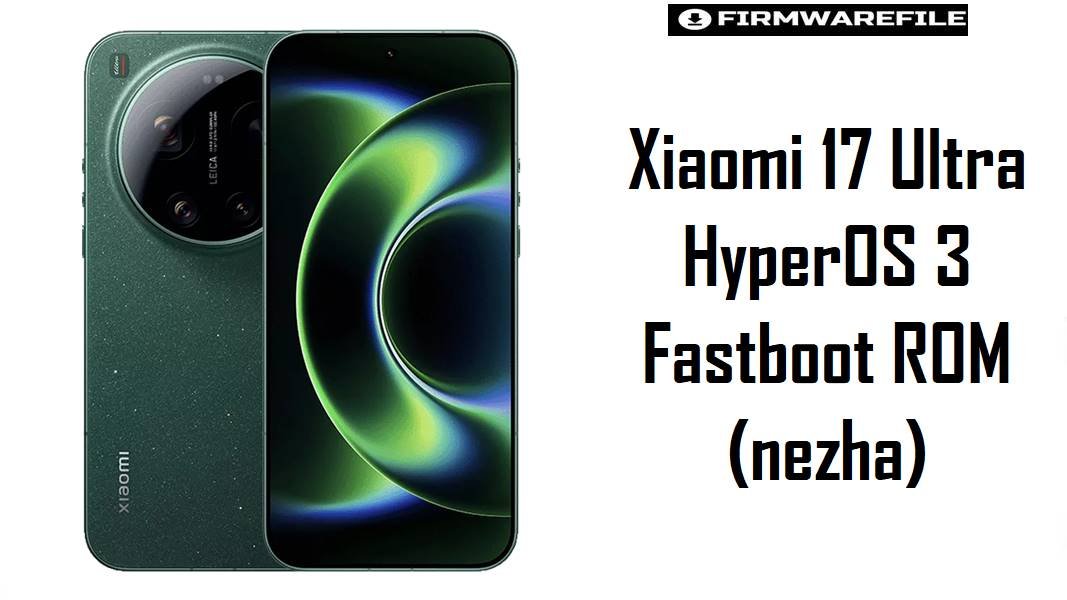
Xiaomi 17 Ultra HyperOS 3 Fastboot ROM (nezha)
The Xiaomi 17 Ultra (codename nezha) is a flagship camera‑centric phone that succeeds earlier Ultra models with an overhauled multi‑sensor Leica system and top‑tier performance. For this class of device, an official HyperOS 3 fastboot ROM is mainly used to recover from serious software issues, reverse heavy modding, or perform a clean install while preserving modem stability and camera tuning.
Download Firmware for Xiaomi 17 Ultra (nezha)
Below is the current known HyperOS 3 Android 16 fastboot ROM for the Xiaomi 17 Ultra China variant. Because this is a CN build, it ships without Google services and targets Chinese firmware behavior; global variants (if released) will require their own region‑specific packages.
| Filename | Region | Build / Channel | Release Window | Android / OS | Flashing Method | Size | Patch Level (est.) | Best For | Notes / Download |
|---|---|---|---|---|---|---|---|---|---|
| nezha_images_OS3.0.10.0.WPACNXM_20260111.0000.00_16.0_cn_6c8ff5bca5.tgz | China (CN) | OS3.0.10.0 WPACNXM – Stable | Mid Jan 2026 | Android 16 / HyperOS 3 | Fastboot (Mi Flash / fastboot) | 11.65 GB | Likely Jan 2026 | Chinese Xiaomi 17 Ultra units needing a full HyperOS 3 clean install for recovery, unbrick, or reverting from custom ROMs while staying on the latest CN baseline. | Firmware sites and update trackers identify OS3.0.10.0 WPACNXM as an official stable HyperOS 3 ROM for Xiaomi 17 Ultra (nezha) China, following earlier OS3.0.7.0 and OS3.0.8.x releases. This fastboot package is large because it includes full system, vendor, and camera resources for the new multi‑sensor Leica setup; it is best used when OTA or recovery updates fail or when undoing deep system modifications. Download China Fastboot |
Complete Device & Firmware Overview
- Device Name
- Xiaomi 17 Ultra, codename
nezha. - Codename Origin
nezhaappears in MiCode repositories and certification leaks for Xiaomi’s flagship series and is tied directly to Xiaomi 17 Ultra in firmware databases and trackers.- Market Position
- Ultra‑tier flagship focused on camera innovation and high‑end hardware, sitting above standard Xiaomi 17/17 Pro and Redmi K‑series flagships.
- Camera Platform
- Leica‑branded multi‑sensor array with a main 50 MP OV50X‑class sensor and updated telephoto modules, built to compete with top camera phones.
- Performance Class
- Xiaomi 17 Ultra is expected to use a Snapdragon 8‑class SoC comparable or superior to Redmi K80’s Snapdragon 8 Gen 3 in CPU/GPU capability.
- Display & Multimedia
- High‑end AMOLED panel with fast refresh and high peak brightness similar to or above Redmi K80’s 6.67″ 1440p 120 Hz screen, paired with stereo speakers and advanced connectivity.
- Battery & Charging
- Large battery with fast wired charging; detailed capacity and wattage differ by leak but fit within Xiaomi’s current high‑end trend (for example, 90 W/120 W class).
- Original Software
- Ships with Android 16‑based HyperOS 3 in China, forming the reference platform for future Xiaomi HyperOS 3 features and ecosystem integration.
- Firmware Type (listed here)
- Full fastboot ROM in
.tgzformat for the China (CN) channel, OS3.0.10.0 WPACNXM, suitable for Mi Flash and fastboot command‑line flashing. - HyperOS 3 Focus
- Emphasizes cross‑device integration, AI features, and refined performance over HyperOS 2, with Xiaomi 17 Ultra positioned as a flagship showcase for these updates.
- Security Patch Level
- OS3.0.10.0 WPACNXM is a January‑2026‑era build, expected to carry late‑2025 or early‑2026 Android security patches beyond earlier OS3.0.7.0 releases.
- Bootloader Status
- OTA updates and stock operation are meant for locked bootloaders; fastboot flashing of
nezha_images_*.tgzrequires an unlocked bootloader. - Bootloader Rules
- Relocking (“clean all and lock”) is safe only on untouched official firmware for the correct region; doing this after modifications or on cross‑region images risks bootloops or NV data issues.
- Fastboot ROM Size
- At about 11.65 GB, this HyperOS 3 fastboot ROM is significantly larger than mid‑range ROMs, reflecting extensive system resources, languages, and camera components.
- Required Tools
- Windows PC, updated Xiaomi USB/Qualcomm drivers, Xiaomi Mi Flash Tool (or fastboot scripts), ADB/fastboot binaries, and a reliable USB‑C cable.
- Best Use Cases
- Recovering from serious software failure, undoing major modding/root changes, or performing a fully clean install when OTA/recovery updates are no longer reliable.
CRUCIAL WARNING: This HyperOS 3 fastboot ROM is strictly for Xiaomi 17 Ultra with codename nezha. It must not be flashed to Xiaomi 17, 17 Pro, Redmi K80, or any other Xiaomi/Redmi device with a different codename, because cross‑flashing can permanently brick the phone or damage modem/NV data.
All official nezha_images_*.tgz fastboot packages normally wipe user data when flashed via Xiaomi’s tools, and enabling options like “clean all and lock” on a mismatched or modified firmware can relock the bootloader on unsupported images and cause bootloops, encryption errors, or loss of mobile network.
Preparation Before Flashing
Show essential preparation checklist for Xiaomi 17 Ultra (nezha)
- Confirm in Settings > About phone that the device is Xiaomi 17 Ultra (China variant), then boot to fastboot and run
fastboot getvar productto ensure the codename isnezha. - Check your current build (for example, OS3.0.7.0 or OS3.0.8.x WPACNXM) and ensure you are moving within the same China branch; do not attempt to flash this CN ROM onto any hypothetical Global/EEA variant.
- Back up photos, video projects, camera profiles, 2FA, and app data; a fastboot clean flash will usually erase all user data on internal storage.
- Install Xiaomi USB/Qualcomm drivers, Mi Flash Tool, and ADB/fastboot on a stable Windows PC; verify that the device appears correctly in fastboot before loading firmware.
- Charge the battery to at least 60–70% and use a high‑quality USB‑C cable; interruptions during flashing can leave this flagship device in a difficult‑to‑recover state.
Quick Firmware Flash Instructions
These high‑level steps summarize fastboot flashing of the official HyperOS 3 ROM on Xiaomi 17 Ultra; follow the detailed guide for images and troubleshooting.
Official HyperOS 3 fastboot ROM (.tgz – China WPACNXM)
- Download
nezha_images_OS3.0.10.0.WPACNXM_20260111.0000.00_16.0_cn_6c8ff5bca5.tgz, then extract the.tgzto a short, simple path on your PC (for example,C:\ROM\nezha_OS3.0.10.0). - With the bootloader unlocked, power off the Xiaomi 17 Ultra, hold Volume Down + Power to enter fastboot mode, and connect it to the computer via USB‑C.
- Open Xiaomi Mi Flash Tool, select the folder containing the extracted
nezha_images_*.tgzfiles, click “refresh” to detect the device, and choose a flash mode that does not lock the bootloader if you plan to continue modding or are unsure about region. - Start the flash and wait until Mi Flash reports success; do not disconnect or close the tool during the process, as this can corrupt system or modem partitions.
- After rebooting into HyperOS 3, complete the setup wizard, restore backups, test cameras and network, and then check if additional OTA updates are available within the same CN WPACNXM branch.
For a general Xiaomi fastboot tutorial that applies to this device as well, use: How to flash Xiaomi firmware with Mi Flash Tool.
Frequently Asked Questions (FAQs)
1. How do I verify that my phone really uses the nezha codename?
Boot the device into fastboot mode, run fastboot getvar product, and check that the output includes nezha; this confirms HyperOS 3 ROMs for Xiaomi 17 Ultra (nezha) are appropriate. You should also confirm on firmware databases that your model is listed under “Xiaomi 17 Ultra (nezha)” before flashing.
2. What is the main difference between this CN HyperOS 3 ROM and a hypothetical Global build?
The CN ROM includes only Chinese and English languages by default, excludes Google Play services, and integrates China‑specific apps and services. A Global ROM would normally add more languages, pre‑bundled Google services, and different regional compliance settings, so cross‑flashing from CN to an unofficial Global port is not recommended for non‑experts.
3. Is OS3.0.10.0 WPACNXM a big upgrade over earlier OS3.0.7.0 HyperOS 3 builds?
OS3.0.10.0 is a later stable release than OS3.0.7.0 documented by firmware trackers, so it typically brings newer security patches, bug fixes, and refinements to HyperOS 3 behavior. Exact changes depend on Xiaomi’s changelog, but in general it is better suited as a long‑term baseline unless specific issues are reported for this version.
4. Will flashing this fastboot ROM fix camera issues or instability caused by mods?
A clean flash of the official CN HyperOS 3 fastboot ROM restores all system, vendor, and camera components to stock, which usually resolves problems introduced by third‑party camera mods or root tweaks. If hardware‑level issues persist (for example, sensor failure), firmware alone will not fix them and service intervention may be needed.
5. Can I relock the bootloader after flashing OS3.0.10.0 WPACNXM?
Relocking can improve physical security, but only when running untouched official WPACNXM firmware with no root, custom recovery, or modified partitions. Relocking on a modified system or after cross‑flashing is risky and can result in bootloops or “critical data” errors, so modders should remain unlocked unless they are fully returning to stock.
6. What is the safest approach if I want to mod my Xiaomi 17 Ultra but still keep a recovery path?
Before unlocking or rooting, download and archive at least one matching HyperOS 3 fastboot ROM for nezha (such as OS3.0.10.0 WPACNXM) along with Mi Flash, drivers, and fastboot tools. This gives a reliable path to return the phone to stock HyperOS 3 if any custom kernel, Magisk module, or experimental ROM causes serious issues.